How to Turn a PDF Into a Shareable Link (Free Hosts Compared, 2026)
Upload your PDF to Google Drive, Dropbox, OneDrive or Adobe Acrobat online, set it so anyone with the link can view, copy the link, then shorten it. Steps and free limits.
You cannot turn a PDF into a link by itself. A link is an address, so the file has to live somewhere online first. FattyURL does not host files: it shortens the link you get from a host.
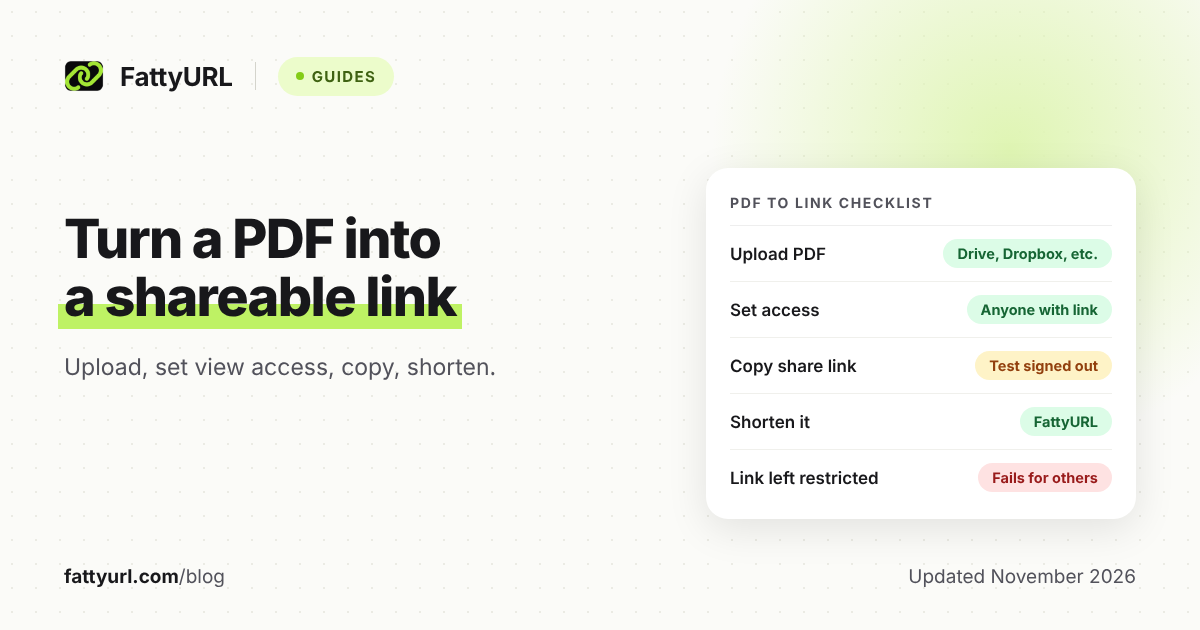
The fix takes four steps: upload the PDF to a host, set sharing so anyone with the link can view it, copy the share link, then shorten it. This works for a resume, menu, brochure, flyer or form you want to text, post or print.
Short answer: Upload the PDF to Google Drive, Dropbox, OneDrive or Adobe Acrobat online, set the link so anyone with it can view, and copy the share link. Then paste that link into FattyURL to get a short one. FattyURL only shortens the address. It never stores your PDF, so the host must keep the file online.
How do I turn a PDF into a shareable link?
Upload the file to a host that gives out share links, change the sharing setting so people outside your account can open it, and copy the link. A host is any service that stores files online and gives each one an address.
- Pick a host from the table below and upload the PDF.
- Open its Share option and allow anyone with the link to view.
- Copy the link.
- Open it in a private browser window, signed out, to confirm it works.
- Shorten it on FattyURL.
Step 4 matters most. A link that opens for you can still be locked for everyone else, because you are signed in to your own account.
Which free host should I use for a PDF link?
For most people it is the account they already have. Google Drive, OneDrive and Dropbox all have free tiers, and Adobe Acrobat online has its own sharing page. The limits below come from each vendor's help pages.
Checked 7 November 2026. "Not stated" means the vendor's help page does not give that figure.
| Host | Free storage or file limit | Default sharing setting |
|---|---|---|
| Google Drive | Up to 15 GB shared across Drive, Gmail and Photos; most files up to 5 TB | Not stated on the sharing page. Options include Restricted, Anyone with the link and Public |
| Dropbox Basic | 2 GB; files up to 2 TB, and each must fit in your storage space | Not stated for the website. Android files default to Link for viewing |
| Microsoft OneDrive | 5 GB on the free plan; files up to 250 GB each | Edit permission is on by default |
| Adobe Acrobat online | Not stated on the sharing page | Not stated. View-only while Allow comments is off |
Two rows need care. OneDrive links allow editing by default, so turn that off before you post one publicly. Adobe says recipients can view it in a browser without signing in, and can sign in to comment if comments are on.
How do I make a PDF a link in Google Drive?
Select the file in Drive, click Share, change General access to Anyone with the link, and click Copy link. Google's own steps give the same order. Viewer is the safe role for a PDF people only need to read.
- Upload the PDF to Drive and select it.
- Click Share.
- Under "General access," click the down arrow and choose Anyone with the link.
- Choose Viewer.
- Click Copy link, then Done.
Avoid the Public option for a flyer you only want to share by link: Google says anyone can find a Public file on Google Search. Drive links start with drive.google.com, and FattyURL can shorten those without an account. Full details are in our Google Drive link guide. Links on docs.google.com need a verified free account.
How do I make a PDF a link in Dropbox?
On dropbox.com, hover over the file, click Share, then Copy link, then Manage to choose Link for viewing. Copy the link again. People without a Dropbox account can preview the file but not edit it.
- Log in to dropbox.com and hover over the PDF.
- Click Share, then Copy link, then Manage.
- Choose Link for viewing.
- Click Copy link.
Passwords and expiration dates are only on certain paid plans, per Dropbox. See our Dropbox link guide for shortening it.
How do I make a PDF a link in OneDrive?
On onedrive.com, select the circle on the file, click Share, then Copy Link, and open the settings gear to choose who can use it. Pick Anyone, clear Allow editing, click Apply, then copy the link.
- Sign in at onedrive.com and select the circle icon on the PDF.
- Click Share, then Copy Link.
- Click the settings gear and choose Anyone.
- Clear Allow editing so the link is view-only.
- Click Apply, then copy the link.
Microsoft says expiration dates and passwords need a Microsoft 365 subscription. Work or school accounts follow your organization's rules. See our OneDrive and SharePoint guide.
How do I share a PDF link with Adobe Acrobat online?
In Acrobat on the web, hover over the document in Your documents or Recent files, select the Get a link icon, then select Get link. Adobe says recipients can open it in a browser without signing in.
- Open Your documents or Recent files.
- Hover over the PDF and select the Get a link icon.
- Make sure Allow comments is off for view-only sharing.
- Select Get link and paste the copied link.
To stop sharing, Adobe's help menu points to a separate Unshare PDFs topic. The sharing page does not state a free storage amount.
Why does my PDF link not work for other people?
The vendors' help pages name these causes: sharing is still restricted, the file was deleted, the link was removed, or the link expired. Dropbox also bans links that draw unusually large amounts of traffic. Test the link signed out before you send or print it.
| Problem | What the help page says | Fix |
|---|---|---|
| Link left restricted | Google Drive: Restricted means only people with access can open the file | Set General access to Anyone with the link |
| File deleted | Dropbox: the link fails, and restoring the file brings it back | Restore the file, or upload again and make a new link |
| Link removed | Dropbox: a deleted link no longer works for anyone | Create a new link |
| Expired link | Dropbox: links with an expiry stop working after the date | Edit the date or make a new link |
| Editing by default | OneDrive: Allow editing is on by default | Clear Allow editing |
Checked 7 November 2026. For other causes, see our short link troubleshooting guide.
What happens when I replace the PDF?
It depends on the host, and the help pages are thin. Google Drive has Manage versions, where you click Upload new version. Google's page does not say whether the link stays the same, so test it. Adobe's page does not address replacing a shared file.
Dropbox's help page for broken links names deleting the file as a cause. Treat "delete, then upload a fresh copy" as a new file with a new link until you confirm otherwise.
Google also says old versions may be permanently deleted after 30 days or once there are 100 newer versions, unless you choose Keep forever.
Why shorten a PDF link?
Share links are long and ugly on a printed flyer or in a text. A short link is easier to read, type and fit on a page. You also get control that the host's raw link does not give you.
With a free FattyURL account, you can change a link's destination later. If you replace the PDF and its host link changes, you point the same short link at the new file. Nothing you printed or posted needs to change. A free account also gives you a custom ending and click counts. See our custom short link guide.
Without an account, links expire after 30 days without a click, so create an account before you print anything. For the basic steps, see how to shorten a link.
Want a scannable code on a printed copy instead? Read how to make a QR code for a PDF.
Before you click a short link someone sends you, check where it goes. See are URL shorteners safe. Only share a PDF you are happy for anyone with the link to read, since anyone who has the address can open it.
FAQ
Does FattyURL store my PDF?
No. FattyURL does not host files. It shortens the share link from a host such as Google Drive, Dropbox or OneDrive. If the host removes the file, the short link has nothing to open.
Can I make a PDF link without uploading it?
No. A link needs an online address, so the file must be stored somewhere. Google Drive, Dropbox and OneDrive have free plans with link sharing, and Adobe Acrobat online can also share a PDF by link.
How do I make a PDF link that anyone can open?
Set sharing to anyone with the link and view only, copy the link, then open it in a private window to test. In OneDrive, choose Anyone and clear Allow editing.
Can I change the PDF later without changing the link?
Possibly, but vendor pages do not promise it. With a free FattyURL account you can point the same short link at a new file, so the link you printed keeps working.
Will a short link to a PDF expire?
FattyURL links made without an account expire after 30 days without a click. With a free account, links never expire. The host's own link can still break. See do short links expire.
Sources
- Google Drive Help: Share files from Google Drive, read 7 November 2026
- Google Account storage, read 7 November 2026
- Google Drive file size limits, read 7 November 2026
- Google Drive: Check activity and file versions, read 7 November 2026
- Dropbox Help: Create and share a link, read 7 November 2026
- Dropbox Help: What is Dropbox Basic?, read 7 November 2026
- Dropbox Help: What is the Dropbox file size limit?, read 7 November 2026
- Dropbox Help: Troubleshoot shared links, read 7 November 2026
- Dropbox Help: Unshare files and folders, read 7 November 2026
- Microsoft Support: Share OneDrive files and folders, read 7 November 2026
- Microsoft Support: Microsoft storage quotas, read 7 November 2026
- Microsoft Support: Restrictions and limitations in OneDrive and SharePoint, read 7 November 2026
- Adobe Help: Share documents via link in Acrobat on the web, read 7 November 2026
- Adobe Help: Share and track PDFs online (current), read 7 November 2026
Disclaimer: This article is for general information only and is not legal or security advice. It was researched and drafted with the help of AI, and its facts were checked against the sources linked above, mostly each provider's own pricing, help and policy pages. URL shorteners, QR code tools and social platforms change their plans, prices and rules often, so confirm the details on the provider's website before you choose a plan, move your links or print a QR code. FattyURL is our own product. Spotted something out of date, or a FattyURL link being misused? Tell us and we will act on it.