How to Shorten a Canva Link (and What Access It Gives) 2026
Canva already makes a short canva.link when you share a design. Here is how to share, rename or shorten it for a bio, email or QR code, and why access never changes.
You do not have to shorten a Canva link yourself in most cases. Canva already creates a short link, usually on canva.link, when you share a design. If you need a cleaner link for a bio, an email or a QR code, a separate shortener can add one more layer.
One rule matters more than any tool: a short link never changes who can open the design. Pick the right access first, then shorten.
Short answer: Open the design, select Share, set who can view or edit, and copy the link. Canva already gives you a short canva.link address. Pro and higher plans can rename its ending. Any other shortener, including FattyURL, only forwards to that link and never changes its access settings.
How do I get a short link for a Canva design?
Canva creates a short link automatically when you share a design, a public view link, a template, a comment, a page or a folder. You do not turn anything on. Canva's help page says so directly.
- Open the design and select Share.
- Choose who can open it and what they can do.
- Copy the link and paste it where you need it.
The copied link uses a base domain, usually canva.link (some regions use another), plus a secure 15-character code. Canva's help page describes this format. The code is hard to read, which is why people look for something cleaner.
Can I change the ending of a Canva link?
Yes, on paid plans. Canva lets Pro, Business and Enterprise users rename the ending of a design copy link or a public view link, for example to my-brand-deck. Free plans cannot create custom links.
In the Share menu, copy the link, then choose Personalize your link, enter the ending and select Save and copy. If the ending is taken or not allowed, pick another.
Canva's help page lists the limits: Pro up to 5 custom links, Business up to 100 shared across the team, Enterprise unlimited. See all your custom links at canva.com/manage-links. Menu names can change, so check Canva's page if yours looks different.
What access does a Canva share link give?
It gives whatever access you chose in the Share menu. Canva's design school guide lists three levels: can view, can comment and can edit. The guide warns that with Anyone with the link, someone you forward the link to may also open the design.
Canva's short links page adds that short links follow the Share menu settings. They do not make a private design public. People without permission still cannot open it.
That has two practical effects:
- A short link to an edit link is still an edit link. With Anyone with the link set, whoever gets it may be able to edit.
- Hiding a long Canva link behind a short one is not security. Change the access in Canva instead.
Sharing options can vary with team settings, so your Share menu may offer fewer choices than this guide describes.
Which Canva link types need a short link?
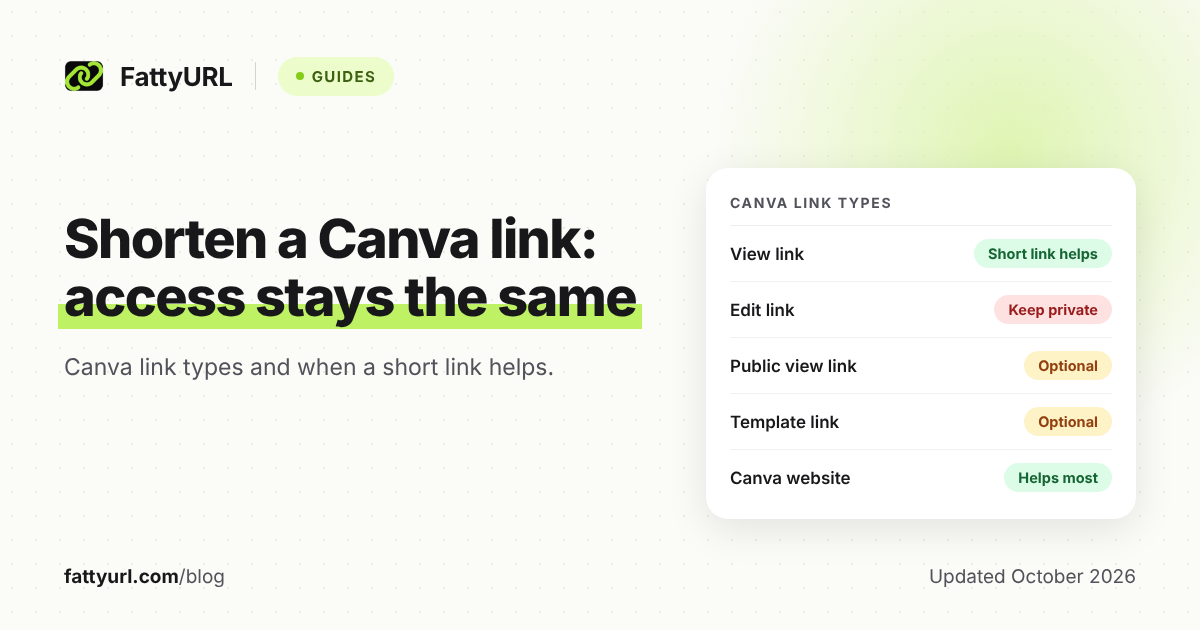
View-style links and public websites benefit most. Edit links rarely belong in public places at all. The table below uses only what Canva's own pages state. Checked 1 November 2026.
| Canva link type | Canva short link? | Does an extra short link help? |
|---|---|---|
| View or comment link | Yes, automatic | Helps for a bio or QR code, and for click counts |
| Edit link | Yes, automatic | Not for public places: anyone with it may be able to edit |
| Public view link | Yes, automatic, can be renamed on paid plans | Optional if you already renamed it |
| Template link | Yes, automatic | Optional: Canva already shortens it |
| Published Canva website | Not for websites, per Canva's shortener page | Yes, this is the clearest case |
Canva's shortener page says automatic shortening covers share links, comments and folders, but not Canva Websites. Its share-as-website help page also says Mobile and Link in Bio designs publish only to a canva.link address.
How do I shorten a Canva link with FattyURL?
Copy the share link from Canva, paste it into FattyURL and copy the short result. You do not need an account to make a link. Test it in a private window before you share it.
- In Canva, set the access you want, then copy the link.
- Paste it into the box on FattyURL.
- Copy the short link and open it while logged out of Canva.
- If it asks for a login or says you need permission, fix the access in Canva.
Links made without an account expire after 30 days without a click, and you can make up to 10 an hour and 50 a day per device. For a bio or a printed piece, a free account is the safer choice: links never expire and you can edit the destination later. See how expiry works across shorteners.
Free FattyURL links may show ads. Links on a paid plan never do. If you want a readable ending, a free account allows custom endings of 6 to 100 characters, and our custom short link guide covers how to choose one.
For the generic steps on any link, read how to shorten a link.
When should I use Canva's own short link instead?
Use Canva's own link when you are happy with a canva.link address and do not need click counts. It is built in and tied to the design. A paid plan lets you rename the ending.
Use a separate shortener when you want a link on your own terms: one place to count clicks across many designs, or a destination you can change later. The catch: if you delete the Canva design, both links stop working. Canva's help page says a permanently deleted design shows a 404 page for its short links.
How do I make a QR code for a Canva link?
You can make one inside Canva or from a short link. Canva's QR code tool is in the editor under Apps. It offers Static and Dynamic codes, and the help page describes entering a web address as the destination.
Canva says a static code's link cannot be changed after creation and has no scan tracking. Dynamic codes are available on all plans (not in China), but Insights and some options need a Business, Enterprise or Nonprofit plan. Free, Pro and Education dynamic codes include the Canva logo by default.
FattyURL works differently. Make a short link first, then make the QR code from that short link. Each scan opens the short link and counts as a click in that link's analytics, which needs a free account. You can change where the link points later without reprinting the code. The QR code itself is static, can be PNG or SVG in any colors, and carries no watermark.
Full steps are in how to make a QR code for a link, and scan counts are covered in how to track QR code scans.
Is it safe to share a shortened Canva link?
It is as safe as the access you set. Before sharing, check the setting in Canva, avoid edit links in public posts, and test the short link logged out. FattyURL checks every link against Google Web Risk when it is created, edited and clicked.
To check where any short link goes before you open it, see our guide on whether URL shorteners are safe.
FAQ
Does Canva have its own URL shortener?
Yes. Canva's help page says it creates a short link automatically when you share a design, and Canva's shortener page calls it built in. The domain is usually canva.link, though some regions use another.
Does a short Canva link change who can open the design?
No. Canva says short links follow the Share menu settings and do not make a private design public. A third-party short link just forwards to the Canva link.
Can I use a short link for a Canva presentation?
Yes. Share the presentation with the access you want, copy the link, and use Canva's short link or paste it into a shortener. Test it logged out before sending.
Why is my Canva website link long?
Canva's shortener page says automatic shortening does not cover Canva Websites. A separate shortener is the simplest way to get a cleaner link to a published site.
Will my short link break if I delete the design?
Yes. Canva says a permanently deleted design shows a 404 page for its short links. A shortener cannot bring it back, though with a FattyURL account you can repoint the link to a new design.
Sources
- Canva Help: Create and manage short links, read 1 November 2026
- Canva: URL shortener, read 1 November 2026
- Canva Design School: Sharing, collaborating and downloading, read 1 November 2026
- Canva Help: Share as a website, read 1 November 2026
- Canva Help: Create and manage QR codes, read 1 November 2026
Disclaimer: This article is for general information only and is not legal or security advice. It was researched and drafted with the help of AI, and its facts were checked against the sources linked above, mostly each provider's own pricing, help and policy pages. URL shorteners, QR code tools and social platforms change their plans, prices and rules often, so confirm the details on the provider's website before you choose a plan, move your links or print a QR code. FattyURL is our own product. Spotted something out of date, or a FattyURL link being misused? Tell us and we will act on it.