Are URL Shorteners Safe? How to Check Any Short Link Before You Click
Why scammers use short links, how to see where any short link goes without clicking it, the warning signs of a scam link, and what a URL shortener can see about you.
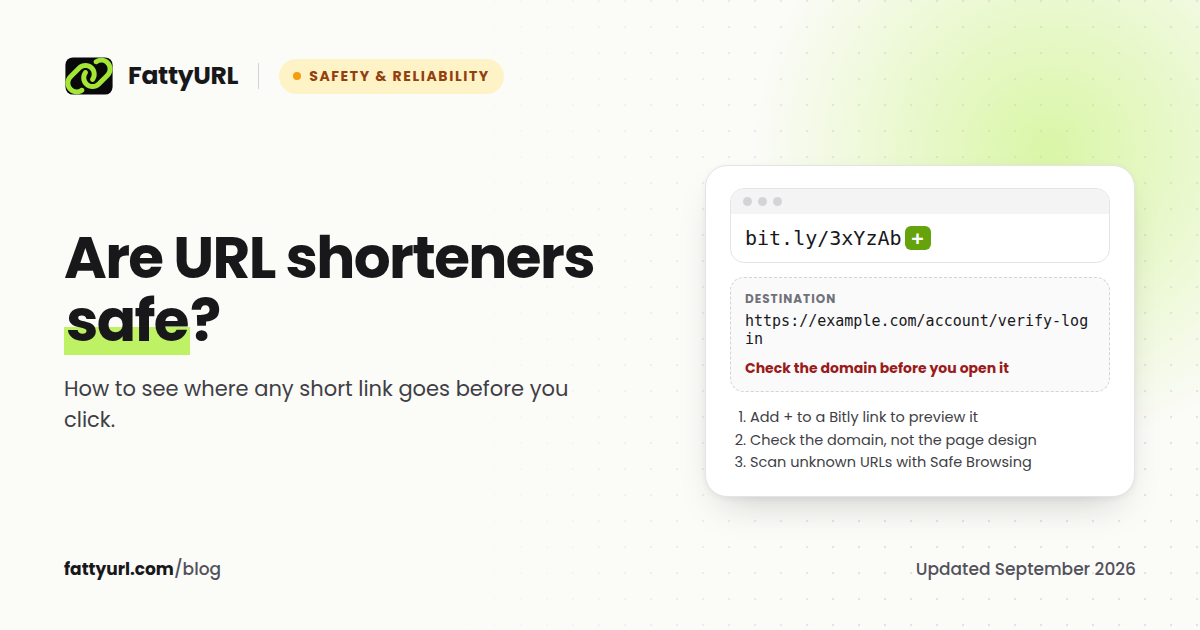
URL shorteners are safe in themselves. A short link is just a redirect: it takes you from one address to another. The risk is that it hides the destination until after you click, and scammers rely on that. The good news is that you can see where almost any short link goes without clicking it, in about ten seconds.
Short answer: Shorteners are safe, but short links can hide scams. Before you open a short link from someone you do not know, preview its destination: add a plus sign to Bitly links, use TinyURL's preview, or paste the link into a URL checker. If the destination domain is not the one you expect, do not open it.
Why scammers use short links
A long phishing URL looks suspicious. A short link on a well-known domain does not. That is the whole appeal, and the data shows it:
- Taiwan's National Institute of Cyber Security analyzed more than 15 million phishing indicators from January to September 2025 and found that "more than half of the top 10 sources were popular URL shorteners, including bit.ly, tinyurl.com and t.co."
- The Anti-Phishing Working Group reported in its Q4 2025 report that "attackers notably redirected attacks through URL shortener TINYURL.COM."
- Cofense, an email security firm, found that from July 2024 to June 2025, 28% of the campaigns it saw using common link-shortening services delivered malware.
- Cloudflare documented attackers who first shorten "their malicious link using a public URL shortener like Bitly" before hiding it further behind email link-wrapping services.
None of this makes the shorteners malicious. Their size makes them useful cover. It does mean a short link is not a trust signal on its own.
How to see where a short link goes without clicking
| Short link from | How to preview it |
|---|---|
| Bitly (bit.ly) | Add a plus sign to the end, like bit.ly/abc123+. Bitly says this "will display a preview page that shows you the destination URL without taking you there" |
| TinyURL | Add "preview." before the domain, like preview.tinyurl.com/abc123, or turn on previews at tinyurl.com/preview |
| is.gd | Offers an optional preview page |
| Any shortener | Paste the link into a URL expander or checker, which follows the redirect for you and shows the final address |
| Any shortener, technical | Run curl -I followed by the link in a terminal. It fetches only the headers, so you see the redirect target in the Location line without loading the page |
Once you can see the destination, read the domain: the part just before the first single slash. paypal.com.account-verify.example is not PayPal. A scam page can copy a brand's design but not its real domain, so check the domain letter by letter.
How to check whether the destination is dangerous
Knowing the address is step one. If you still are not sure, check it:
- Google Safe Browsing site status. Google's Transparency Report has a tool that shows whether a site "currently contains content that Safe Browsing has determined to be dangerous."
- VirusTotal. It checks a URL against "over 70 antivirus scanners and URL/domain blocklisting services." One caution: VirusTotal reports "are shared with the public VirusTotal community," so never submit a link that contains private information, such as a password reset or a document you do not want public.
Warning signs that a short link is a scam
- It arrives with urgency: your account will be closed, a parcel is waiting, a payment failed.
- It comes by text message or chat from a sender you do not know, claiming to be a bank, courier or government office.
- It leads to a login page. Legitimate services rarely ask you to sign in from a link someone sent you.
- The preview shows a domain that is close to, but not exactly, the real one.
- A QR code has been stuck over another code on a sign, menu or parking meter. Our guide to QR codes covers how to check a scanned link.
If a message claims to be from a company you use, skip the link entirely and open the company's app or type its address yourself.
What a URL shortener knows about you
Every shortener logs something when you click, because counting clicks is the service. Here is what two of them say they collect:
| Shortener | What it records about clicks, per its privacy policy |
|---|---|
| Bitly | "IP address and location derived from the IP address," referring sites, "the time and date of each access," browser, operating system and language |
| FattyURL | Browser, operating system, device type, referring URL, country and city, and a hashed IP address. Never the raw IP address, and data is never sold |
A hashed IP address is not the same as anonymous data. The European Data Protection Board's 2025 draft guidance says pseudonymised data "is to be considered information on an identifiable natural person." So the useful questions to ask any shortener are what it stores and whether it sells data.
Creating links without an account is a separate question. On FattyURL you can shorten a link without giving an email address at all. Some services require an account for everything, and Bitly now does. Creating an account is only needed on FattyURL if you want analytics and editing.
If you share short links: how to keep them trusted
People are right to be careful with short links, so make yours easy to trust:
- Use a readable custom slug that says where it goes, like
fattyurl.com/spring-menu, instead of random characters. Our guide to custom short links covers how. - Avoid shorteners that show ad pages in front of your link. An unexpected page is exactly what careful people are trained to distrust.
- Do not use public shorteners in business text messages. US carrier guidance says senders should use a shortener "dedicated to the exclusive use of the Message Sender," and SMS providers such as ActiveCampaign prohibit free public shorteners outright. In India, since 1 October 2024 carriers must block commercial SMS containing links the sender has not whitelisted, and short URLs must clearly relate to the sender, so use a link on your own domain.
What FattyURL does
FattyURL shows no ads and puts no ad pages in front of your links. We store a hashed IP address rather than the raw address, and we never sell data. Our promise protects working links, not abuse: links used for phishing or malware break our terms and can be taken down. You can report a suspicious FattyURL link through our contact page. Our privacy policy lists exactly what is collected, and we explain how FattyURL stays free without ads or selling data.
FAQ
Are URL shorteners safe to use?
Yes. The shortener itself is just a redirect. The risk is that a short link hides its destination, so preview links from unknown senders before opening them.
Is bit.ly safe?
Bitly is a legitimate company, but anyone can create a bit.ly link, including scammers. Add a plus sign to the end of any bit.ly link to see its destination before you click.
How do I check a short link before clicking?
Use the shortener's preview (a plus sign for Bitly, "preview." for TinyURL), or paste the link into a URL expander. Then check the destination domain with Google Safe Browsing's site status tool if you are unsure.
Can clicking a short link give me a virus?
Clicking the link on its own sends you to a web page. The danger comes from what that page asks you to do: download a file, enter a password, or pay. Preview the destination first and never download files from unexpected links.
Do URL shorteners track you?
They record click data such as your approximate location, browser, device and the page you came from, because counting clicks is what they do. Check the shortener's privacy policy for what it stores and whether it sells data.
Is it safer to use a URL shortener without an account?
For the person creating links, no account means no email address or profile stored with the service. FattyURL lets you shorten links that way. You only need a free account if you want analytics or to edit links later.
Sources
- Taipei Times: Taiwan NICS phishing analysis (November 2025)
- APWG Phishing Activity Trends Report, Q4 2025
- Cofense: the URL shorteners helping hackers (November 2025)
- Cloudflare: attackers abusing link wrapping (July 2025)
- Bitly: how to tell if a link is safe
- University of Michigan Safe Computing: shortened URL security
- is.gd FAQ
- curl manual
- Google Safe Browsing, site status tool
- VirusTotal: how it works
- Bitly privacy policy, FattyURL privacy policy
- EDPB guidelines on pseudonymisation (January 2025 draft)
- CTIA Messaging Principles and Best Practices (May 2023), ActiveCampaign on public shorteners in SMS, TRAI press release on URL whitelisting (September 2024), WebEngage: TRAI CTA whitelisting guidelines
Disclaimer: This article is for general information only and is not legal or security advice. It was researched and drafted with the help of AI, and its facts were checked against the sources linked above, mostly each provider's own pricing, help and policy pages. URL shorteners, QR code tools and social platforms change their plans, prices and rules often, so confirm the details on the provider's website before you choose a plan, move your links or print a QR code. FattyURL is our own product. Spotted something out of date, or a FattyURL link being misused? Tell us and we will act on it.