Do Short Links Like Bitly Send Emails to Spam? What 8 Email Platforms Say (2026)
They can. Mailchimp, Brevo, Klaviyo, ActiveCampaign and MailerLite all tell senders to avoid public link shorteners like bit.ly in email. Here is why shared short domains hurt deliverability, what to use instead and how to test.
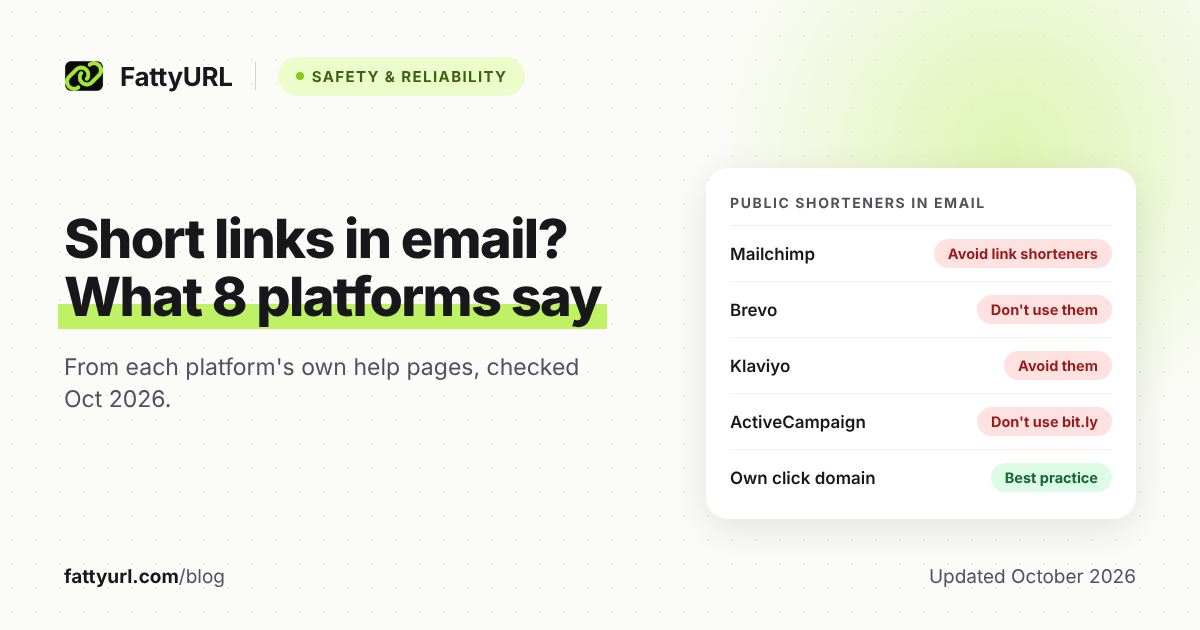
Public link shorteners such as bit.ly can push marketing email toward the spam folder. We read the help pages of eight email platforms on 28 October 2026. Five tell senders to avoid public shorteners, and none recommends them for email.
Short links aren't harmful in themselves. The trouble is that a public shortener's domain is shared by all its users, spammers included. Many spam filters judge every domain in your message.
Short answer: They can: Mailchimp, Brevo, Klaviyo, ActiveCampaign and MailerLite all tell senders to avoid public link shorteners. Spammers use them, and many filters weigh every domain a message links to. Use full links, let your email platform track clicks on your own branded domain if possible, and test in a few inboxes before sending.
Do short links make emails go to spam?
They can, although no major mailbox provider bans them in writing: Google's sender guidelines never even mention URL shorteners. Email platforms are blunter. Five of the eight we checked tell you to avoid public shorteners in campaigns, because spam filters associate them with spam.
Google's guidance is about clarity: “Web links in the message body should be visible and easy to understand.” A bare short link shows neither the site nor the page it leads to. That's why cautious readers check where a short link goes before clicking.
Yahoo's Sender Best Practices page doesn't mention shorteners either, and neither does Microsoft's Outlook.com notice for high-volume senders. The warnings come from email platforms instead. ActiveCampaign's version is blunt: link to a domain with a poor reputation, and filters penalize you.
What do email platforms say about URL shorteners?
Mailchimp, Brevo, Klaviyo, ActiveCampaign and MailerLite all advise against using public link shorteners in email. HubSpot, Twilio SendGrid and Campaign Monitor don't mention shorteners on the help pages we read. Instead, each lets you send tracked links through a domain you control.
Each row comes from the platform's own help pages, checked 28 October 2026.
| Platform | What its own pages say | Page |
|---|---|---|
| Mailchimp | “Test all links before you send your email, and avoid link shorteners.” | About Spam Filters |
| Brevo | Don't use shorteners such as bit.ly or goo.gl, because spam filters flag them. Spammers use them to hide their real URLs. | Best practices for email deliverability; Why emails go to spam |
| Klaviyo | Avoid link shorteners and links to external sites, which can make inbox providers suspicious and trigger bot clicks. Set up dedicated click tracking on your own domain (paid accounts only). | Understanding bot clicks; Deliverability best practices |
| ActiveCampaign | Don't use services like bit.ly; use full links to the real URL. Spam filters check the URLs you link to. | Why is my email going to the spam folder? |
| MailerLite | Add full original links. Phishers often use shorteners, so filters may reject your email or send it to spam. | Tips on how to improve your deliverability |
| HubSpot | No mention of shorteners on the deliverability pages we read. Lets you set the domain used for click tracking in email links. | Manage open and click tracking |
| Twilio SendGrid | No mention of shorteners. Says filters judge the links in an email by the root domain's reputation, and offers link branding on your domain. | How to set up link branding |
| Campaign Monitor | No mention of shorteners. Warns that ISPs look at the domains in your campaigns and that mismatched links look deceptive. | Avoid looking like a phisher |
Brevo's Gmail troubleshooting page goes further, listing shorteners such as bit.ly in the email body as a cause of Gmail content filtering. Its anti-spam policy also bans unbranded shortened URLs in text messages to US phone numbers.
Why do public shortener domains hurt deliverability?
Because reputation attaches to domains, and a public shortener's domain is shared. A bit.ly, tinyurl.com or fattyurl.com link shares its domain with every other link made there, including any that spammers made. Judged by its domain, your link looks like theirs, so your email inherits that domain's history.
- Filters weigh every domain in a message. Klaviyo says many mailbox providers and filters consider the reputation of all the domains in your email. Twilio SendGrid says they judge links by the reputation of the root domain.
- Spammers lean on shorteners. Spamhaus says spammers frequently use shortening services to try to slip past filters that use its Domain Blocklist. It files abused shortener and redirector domains under their own return code, 127.0.1.103. That keeps them apart from spam domains, so mail admins can handle them differently.
- Shortening doesn't hide the destination. Apache SpamAssassin's DecodeShortURLs plugin spots known shortener domains, follows the redirect and adds the real destination to the links it checks. It can also flag links that chain one shortener into another.
- Short links invite bot clicks. Klaviyo says inbox providers, some security software and carriers use bots to click links before people do. Shorteners can make a provider suspicious enough to test a link this way.
Google makes a similar point about shared sending IP addresses. It says any sender's activity on a shared IP affects the reputation of all its senders. A public short domain is shared in the same way.
Spamhaus asks shortener operators to check each link's domain against its blocklist at creation and again later. It also says not to let users change a link's destination afterward. SURBL's open letter to redirector operators, undated but citing examples from 2011, asks for similar checks.
Are Bitly links in emails more likely to go to spam?
The risk isn't unique to Bitly, but bit.ly is the example platforms reach for. Brevo and ActiveCampaign both name it when telling senders what to avoid. The cause is the shared domain, so the same caution applies to TinyURL, FattyURL and every other public shortener.
Postmark saw the effect firsthand. In July 2021 it reported Gmail blocking specific customer messages that all contained free URL shorteners, most often bit.ly. Delivery returned to normal once the original URLs went back in.
If your Bitly links are landing in spam, run the test below with and without them. If the link is the problem, swap in the full URL and let your email platform track the click. Or move to a short domain of your own; Bitly's Growth plan includes a complimentary custom domain.
What should you use instead of a public shortener?
Use the full destination URL behind descriptive link text or a button, and let your email platform count the clicks. For branded links, set up your platform's custom click-tracking domain. With click tracking on, platforms already rewrite links to count clicks, so a short link inside the email only adds another hop.
- Write descriptive link text. Brevo and ActiveCampaign suggest “click here”, a short descriptive sentence or a button, and Postmark suggests calls to action like Reset Password. Campaign Monitor warns against showing a URL as link text, because a mismatch with the real link looks deceptive.
- Track clicks in your email platform. Add UTM tags so your analytics tool sees the source, as our guide to tracking link clicks with UTM tags explains.
- Brand the tracking domain. Klaviyo calls dedicated click tracking a best practice and needs a paid account for it. SendGrid's link branding replaces sendgrid.net with your domain, HubSpot lets you set the click-tracking domain, and Campaign Monitor's custom domains cover tracking links.
- Need a link people can read or type? Put it on a short domain of your own, so only your links shape its reputation. See how custom short links on your own domain work.
Two cautions. Campaign Monitor notes that putting clickable URLs in HTML campaigns creates exactly that mismatch. And a new branded domain starts with no history, although Klaviyo says dedicated click-tracking domains don't need warming.
How do you test links before sending a campaign?
Test the whole email first, then the links one by one. Klaviyo's method is to send a version with no links to a test inbox, then add links back one at a time. If one addition lands the email in spam, that link is your suspect.
- Rule out the basics first. Google requires SPF or DKIM from all senders, and SPF, DKIM and DMARC from anyone sending 5,000 or more messages a day. Klaviyo says to test content only after ruling out other causes.
- Strip the email down. Remove links, images and ads, but keep the unsubscribe link and footer. Send it to a test account at the mailbox provider you're checking.
- Add links back one at a time. Send a test after each, keeping the subject line, sender and test inbox the same.
- Check each linked domain. Spamhaus offers an IP and Domain Reputation Checker for its blocklists. Google also tells senders to check that their domain isn't listed as unsafe by Google Safe Browsing.
- Treat spam scores as hints. ActiveCampaign's Spam Check runs on SpamAssassin, and its page notes that major ISPs don't rely heavily on it. Klaviyo adds that a preview's inbox placement doesn't guarantee your audience's.
- Watch the first real send. Start with a small segment and check Google Postmaster Tools, where Google asks senders to keep spam rates below 0.1% and never reach 0.3%.
Does this apply to FattyURL links too?
Yes: fattyurl.com is a public shortener, so free FattyURL links share one domain with every other user's links. In bulk email, the same advice applies: use full links and your platform's click tracking. FattyURL checks every link against Google Web Risk, but no shortener decides how filters rate its domain.
FattyURL runs those checks when a link is created, edited and clicked, and pauses harmful links rather than deleting them. Spamhaus, though, advises shorteners not to let users change a link's destination after it's created, and FattyURL account holders can.
Two more details matter in email: free links may show ads, while links on a paid plan never do. Links made without an account since 7 October 2026 expire after 30 days without a click. That can break an old campaign, so check which short links expire before you send.
Need short links in email anyway? FattyURL's Pro plan includes 10 custom domains for $9 a month, so your links sit on a domain only you use.
For QR codes and social posts, where email tracking doesn't reach, FattyURL's free shortener works without an account. A free account keeps those links from expiring.
FAQ
Will one bit.ly link send my whole email to spam?
Not necessarily: Spamhaus lists abused shortener domains separately so mail admins can handle them differently. Still, Postmark's 2021 Gmail case shows shorteners can get specific messages blocked. Test the email with and without the link to find out.
What is the best link shortener for email marketing?
Usually none: your email platform's click tracking already counts clicks, and five of the eight platforms we checked advise against public shorteners. If you need readable short links, pick a shortener that supports your own domain. Our list of the best free URL shorteners is a starting point.
Why do my email reports show clicks seconds after sending?
They may be bots. Klaviyo says inbox providers, some security software and carriers click links to check them before people do, and shorteners can draw extra checks. Any tracked link can collect these clicks, short or not.
Why does Gmail show a suspicious link warning on my email?
Gmail can warn recipients about links it considers suspicious or unsafe, as Klaviyo's deliverability FAQ notes. Check the real destination behind every link, including tracked ones. Google also tells senders to check that their domain isn't listed as unsafe by Google Safe Browsing.
Are short links fine in text messages?
Rules differ by channel. Brevo's anti-spam policy bans unbranded shortened URLs in SMS to US phone numbers, so a branded short domain is the safer choice there too. If a short link of yours is ever abused, see how to report a phishing short link.
Sources
- Google: Email sender guidelines, read 28 October 2026
- Yahoo: Sender Best Practices, read 28 October 2026
- Microsoft: Outlook.com Postmaster announcements, read 28 October 2026
- Mailchimp: About Spam Filters, read 28 October 2026
- Brevo: Best practices for email deliverability, Why are emails being delivered to the spam folder?, Deliverability issues with Gmail and Anti-spam policy, read 28 October 2026
- Klaviyo: Understanding bot clicks, Email deliverability best practices reference, Email deliverability FAQs and How to test your email content to identify spam triggers, read 28 October 2026
- ActiveCampaign: Why is my email going to the spam folder? and About Spam Check, read 28 October 2026
- MailerLite: Tips on how to improve your deliverability, read 28 October 2026
- HubSpot: Manage marketing email open and click tracking, Improve email deliverability and Overview of email deliverability, read 28 October 2026
- Twilio SendGrid: How to set up link branding, read 28 October 2026
- Campaign Monitor: Avoid looking like a phisher and Use your own domain names, read 28 October 2026
- Postmark: URL shorteners hurt Gmail deliverability (blog, 28 July 2021), read 28 October 2026
- Bitly: Custom links (Growth plan), read 28 October 2026
- Spamhaus: Domain Blocklist FAQs and Changes in DBL return codes (15 June 2014), read 28 October 2026
- SURBL: An Open Letter To Operators Of Redirection Sites, read 28 October 2026
- Apache SpamAssassin: DecodeShortURLs plugin, read 28 October 2026
- FattyURL: Pricing and Our Promise, read 28 October 2026
Disclaimer: This article is for general information only and is not legal or security advice. It was researched and drafted with the help of AI, and its facts were checked against the sources linked above, mostly each provider's own pricing, help and policy pages. URL shorteners, QR code tools and social platforms change their plans, prices and rules often, so confirm the details on the provider's website before you choose a plan, move your links or print a QR code. FattyURL is our own product. Spotted something out of date, or a FattyURL link being misused? Tell us and we will act on it.