How to Report a Phishing Short Link in 2026: Bitly, TinyURL, Google and 7726
Report a phishing short link in four places: the shortener that made it, Google Safe Browsing, Microsoft, and the channel it came through, such as 7726 for texts. Official report pages for six shorteners, checked 28 October 2026.
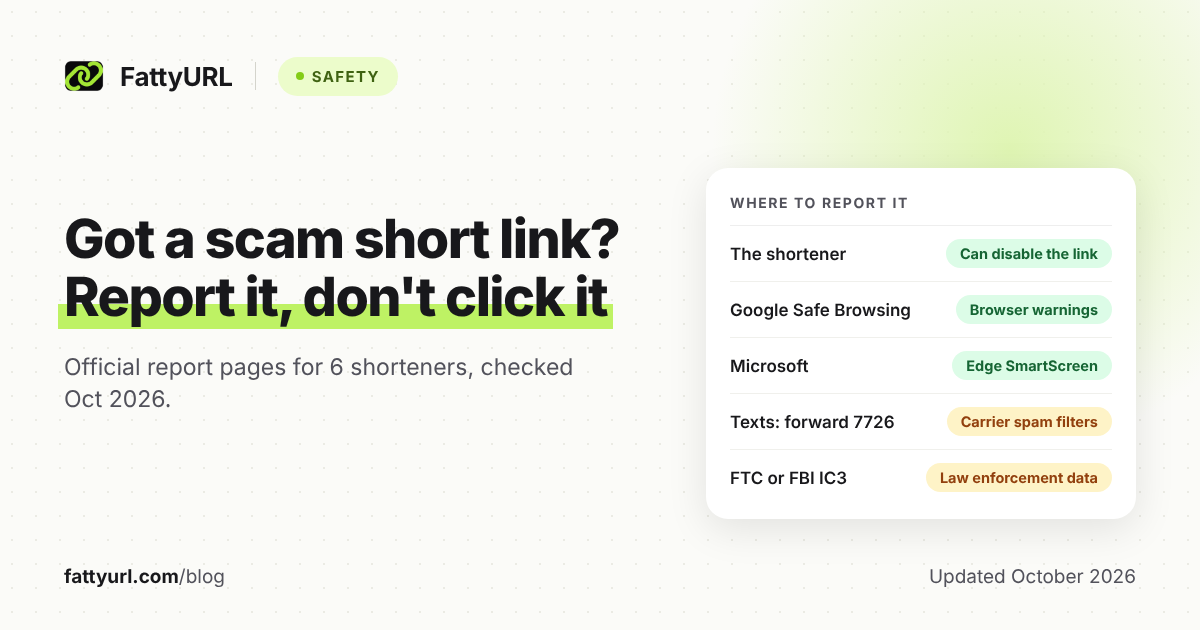
Report a phishing short link in four places: the shortener that made it, Google Safe Browsing, Microsoft, and the channel it reached you through. Each one protects people in a different way.
You never need to open the link to report it. Copy it as text, screenshot the message, and use the official pages below, each checked on the provider's own site on 28 October 2026.
Short answer: Without opening the link, copy it as text and report it to the shortener's abuse page, Google Safe Browsing and Microsoft's unsafe-site form. Forward scam texts unedited to 7726, and use Report phishing in Gmail or Outlook. In the US, also file at ReportFraud.ftc.gov, and at IC3 if you lost money.
How do you report a phishing short link?
Copy the link without opening it, and screenshot the message. Report it to the shortener first, because only the shortener can switch off the short link itself. Then report it to Google Safe Browsing, Microsoft, the channel it came through and, in the US, the FTC.
- Don't open it. Press and hold the message itself, not the link, to copy it, then take a screenshot. On a computer, right-click the link and copy the link address.
- Report it to the shortener on the official page in the table below.
- Report it to Google and Microsoft. You paste the link into their forms, so you never visit it.
- Report it in the channel: forward texts to 7726, use Report phishing for email, or report the post or message.
- Tell the authorities. In the US, file at ReportFraud.ftc.gov, plus IC3 if you lost money.
- Block and delete last, once you have copied what you need.
If you can't tell which service made the link, skip step 2. The other steps work for any malicious short URL, whether it leads to a fake login page or a malware download.
Where do you report a Bitly, TinyURL or other short link?
Report it on the abuse page of the service that made it. The domain tells you which: links on bit.ly come from Bitly, tinyurl.com from TinyURL, rebrand.ly from Rebrandly, t.ly from T.LY and fattyurl.com from FattyURL. A branded link on a company's own domain may not name its shortener at all.
Checked 28 October 2026 on each provider's own site.
| Shortener | Where to report | What it says happens next |
|---|---|---|
| Bitly (bit.ly) | Report Abuse form, which also takes harmful QR Code scans and Link-in-bio pages | Reads every report; harmful links show clickers a warning page instead |
| TinyURL (tinyurl.com) | Report Abuse link in the footer of TinyURL's help page (opens tinyurl.com/app/freescout) | Not stated on its help pages |
| Rebrandly (rebrand.ly) | Email [email protected], the Report abuse address on its Link Checker | Investigates quickly, then suspends a violating link (clickers see a 404) and the creator's account |
| Short.io | abuse.short.io, which emails you a code to confirm your address | Confirmed violations: account ban, domain suspension and link deletion |
| T.LY (t.ly) | t.ly/safety/report, which opens an email to its safety team | High-risk reports immediately, others usually within a few hours; warning page, disabling or removal |
| FattyURL (fattyurl.com) | fattyurl.com/contact or [email protected] | Harmful links are paused, never deleted |
T.LY publishes the most specific timeline of the six. Never use a "report" or "unsubscribe" link inside the scam message itself.
How do you report a phishing link to Google?
Use Google Safe Browsing's phishing report form and paste the link exactly as you received it. Google's help page doesn't promise an outcome for each report. Sites that Safe Browsing flags trigger warnings in Chrome and other browsers, Google Search and Gmail.
- Phishing pages: Report a page to Google Safe Browsing, for fake login, payment or delivery pages.
- Malware: if the link pushed a download, use Google's malware report form instead.
- Google Forms, Docs, Sheets or Drive: if you already opened a Google file from the link, click Help, then Report, inside it. Google says a report doesn't guarantee removal.
Google says Safe Browsing helps protect over five billion devices every day, so one report can reach well beyond Chrome.
How do you report a phishing link to Microsoft?
Use Microsoft's Report an unsafe site form, and choose Continue as a guest if you'd rather not sign in. Paste the link, pick Phishing or Malware, choose the site's language and complete the CAPTCHA. Edge's SmartScreen checks pages against a list of reported phishing and malware sites and blocks matches with a warning.
- The form: Report an unsafe site takes up to 100 links at once, or a .txt file under 1 MB. That helps when one scam sent you several links.
- Skip Edge's built-in command. Report unsafe website, under Settings and more, then Help and feedback, reports the page you have open. For a link you haven't opened, the web form is the safer route.
How do you report a short link that came by text, email or social media?
Report it where it arrived too, because only the carrier, email provider or platform can act against the sender. Forward texts unedited to 7726, which spells SPAM. Use Report phishing in Gmail or Outlook, and the Report option on a social post or direct message.
Texts: AT&T, Verizon and T-Mobile document 7726 in the US, and Rogers does in Canada. Ofcom says all major UK mobile companies use it, free of charge.
- T-Mobile: don't edit the message or add comments. It's free, and T-Mobile texts back to confirm.
- Verizon: a reply asks for more information. Answer with the number that sent the scam.
- AT&T: free for customers. If you can't see the sender's number, email the whole message to [email protected].
- iPhone: T-Mobile's guide says iOS 16 or later offers Report Junk, then Delete and Report Junk.
- Android, Google Messages: touch and hold the conversation, then choose Block and Report spam. Google gets the sender's number and their last 10 messages to you.
Don't reply, even to ask who it is. The FCC advises against responding to texts from unknown numbers or ones that look suspicious.
Email: in Gmail on a computer, open the message, click More next to Reply, then Report phishing. In Outlook.com, select the message, then Report, then Report phishing; Microsoft notes this reports the sender but doesn't block them. The FTC also asks people to forward phishing emails to the Anti-Phishing Working Group at [email protected].
Social media: use the app's Report option on the post, comment or direct message. Some platforms wrap links in their own redirects, as our guide to how short links behave on each social platform explains.
If the message impersonates a company, such as a bank or delivery firm, tell that company too. Use the fraud address on its official website, never one given in the message.
Should you report a phishing link to the FTC?
Yes, if you are in the US, even if you never clicked: file at ReportFraud.ftc.gov. Reports go into the FTC's Consumer Sentinel Network, which any federal, state or local law enforcement agency can use. If you lost money, also file with the FBI's Internet Crime Complaint Center (IC3).
- IC3: ic3.gov analyzes complaints and may refer them to law enforcement. It says it cannot reply to every submission.
- If you gave away details: the FTC points people to IdentityTheft.gov for steps based on what was lost.
- During a government shutdown: ReportFraud.ftc.gov can go offline. The FTC's closure notice of 31 January 2026 listed it as unavailable, so keep your evidence and file once it returns.
What should you include in a phishing link report?
Include the exact link, where and when it reached you, and what it pretended to be. Forms ask for little else: T.LY wants the link, a category and a description, and Short.io adds your email and the abuse type. Keep a screenshot of the full message as backup.
- The full short link, copied as text and unchanged.
- The sender's phone number, email address or account name.
- The date and time it arrived, and the app it came through.
- What it imitated, such as a bank, a toll agency or a parcel delivery.
- Whether you opened it and what you saw.
What not to do:
- Don't open the link to check it. The FTC says not to click links in an unexpected text that asks for personal or financial information. To check one safely, see how to see where a short link goes without clicking.
- Don't forward the link to friends or post it as a warning. Someone may tap it. Share a screenshot with the link blurred instead.
- Don't put passwords, card numbers or one-time codes in a report. None of these forms needs them.
- Don't delete the message too early. Copy the link and take the screenshot first.
What happens after you report a short link?
Often nothing you can see at first. If the shortener confirms abuse, it disables or removes the link, or puts a warning page in front of it. Google and Microsoft may add browser warnings, carriers tune their filters, and the FTC and IC3 make reports available to law enforcement.
Checked 28 October 2026 on each organization's own pages.
| Where you report | What it can change | Who it helps |
|---|---|---|
| The shortener | Disables the short link or shows a warning page | Everyone who got that link, on any channel |
| Google Safe Browsing | Warnings in Chrome and other browsers, Search and Gmail | Users of those products, once Google flags the page |
| Microsoft | A SmartScreen blocking warning in Edge | Edge users |
| Your carrier (7726) | Helps block similar texts | That carrier's customers |
| Your email provider | Reports the sender; Outlook says it doesn't block them | That provider's users |
| FTC or IC3 | Makes your report available to law enforcement | Future victims, through cases |
On FattyURL's free shortener, harmful links are paused, never deleted, so the record of where a link pointed survives. Short.io says confirmed violations end in link deletion.
FattyURL also checks every link against Google Web Risk when it is created, edited and clicked. Blocklists only know pages someone has already flagged, which is why a report still matters for a brand-new scam.
FAQ
Can I report a short link without opening it?
Yes. Copy the link from the message as text and paste it into each form or email. Only Edge's built-in Report unsafe website command and the Report option inside a Google file need the page open.
What if I already clicked the short link?
Close the page. If you typed a password, change it on the real site and turn on two-step verification; if you shared card details, call your bank. If something downloaded, the FTC says to update your security software and run a scan, then report the link anyway.
Can the shortener tell me who sent the link?
Usually not to you. Short.io says it can help police identify the person once police are involved. If you lost money, give the short link to the police or IC3.
Is it safe to forward a scam text to 7726?
Yes. Forwarding sends the message to your carrier for analysis and doesn't open the link. AT&T and T-Mobile say it's free for their customers.
Will a scam short link stop working on its own?
Don't count on it. Expiry rules vary, as our guide to which short links expire shows, and rules based on inactivity never trigger while people keep clicking. FattyURL links made without an account since 7 October 2026, for example, expire only after 30 days without a click. If a link you trust stops opening instead, our short link troubleshooting guide covers the usual causes.
What if I'm outside the US?
Report to the shortener, Google and Microsoft the same way. In the UK, forward texts to 7726; if you were scammed, use Report Fraud, which replaced Action Fraud, or Police Scotland on 101. In Canada, Rogers documents 7726 for its customers.
Sources
- Bitly: Reporting Abuse of Bitly Links and abuse system overview, read 28 October 2026
- TinyURL: Help page and footer Report Abuse link, read 28 October 2026
- Rebrandly: handling reports of harmful links, Link Checker and Is rebrand.ly safe?, read 28 October 2026
- Short.io: Report abuse and abuse portal announcement, read 28 October 2026
- T.LY: Report Abuse, Trust and Safety and Safety policies, read 28 October 2026
- FattyURL: Contact and abuse reports and Our Promise, read 28 October 2026
- Google: Report spam, phishing, or malware, Safe Browsing, Docs: Report a violation, Gmail: Report phishing and Messages: Report spam, read 28 October 2026
- Microsoft: Report an unsafe site, guest form, SmartScreen in Edge and Phishing in Outlook, read 28 October 2026
- FTC: Spam text messages, Phishing scams, Consumer Sentinel Network and closure notice, 31 January 2026, read 28 October 2026
- FBI: Internet Crime Complaint Center, read 28 October 2026
- FCC: Robotext scams alert, read 28 October 2026
- Carriers: AT&T, Verizon, T-Mobile and Rogers, read 28 October 2026
- Ofcom: Scam calls and texts, read 28 October 2026
- Report Fraud: service goes live and Stop! Think Fraud: reporting fraud, read 28 October 2026
Disclaimer: This article is for general information only and is not legal or security advice. It was researched and drafted with the help of AI, and its facts were checked against the sources linked above, mostly each provider's own pricing, help and policy pages. URL shorteners, QR code tools and social platforms change their plans, prices and rules often, so confirm the details on the provider's website before you choose a plan, move your links or print a QR code. FattyURL is our own product. Spotted something out of date, or a FattyURL link being misused? Tell us and we will act on it.