Short Link Not Working? 13 Causes and How to Fix Each One (2026)
Most short link failures have one of 13 causes: a mistyped case-sensitive ending, an expired, deleted or paused link, a dead destination, or a filter, firewall, wrapper or extension in between. Here is how to tell which, and fix it.
A short link, or shortened URL, fails in one of three places. The shortener may refuse it because the ending is mistyped, or the link expired, was deleted or was paused. The destination may be down, or something in between may block it: an email filter, firewall, DNS blocker, app wrapper or browser extension.
To find which, read the address bar on the page you land on, then test on a second network. The matrix below maps each symptom to a cause and a fix. It also says who can fix it: the link's owner or the person clicking.
Short answer: Copy the link again instead of retyping it, because endings on Bitly and FattyURL are case-sensitive. A shortener error or warning page after that means the link is wrong, expired, deleted or paused, which only its owner can fix. If it fails only on one network, browser or app, something there is blocking it.
Is the problem the short link or the page it points to?
Read the address bar on the page where the link fails. If it still shows the short domain, the short URL never redirected; if it shows the destination's domain, the website failed. A browser error or a blocker's page means something between you and the shortener stopped it.
- The short domain, with the shortener's own page: the link itself failed. It may be mistyped, expired, deleted or paused. Bitly's error page says "Something's wrong here."
- The destination's domain, with an error such as 404 or 503: the redirect worked. The page moved or was removed, or the site is down.
- A red browser warning, such as Chrome's "Dangerous site": Safe Browsing in Chrome, or SmartScreen in Edge, flagged the link or its destination.
- A connection error, or a "blocked" page from work, school or an ad blocker: a firewall, DNS filter or extension stopped the request.
Why is my short link not working? 13 causes and fixes
Most short link failures trace back to one of the 13 causes below, grouped by where they happen. Find the row that matches what you see, then apply its fix. "Owner" means the person who made the link and can sign in to the shortener; "clicker" means anyone trying to open it.
Checked 28 October 2026 against each provider's help pages, listed under Sources.
| Symptom | Likely cause | Fix |
|---|---|---|
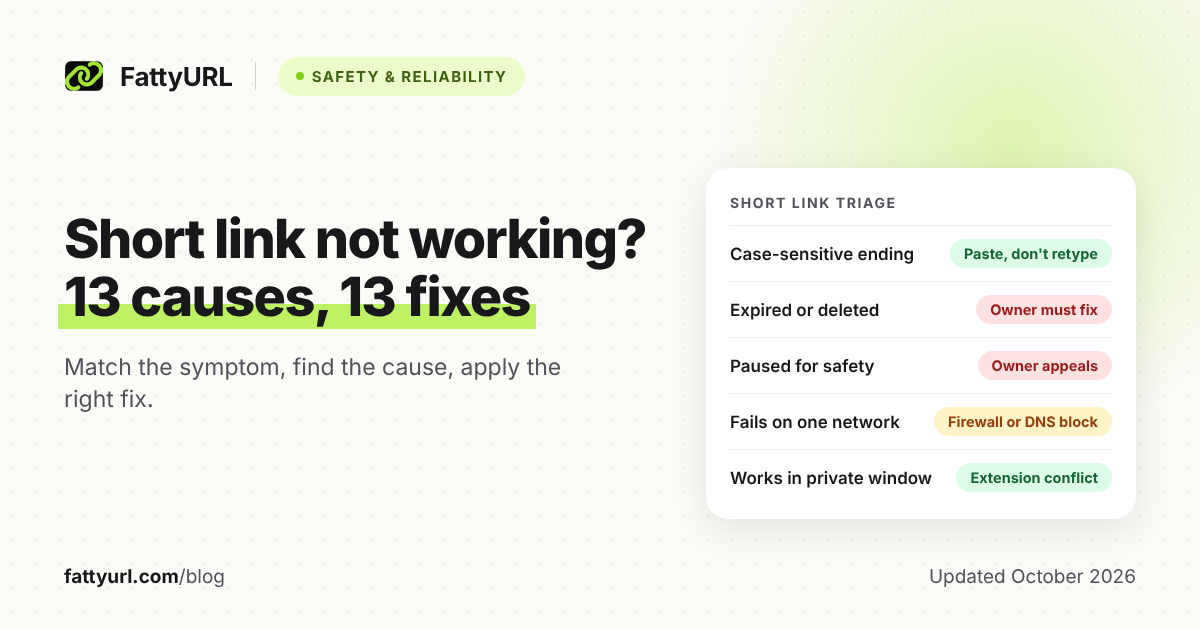
| Shortener's error page on the first try | A typo or wrong capital letter: Bitly and FattyURL endings are case-sensitive. Or the link never existed; Bitly warns that AI-written text can contain bit.ly links that aren't real. | Clicker: paste a fresh copy and check l, I, 1, O and 0. Owner: copy links from your dashboard, never retype them. |
| Error page on a link that used to work | It expired. Bitly's optional expiry (some paid plans) shows a 410 or custom error page. FattyURL links made without an account since 7 October 2026 expire after 30 days without a click. | Owner: reactivate it if your shortener allows, as Bitly does, or replace it. Compare how long short links last on each service. |
| "Deleted" or error page on a link that used to work | The owner deleted it. Bitly says deletion is permanent, and PicSee shows "Short link has been deleted." | Owner: make a new link and update everywhere you shared the old one. |
| Warning page instead of the destination | Paused or flagged for safety. Bitly blocks links that are reported, look malicious or hide behind another shortener. FattyURL checks links against Google Web Risk when they are made, edited and clicked, and pauses harmful ones. | Clicker: don't click through. Owner: confirm the destination is clean, then appeal to Bitly or ask FattyURL to re-check. FattyURL never deletes paused links. |
| The link opens the wrong page | The destination was changed or entered wrong. Bitly's redirect feature (some paid plans) sends everyone to the new address. | Owner: correct the destination; a free FattyURL account can edit it. Clicker: tell the sender where you landed. |
| Destination's domain shows 404, 410 or a 5xx code | The website failed, not the short link. 404 means not found and 410 means gone for good. Codes 500 to 599 are server errors, such as 503 during maintenance. | Clicker: try later, or search from the site's homepage. Owner: fix the page or repoint the link. |
| Old goo.gl or page.link link returns 404 | The service shut down. From 25 August 2025, Google switched off goo.gl links with no activity in late 2024, and Firebase Dynamic Links (page.link) ended. | Owner: replace it with a link on a live service. See which goo.gl links survived. |
| A preview or ad page appears first | Some free links show a page in between. Bitly says its no-account links show a preview with ads, and free accounts still include ads. FattyURL free links may show ads. | Clicker: the link still works, so continue past the preview. Owner: Bitly says a paid plan removes ads, and FattyURL links on a paid plan never show them. |
| Email link opens a security warning or a long rewritten address, or a text never arrives | Email or SMS filters. Microsoft Defender Safe Links rewrites email links and checks them on click. Google Workspace admins can make Gmail look behind short URLs. Many mobile carriers block texts with links from public shorteners. | Owner: use a custom domain for SMS, as Bitly advises, and add the full URL in emails. Clicker: forward the warning to IT. |
| Fails on office, school or home Wi-Fi but works on mobile data | A firewall, ISP or DNS blocker stops the shortener's domain. Bitly has seen firewalls block all of .ly, and Dub says some ISPs block dub.sh. By default, Pi-hole answers blocked domains with 0.0.0.0. | Clicker: switch networks, or ask IT to allowlist the domain. Owner: use a custom domain, as Dub recommends. |
| Fails or warns inside an app, or the link shows as t.co | Platform link wrapping. X turns every link shared on X into a t.co link and checks it against a list of potentially dangerous sites. | Owner: see how each social platform handles short links. Clicker: don't bypass an app's warning. |
| Warning about another shortener, or a redirect loop error | Chained shorteners. Bitly blocks links that hide behind another shortener, and each extra hop can break. A destination that redirects back to the short link loops. | Owner: shorten the final address, never another short link. |
| Works only in a private window or another browser | A browser extension. Ad blockers such as uBlock Origin can block whole pages. Firefox runs extensions in private windows only if you allow it. | Clicker: turn extensions off, then on one at a time, as Chrome's help suggests. |
Scanning a QR code adds its own failure points, from print quality to camera apps. If your link sits inside a QR code, see why a QR code stops working.
How do I test a short link from another network or device?
Test the same link in four ways: a fresh copy, a private window, a second network and a second device. Change one thing at a time. The pattern of where it fails tells you whether the link, the network, the browser or an app is the cause.
- Paste a fresh copy. Copy the link from the original message. Retyping is how capitals and look-alike characters go wrong.
- Open a private window. Chrome's fix list says to try Incognito, then turn off extensions and re-enable them one at a time. Firefox runs none in private windows unless you allow them.
- Switch networks. On your phone, turn off Wi-Fi and use mobile data, or the reverse.
- Try a second device or person. Ask someone on another network exactly what they see.
- Check where it points. Bitly's Link Checker shows a Bitly link's destination. On a computer,
curl -Iplus the link fetches only the headers, and the Location line names the next address. Our guide covers how to check where any short link goes. - Check the shortener. If several links from one service fail everywhere, suspect an outage. Bitly suggests its status page in that case.
Then read the pattern:
| Where it fails | What it points to |
|---|---|
| Everywhere: every network, browser and device | The link or its destination (rows 1 to 8 and 12 above) |
| Only on one network | That network's firewall, content filter or DNS blocker |
| Only in one browser | An extension, or that browser's safety warning |
| Only inside one app or email account | The platform's link wrapper or email security |
| Works for you, fails for others | Their network, filter or device, not your link |
What can the link owner fix, and what can the clicker do?
Only the owner can change what the shortener does. That means correcting the destination, replacing an expired link, appealing a pause or moving to a custom domain. The clicker controls their own side: the copy they paste, their browser, their network and who they ask for help.
If you made the link:
- Check its status, ending and destination in your dashboard. A free FattyURL account can edit destinations.
- Reactivate an expired link if your shortener allows it. Otherwise make a new short link and replace the old one everywhere.
- Appeal a pause once the destination is clean. Don't re-shorten it to dodge the block, because Bitly blocks links hidden behind another shortener.
- If networks block your shortener's shared domain, use a custom short link on your own domain. Bitly and FattyURL both offer custom domains on paid plans only.
- Before sending, test in a private window and over mobile data, and add the full URL to emails.
If you are clicking it:
- Paste a fresh copy, then run the tests above.
- If the destination's domain shows the error, search that site from its homepage.
- Tell the sender what you saw: the address bar, your network and your device.
- Never click past a red browser warning or a safety page on a link from a stranger.
FAQ
Are short links case-sensitive?
On Bitly and FattyURL, yes. Bitly says the wrong capitalization leads to an error page or a different destination, and FattyURL endings are case-sensitive in the same way. Whatever the service, copy and paste a short link rather than typing it.
Why does my short link work on Wi-Fi but not on mobile data?
Something on one of those networks is filtering it. If it fails only on Wi-Fi, ask whoever runs that network to allowlist the shortener's domain. If it fails only on mobile data, suspect the carrier: Dub notes that some ISPs block its shared dub.sh domain.
Can I get an expired or deleted short link back?
The owner of an expired Bitly link can reactivate it, but Bitly says deletion is permanent. On FattyURL, links made with a free account never expire. If a link made without an account expired after 30 days without a click, make a new one, ideally from a free account.
Why does my short link say 404?
Check which domain shows the 404. On the shortener's domain, the link doesn't exist: a typo, a deleted link or a dead service such as old goo.gl links. On the destination's domain, the short link worked, but the page it points to moved or was removed.
Sources
- Bitly Support: Why is my Bitly Link not working?, read 28 October 2026
- Bitly Support: Are Bitly Links case sensitive?, read 28 October 2026
- Bitly Support: Why does a link lead to Bitly's error page?, read 28 October 2026
- Bitly Support: How do I set an expiration date for my links and QR Codes?, read 28 October 2026
- Bitly Support: How do I delete a Bitly Link?, read 28 October 2026
- Bitly Support: Why am I seeing a warning page when clicking a Bitly link?, read 28 October 2026
- Bitly Support: How do I redirect a Bitly Link?, read 28 October 2026
- Bitly Support: How do I allowlist a domain?, read 28 October 2026
- Bitly Support: Why can't I use Bitly links in some SMS campaigns?, read 28 October 2026
- Bitly Support: Free Short Link Generator (Anonymous Link) FAQ, read 28 October 2026
- Bitly Support: Best practices for creating and sharing content in Bitly, read 28 October 2026
- Bitly Support: Can I check a Bitly link's destination before clicking on it?, read 28 October 2026
- Dub Help: Why are my dub.sh links not working?, read 28 October 2026
- PicSee Help: Short link not working after publishing, read 28 October 2026
- FattyURL: our public promise (expiry, pauses and ads), read 28 October 2026
- Microsoft Learn: Complete Safe Links overview for Microsoft Defender for Office 365, read 28 October 2026
- Google Workspace Help: Advanced phishing and malware protection, read 28 October 2026
- X Help Center: About X's link service (t.co), read 28 October 2026
- Google Chrome Help: Fix connection and loading errors in Chrome, read 28 October 2026
- Google Chrome Help: Manage warnings about unsafe sites, read 28 October 2026
- Microsoft Support: How can SmartScreen help protect me in Microsoft Edge?, read 28 October 2026
- Firefox Help: Extensions in Private Browsing, read 28 October 2026
- uBlock Origin wiki: Strict blocking, read 28 October 2026
- Pi-hole documentation: Blocking mode, read 28 October 2026
- MDN: HTTP response status codes, with the 404, 410 and 503 pages, read 28 October 2026
- MDN: Redirections in HTTP and the Location header, read 28 October 2026
- curl manual: the -I, --head option, read 28 October 2026
- Google Developers Blog: Google URL Shortener links will no longer be available, read 28 October 2026
- Firebase: Dynamic Links Deprecation FAQ, read 28 October 2026
Disclaimer: This article is for general information only and is not legal or security advice. It was researched and drafted with the help of AI, and its facts were checked against the sources linked above, mostly each provider's own pricing, help and policy pages. URL shorteners, QR code tools and social platforms change their plans, prices and rules often, so confirm the details on the provider's website before you choose a plan, move your links or print a QR code. FattyURL is our own product. Spotted something out of date, or a FattyURL link being misused? Tell us and we will act on it.