How to Shorten a Zoom Link: Personal Link, Vanity URL and QR Code (2026)
Zoom's built-in short option, the Personal Link, needs a licensed user on a Business, Education or Enterprise account. Anyone else can shorten the full invite link, passcode part included, to get a link they can repoint and count.
Inside Zoom, the closest thing to a short link is the Personal Link: a name you choose for your personal meeting room. Zoom's requirement for setting one is a licensed user on a Business, Education or Enterprise account. A vanity URL brands an organization's Zoom address, but it doesn't give each meeting a short link.
For everything else, shorten the full invite link, passcode part included, with a shortener that lets you edit the link later. That gives you a QR code and an easy-to-type address that survive meeting changes.
Short answer: Licensed users on Zoom Business, Education or Enterprise accounts can set a Personal Link name under Profile in the web portal. Everyone else should copy the meeting's full invite link, passcode part included, and shorten it with a service that lets you edit the destination. Then one address, and one QR code, keeps working when the meeting changes.
Can you shorten a Zoom link inside Zoom?
Only for your personal meeting room. Zoom lets licensed users on Business, Education or Enterprise accounts set a Personal Link, a name-based alias for their Personal Meeting ID (PMI). Other licensed users can pick a custom 10-digit PMI instead, and invitations show the PMI, not the Personal Link.
Zoom's rules for the Personal Link name:
- 5 to 40 characters, starting with a letter
- Letters, numbers and periods only
- Unique to you: no other Zoom user can hold it, even on an account with a vanity URL
- No common names
To set it:
- Sign in to the Zoom web portal.
- In the navigation menu, click Profile.
- Under Meeting, to the right of Personal Link, click Customize.
- Enter the name you want, then click Save Changes.
Two catches. Because Zoom's invitations use the PMI, you have to share the Personal Link yourself. And it opens your personal meeting room, which Zoom says shouldn't be used for back-to-back meetings or people you don't meet with regularly.
Basic and Pro accounts aren't on Zoom's list for the Personal Link. Education accounts are, so a teacher who is a licensed user on a school's Education account may already qualify. For everyone else, a short link with a custom ending is the closest substitute.
What is a Zoom vanity URL, and who can get one?
A vanity URL is a custom Zoom subdomain for an organization, such as yourcompany.zoom.us. Owners or admins on Business, Education, Enterprise, Zoom Phone only or Zoom Contact Center only plans can request one for their own domain. It brands the organization's Zoom address rather than shortening each meeting link.
Zoom's guidelines, as they read today:
- Apply at zoom.us/account. Requests that meet the guidelines are approved within 3 business days.
- The vanity URL must match your company's domain name. Widely used generic domains, such as gmail.com or outlook.com, can't be used.
- At least 4 characters, using only letters, numbers and dashes.
- It's required if you plan to turn on single sign-on (SSO).
- To change it later, contact Zoom Support, and ask for the old vanity URL to redirect so existing meeting links still work.
So a solo tutor on a Gmail address can't get one, whatever the plan. In July 2020, Check Point Research showed vanity URLs could be abused to dress up phishing invites as a real company's. It reported that Zoom had fixed the issue.
What does the passcode part of a Zoom link do?
It lets people join without typing the passcode. With the setting Embed passcode in invite link for one-click join turned on, Zoom encrypts the meeting passcode into the invite link. Zoom's own example join link shows a ?pwd= section after the meeting ID.
Zoom says an embedded passcode "makes your meeting more secure and easier for attendees to join." The catch is that the link itself now carries the key. Anyone who gets it, from a forwarded email or a photo of your poster, gets past the passcode without knowing it.
Zoom's security guide warns that once meeting links reach social media or public forums, "anyone with the link can join it." Its advice: a random meeting ID and a passcode, shared privately.
For more control, turn on the Waiting Room, so the host decides when each person joins. Pro, Business, Education and Enterprise accounts can also require authentication, which can limit a meeting to signed-in Zoom users. For events with people you may not know, Zoom suggests Zoom Webinars or Zoom Events.
To change the embed setting, sign in to the Zoom web portal, click your profile picture, then Settings, and open the Meeting tab. The toggle sits under Security. If it's grayed out, it has been locked at the group or account level, so ask your Zoom admin.
Turning the setting off doesn't recall links you've already sent. Zoom says they keep working while that meeting's passcode stays unchanged. So if a link leaks, change the meeting's passcode, then point your short link at the new invite link.
Which Zoom link should you share?
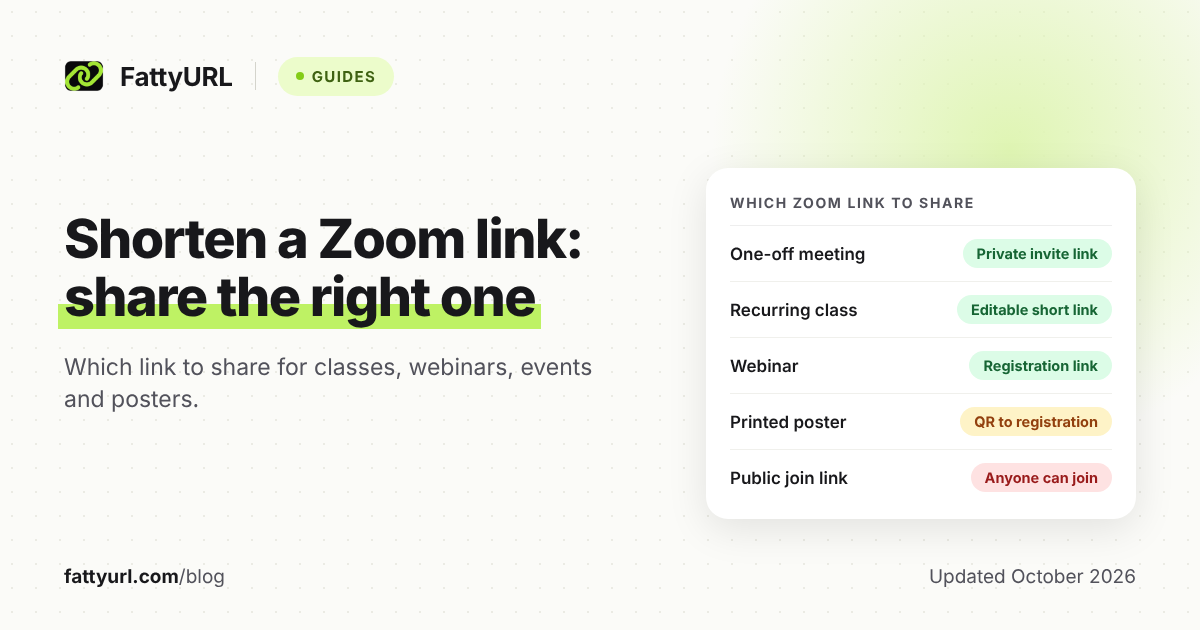
A private meeting can use Zoom's own invite link. Anything posted, printed or reused for months works better as a short link you control. If strangers might see it, point it to a registration page, which emails the join link, rather than to the meeting itself.
Checked 28 October 2026, against the Zoom help pages listed under Sources.
| Situation | Share this | Why |
|---|---|---|
| One-off meeting with people you know | Zoom's invite link, sent privately | Zoom advises a random meeting ID and a passcode, shared privately |
| Recurring class or coaching group | A short link you can edit, pointing to a recurring meeting | Every session uses the same meeting ID, but it expires after 365 days without a session, and a series holds up to 60 sessions |
| Drop-in personal room | Your Personal Link, or your PMI link if you can't set one | Anyone with the link can join while the room is in use, unless you lock it or use the Waiting Room |
| Webinar | The registration link, shortened for slides | Zoom says you can share the registration URL; registrants get the join link by email |
| Public event with strangers | A registration link, for a webinar or a meeting with registration | Zoom warns that anyone with a public join link can join, and points public events to Zoom Webinars or Zoom Events |
| Printed poster or flyer | A QR code made from a short link to the registration page | Anyone who scans or photographs it gets the link; the code keeps working when you repoint the link |
Registration has plan requirements. Zoom lists a Pro, Business, Education or Enterprise account and a licensed host for meeting registration; webinars also need the Zoom Webinars add-on. Registration also can't run on your PMI.
When does a short link help with a Zoom meeting?
When the link must outlive one meeting, sit on a slide or poster, or tell you how many people opened it. A short link you can edit keeps one address while the Zoom meeting behind it changes. It doesn't lock anything, though: it forwards to the full Zoom link.
A recurring class link. Meeting IDs expire: a one-time meeting's 30 days after its scheduled date, a recurring meeting's after 365 days without a session. A new term, meeting or passcode means a new invite link, but the short link on your syllabus stays the same.
A QR code on a slide or poster. A static QR code, like FattyURL's, stores exactly the link you give it, so make it from the short link. The printed code then follows each time you repoint the link.
Click counts. A free FattyURL account shows total clicks, unique visitors and clicks over 7, 30, 90 or 365 days. It breaks them down by country, city, device, browser, operating system and referrer, and counts QR scans as clicks.
A click means someone opened the link, not that they joined. Give each place you share, such as the class email and the poster, its own short link to compare them. Our guide to tracking QR code scans covers what the numbers can and can't tell you.
A link people can type. A custom ending of 6 to 100 characters, such as the class name, is easy to read aloud or type. Here's how to pick a custom ending people remember.
The honest caveat: a short link forwards to the full Zoom link, passcode part included. Anyone who has the short link reaches the meeting page with the same one-click access. Keep the Waiting Room on for any link that travels.
If you qualify for a Personal Link and only need your personal room, use it. It's Zoom's own address, with no redirect in between. For public events, Zoom's registration does something a short link can't: it sends the join link by email to people who register.
How do you shorten a Zoom link and make a QR code for it?
Copy the meeting's invite link from Zoom, paste the whole link into a shortener, and make the QR code from the short link. Sign in first if the link must last or change later. Then test the link and the code before you share or print anything.
- Copy the invite link. In the Zoom web portal, open Meetings, click the meeting topic, and copy the link to the right of Invite Link. In the desktop app, click the meeting card on the Home tab and copy the link under Join Zoom Meeting.
- Keep the whole link. When the passcode is embedded, it travels inside the link you copied. Trim the link, and people may have to type the passcode.
- Shorten it. Sign in to a free FattyURL account and paste the link on the FattyURL home page. Add a custom ending if you like.
- Make the QR code from the short link. FattyURL exports PNG or SVG, in any colors, with no watermark. For print checks, see how to make and test a QR code for any link.
- Test both. Open the short link in a private browser window, then scan the code with a phone. Zoom should prompt you to open the Zoom Workplace app.
- Repoint when the meeting changes. Edit the short link's destination to the new invite link. The QR code and every shared copy follow.
Without an account, you can still shorten a link and make a QR code, but the link expires after 30 days without a click. A class link left unused over summer break would stop working. Free links may show ads; links on a paid plan never do.
Any shortener that lets you change a link's destination will do the job, but check how long each shortener keeps links. FattyURL has no integrations, so it can't create a short link for each new Zoom meeting automatically. A 2020 Short.io blog post walks through one automation that does.
New to shortening in general? Start with four free ways to shorten any link.
FAQ
Why doesn't my Zoom invitation show my Personal Link?
Zoom doesn't put the Personal Link in meeting invitations; it uses your Personal Meeting ID instead. To share it, open Meetings in the web portal, click the Personal Room tab and copy the link next to Invite Link.
Why does Zoom reject my Personal Link name?
Check Zoom's rules: 5 to 40 characters, starting with a letter, using only letters, numbers and periods. The name can't already belong to another Zoom user, and common names aren't allowed.
Can I get a Zoom Personal Link on a free or Pro account?
Not according to Zoom's requirements, which name licensed users on Business, Education or Enterprise accounts. Licensed users can instead pick a custom 10-digit PMI that starts with 2 to 9. Zoom also bars sequences, runs of five identical digits and toll-free prefixes such as 800.
Does a shortened Zoom link still skip the passcode?
Yes, if you shortened the full invite link with the embedded passcode. The short link forwards to it, so people still join in one click, and so does anyone else who holds the short link.
Do people need the Zoom app to join from a QR code?
Not always. Zoom's help lists a Zoom Web App at app.zoom.us/wc/ with limited features, and a join-from-browser link the host must enable. Otherwise, the scan opens the link and Zoom prompts you to open or download the app.
Sources
- Zoom Support: Customizing your personal meeting ID (PMI) and personal link, read 28 October 2026
- Zoom Support: Using Personal Meeting ID (PMI), read 28 October 2026
- Zoom Support: Guidelines for Vanity URL requests, read 28 October 2026
- Zoom Support: Embedding meeting passcode in invite link, read 28 October 2026
- Zoom: Zoom Meetings security guide, read 28 October 2026
- Zoom Support: Using waiting room during a meeting, read 28 October 2026
- Zoom Support: Requiring authentication to join a meeting or webinar, read 28 October 2026
- Zoom Support: Inviting others to join a meeting, read 28 October 2026
- Zoom Support: Joining a Zoom meeting, read 28 October 2026
- Zoom Support: Scheduling a recurring meeting, read 28 October 2026
- Zoom Support: Frequently asked questions about meeting and webinar IDs, read 28 October 2026
- Zoom Support: Scheduling a webinar with registration, read 28 October 2026
- Zoom Support: Scheduling and customizing a meeting with registration, read 28 October 2026
- Check Point: Fixing the Zoom "Vanity Clause" (published 16 July 2020), read 28 October 2026
- Short.io blog: Shorten Zoom links with Short.io and share them via Gmail (published 27 August 2020), read 28 October 2026
- FattyURL pricing, read 28 October 2026
Disclaimer: This article is for general information only and is not legal or security advice. It was researched and drafted with the help of AI, and its facts were checked against the sources linked above, mostly each provider's own pricing, help and policy pages. URL shorteners, QR code tools and social platforms change their plans, prices and rules often, so confirm the details on the provider's website before you choose a plan, move your links or print a QR code. FattyURL is our own product. Spotted something out of date, or a FattyURL link being misused? Tell us and we will act on it.