How to Shorten a Google Maps Link (and Make a QR Code for It) in 2026
Google Maps already makes short links: tap Share on a place, pin or route. Here are Google's steps for Android, iPhone and computer, which Maps links stay short, and when your own short link or QR code is worth it.
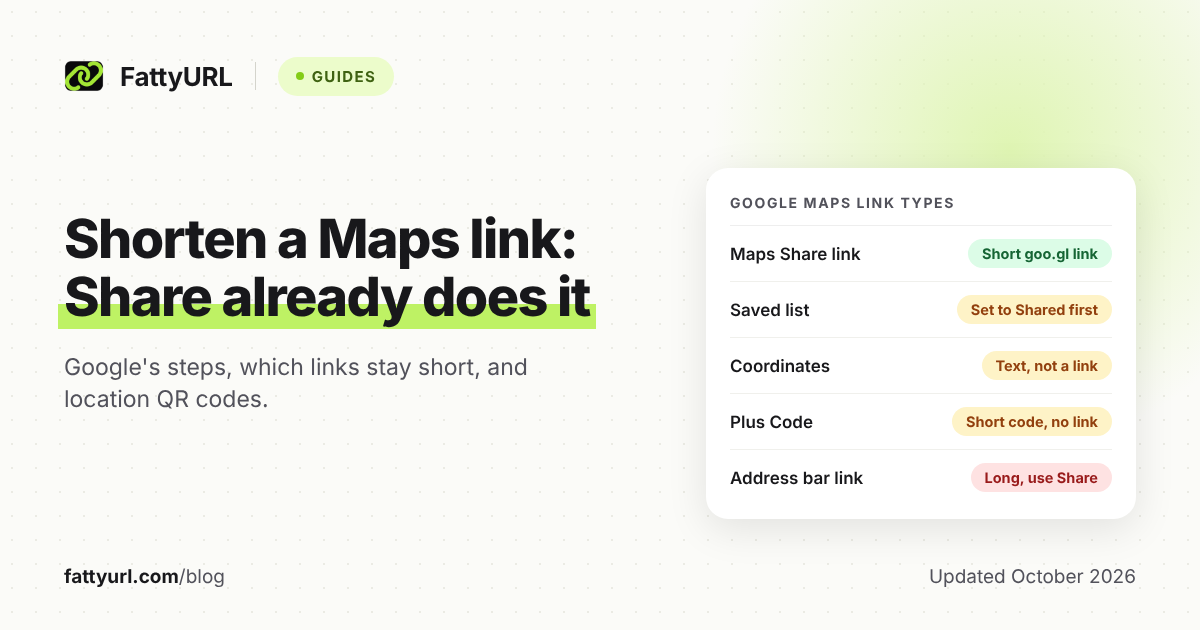
You usually don't need a separate shortener for a Google Maps link. Tap Share on a place, dropped pin or route, and Maps gives you a short goo.gl link. If yours starts with maps.app.goo.gl, it's already short; the long address in your browser bar is the one to avoid.
Your own short link adds what Google's can't: your name, click counts, and a destination you can change after printing.
Short answer: In the Google Maps app, find the place or drop a pin, tap its name, then tap Share. On a computer, click Menu, Share or embed map, Send a link and Copy link. Both give a short goo.gl link, so make your own only for a custom name, click counts or an editable QR code.
How do you get a short Google Maps link on a phone or computer?
Use the Share option inside Google Maps rather than copying the browser's address bar. Google's help gives the same steps for the Android and iPhone apps, and a menu route on a computer. What you get back is a short goo.gl link, the kind Google's developer blog says Maps sharing generates.
On an Android phone or iPhone:
- Open the Google Maps app.
- Search for a place, or touch and hold the map to drop a pin.
- At the bottom, tap the place's name or address.
- Tap Share.
- Choose an app to share it with. To shorten or print the link, send it somewhere you can copy it from, like a notes app.
On a computer:
- Open Google Maps and go to the part of the map you want to share.
- At the top left, click Menu.
- Click Share or embed map.
- Click Send a link, then Copy link.
For directions in the app, tap Directions, enter your locations and choose a route. Then tap More and Share directions. On a computer, click Directions, choose a route and click Share, then Send a link and Copy link.
What is a maps.app.goo.gl link, and will it keep working?
It's a short link on goo.gl, the domain Google used for its URL Shortener.com/maps address, the full link behind it. Google's developer blog says "goo.gl links generated via Google apps (such as Maps sharing) will continue to function."
Links that start with goo.gl/maps are Google Maps redirection URLs, and Google's iOS developer guide still accepts them, so the same note applies. For the wider goo.gl shutdown and what replaced it, see our guide to the Google URL Shortener shutdown and its alternatives.
Which Google Maps links are already short?
Share gives you a link for a place, pin, route or list, and Google's developer blog says Maps sharing generates goo.gl links. Coordinates and Plus Codes are short text you copy, not links, and embedding gives you HTML for a web page. The table shows how to get each one.
Checked 28 October 2026 against Google Maps Help and the Google Developers Blog.
| What you're sharing | How to get it (Google's steps) | What you get |
|---|---|---|
| A place, such as a business or venue | App: search for it, tap its name or address, tap Share. Computer: Menu, Share or embed map, Send a link, Copy link | A link to send or copy |
| Directions | App: Directions, choose a route, More, Share directions. Computer: Directions, choose a route, Share, Send a link, Copy link | A link to send or copy |
| A dropped pin, such as a meeting point | App: touch and hold the map, tap the name or address at the bottom, tap Share | A link to send through an app |
| Coordinates | App: touch and hold an unlabeled spot; they show in the search box (Android) or the placesheet (iPhone). Computer: right-click the spot, click the latitude and longitude to copy them | Text such as 41.40338, 2.17403, not a link |
| A Plus Code | App: drop a pin, then in the panel tap the Plus Code to copy it. Computer: click the spot, click the coordinates in the info box, then click the Plus Code | A short code such as JJXX+HR8, Seattle, not a link |
| A saved list | Android: You, open the list, Share. iPhone: You, More next to the list, Share list. Computer: Menu, Saved, More, Send a link to view | A link to view the list; set it to Shared so others can open it |
| A map on your website | Computer: Menu, Share or embed map, Embed a map, Copy HTML | HTML code, not a link |
On a computer, Google says you can't share starred places. Nor can you share a map with your saved locations, a distance measurement or a map image. Anyone who can view a shared list can also see the names and profile pictures of people who joined it.
For coordinates, Google wants decimal degrees with a period, latitude first: 41.40338, 2.17403 works, but 41,40338, 2,17403 doesn't. For a Plus Code, add the town name, as in JJXX+HR8, Seattle, unless the other person is in the same town.
How do you make a clean Google Maps link from an address or coordinates?
Use Google's documented Maps URLs: start with https://www.google.com/maps/search/?api=1&query= and add a place name, address or coordinates. Google says these links open the Maps app on Android and iPhone when it's installed, and a browser otherwise. That makes them handy for meeting points with no street address.
Google's own example drops a pin on Seattle's Lumen Field by its coordinates:
https://www.google.com/maps/search/?api=1&query=47.5951518%2C-122.3316393
- Keep api=1. Without it, Google says Maps ignores every other part of the link.
- Encode the comma. Google asks for %2C in place of a comma, and + or %20 in place of a space.
- Name the business. Coordinates alone drop a pin with no place details, Google notes, so use the name and address when the place has a listing.
- Leave out the start point for invites. A directions link with only a destination starts from the most relevant location, such as the guest's device location, if available.
A destination-only directions link looks like this, adapted from Google's example:
https://www.google.com/maps/dir/?api=1&destination=Pike+Place+Market+Seattle+WA
These links are readable but still long, which makes them good candidates for shortening.
When should you shorten a Google Maps link yourself?
For a quick message to a friend, Google's share link is simply better. It's free, built in, and Google says goo.gl links from Maps sharing keep working. Make your own when you need your name in the link, click counts, or a link you can repoint after printing.
- Your name in the link. An ending like /smith-wedding-venue reads better on an invite than a random code. A free FattyURL account allows endings of 6 to 100 characters, and our custom short link guide covers picking one. Paid plans add your own domain, from $9 a month (checked 28 October 2026).
- Click counts. Google's sharing help mentions none. A short link on a free FattyURL account shows total clicks, unique visitors and clicks over 7, 30, 90 or 365 days. It also breaks clicks down by country, city, device, browser, operating system and referrer.
- A venue that moves. With a free account you can edit where the short link points. Everyone holding the old link, on screen or on paper, lands on the new place.
Two cautions. Links made without an account expire after 30 days without a click, so sign in before you print anything. Free links may show ads, while links on a paid plan never do.
When you shorten, paste the full Maps address or a Maps URL you built, not the goo.gl link. On a computer, open the share link, let Maps load, and copy what's in the address bar. That spares visitors a second redirect and keeps your link from depending on two services.
You can make the short link on the FattyURL home page, with or without an account.
How do you make a QR code for a Google Maps location?
The simplest route is to put Google's own share link into any QR code generator. It's already short, which keeps the code simple, since DENSO WAVE notes that more data needs more modules. Use your own short link instead if you want to count scans or change the place without reprinting.
- Get the location's link with Share, or build a Maps URL as shown above.
- For scan counts and an editable destination, sign in to a free FattyURL account and shorten the full Maps address.
- Make the QR code from that short link. FattyURL exports PNG or SVG in any colors, with no watermark.
- Scan it with an iPhone and an Android phone. Check that the right place opens, in the Maps app or a browser.
- Print the written address next to the code for anyone who can't scan it.
Each scan of a code made from a FattyURL short link on a free account counts as a click in that link's analytics. For setup and testing, see how to track QR code scans for free.
Chrome on a computer can also make a quick code. Open the place in Google Maps, then select More, Cast, save, and share, Create QR code, then Download. That code holds the page's own address and can never be changed, so keep it for one-off use.
Sizing, colors and print checks are in our guide to making a QR code for any link. Asking customers for reviews is a different job with its own Google link, covered in our Google review QR code guide.
FAQ
Can I customize a maps.app.goo.gl link?
No. Google's sharing help offers no way to choose the ending, change the destination or see clicks. For a readable name, shorten the full Maps address with a custom ending instead.
Will a short link open the Google Maps app?
Google says its Maps URLs open the Maps app on Android and iPhone when it's installed, and a browser otherwise. A short link only forwards people to that address, so test yours on both kinds of phone before you print.
How do I share my live location instead of a place?
Use Location Sharing, a separate feature. Google says its setting can't be turned on until you've shared your location with someone through a Google app or service, such as Maps. A place link stays fixed on one spot.
Is a maps.app.goo.gl link safe to open?
It sits on goo.gl, Google's own short-link domain. It still shows whatever place the sender picked, so check the name and address before you set off. For other short links, see how to check where a short link goes.
Sources
- Google Maps Help: Share, send, or print directions from Google Maps (Android, iPhone and computer versions), read 28 October 2026
- Google Maps Help: Search by latitude & longitude in Google Maps (all three versions), read 28 October 2026
- Google Maps Help: Find & share a location using Plus Codes (all three versions), read 28 October 2026
- Google Maps Help: Create a list of places (all three versions), read 28 October 2026
- Google Account Help: Manage your Location Sharing settings, read 28 October 2026
- Google for Developers: Get started with Maps URLs (last updated 27 October 2026), read 28 October 2026
- Google for Developers: Google Maps URL Scheme for iOS (goo.gl/maps redirection URLs), read 28 October 2026
- Google Developers Blog: Google URL Shortener links will no longer be available (updated 1 August 2025), read 28 October 2026
- Google Chrome Help: Share tabs in Chrome (QR code steps), read 28 October 2026
- DENSO WAVE: Information capacity and versions of the QR Code, read 28 October 2026
- FattyURL pricing, read 28 October 2026
Disclaimer: This article is for general information only and is not legal or security advice. It was researched and drafted with the help of AI, and its facts were checked against the sources linked above, mostly each provider's own pricing, help and policy pages. URL shorteners, QR code tools and social platforms change their plans, prices and rules often, so confirm the details on the provider's website before you choose a plan, move your links or print a QR code. FattyURL is our own product. Spotted something out of date, or a FattyURL link being misused? Tell us and we will act on it.