How to Shorten Your LinkedIn URL for a Resume, Signature or QR Code (2026)
To shorten your LinkedIn URL, edit your public profile URL so it reads linkedin.com/in/yourname. Add a short link only for click counts or a link you can repoint later. Here is the best format for each place you use it.
To shorten your LinkedIn URL, start with LinkedIn's own setting. Edit your public profile URL so it reads linkedin.com/in/yourname. It stays on linkedin.com, and anyone reading it knows where it goes.
Add a short link only when it gives you something extra. That means a count of clicks from the resumes you send, or one link you can repoint to a portfolio later.
Short answer: From your LinkedIn profile, open your public profile settings and change the custom part to your name, so your URL reads linkedin.com/in/yourname. Use that address on resumes and signatures, with a QR code for cards and slides. Add a short link only for click counts or a link you can repoint later.
How do you customize your LinkedIn profile URL?
Open your profile, go to your public profile settings, and replace the custom part of the address. LinkedIn's developer documentation gives every public profile address the same shape: www.linkedin.com/in/ followed by that custom part. Editing it is the cleanest way to shorten your profile link, and you never leave linkedin.com.
On a computer:
- Sign in to LinkedIn and open your own profile.
- From your profile, open your public profile settings.
- Edit the custom part of your URL, for example to janedoe, and save the change.
On a phone: we couldn't confirm LinkedIn's current app steps for this update, so this guide sticks to the computer route.
Then test it. Open the new address in a private browser window while signed out, since that's close to what a recruiter who isn't signed in sees. If your profile shows less than you expect, check your profile's visibility settings.
What should you check before you change your LinkedIn URL?
Check LinkedIn's own rules first. They're in LinkedIn Help, which we couldn't check for this update, so read them there before you choose. Then pick a custom URL you can keep, because every change means updating your resume, signature and printed codes.
- Your old URL: don't count on it reaching you after a change. Update your resume, email signature and any QR code the same day.
- Availability: each address opens just one profile, so a common name may already be in use.
If your name is taken, add a middle initial, a credential or your field: janedoecpa or janedoeux reads better than janedoe4821. Use the same name as on your resume, so the two clearly belong together.
How do you change a LinkedIn company page URL?
A company page lives at linkedin.com/company/ plus its own name, the pattern LinkedIn uses for its own Page. That name part is edited from the Page's admin view. LinkedIn's developer docs call it the "Entity's unique name used in URLs," so two Pages can't share one.
- Open your Page in admin view.
- Open the Page's edit settings and find its public URL.
- Change the name part and save.
Before you change it, check LinkedIn Help for who can make the change and whether the old address still works. Then list everywhere the old address appears: your website, email footers, job ads and printed materials. Update them all the same day.
LinkedIn's QR code launch post only describes member profiles, so make a Page's QR code from its URL yourself.
Where is your LinkedIn QR code?
LinkedIn put a profile QR code in its iPhone and Android apps in June 2018. Its launch post says to tap the QR code icon in the search box on the Home tab, then tap My code. The post says you can save or share your code there, or scan someone else's to open their profile.
These are the launch post's steps, so labels in today's app may differ:
- Open the LinkedIn app and tap the QR code icon in the search bar.
- Tap My code to show your own code.
- Save it to your photos, or share it by message or email.
- To open someone's profile, scan their code from the same screen. You can also upload a LinkedIn QR code image from your phone.
The launch post says nothing about scan counts or design options. If you want either, or you're on a computer, make your own code from your profile URL or a short link.
Something newer is coming too. On October 15, 2026, LinkedIn announced personalized digital business cards you can add to your digital wallet. Its timing: "Rolling out globally over the coming months," so check your app before you order printed cards.
Which LinkedIn link format is best for a resume, signature or card?
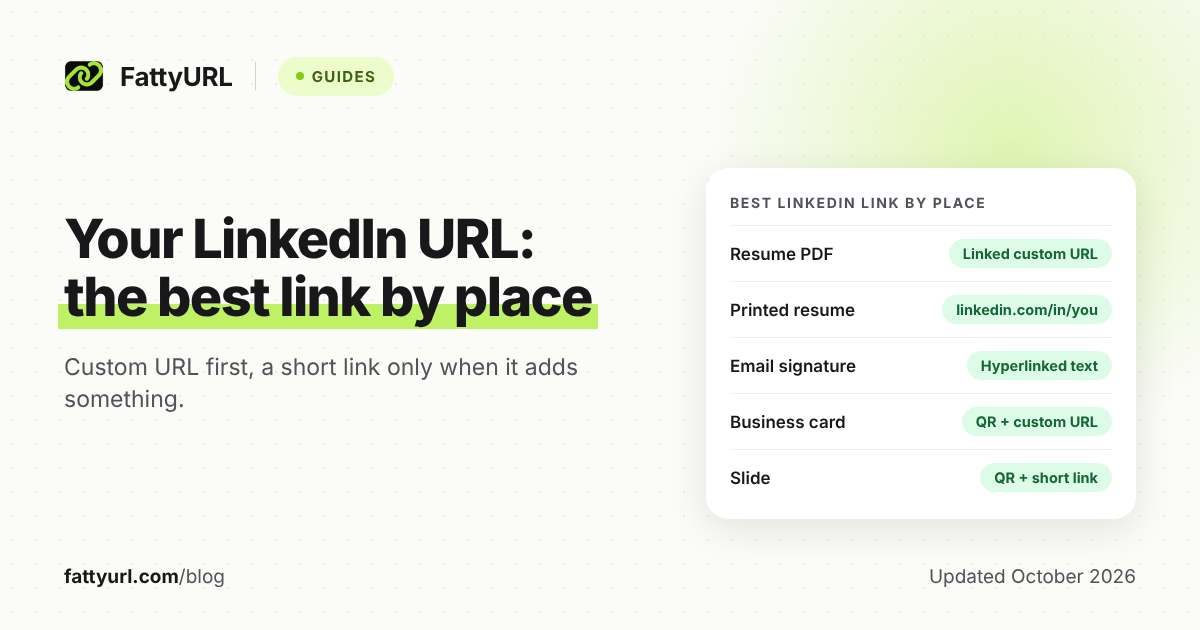
Use your custom linkedin.com/in/ address anywhere people read or click, because it's short and recognizable. Add a QR code wherever people meet you in person or see you on a screen. Add a short link only where you want a click count or a destination you can change later.
Checked 28 October 2026. The examples use janedoe as the custom part.
| Where the link goes | Best format | Why |
|---|---|---|
| Resume PDF you email or upload | Your custom URL as the visible text, linked to the same address | A linked URL can be clicked on screen and still read on paper. Click it in the final PDF to check the link survived export. |
| Printed resume | linkedin.com/in/janedoe as plain text | Paper can't be clicked, so the shortest form a reader can type wins. |
| Online application form | The full https://www.linkedin.com/in/janedoe address | The field asks for your profile, so give the LinkedIn address itself, not a redirect. |
| Email signature | The word LinkedIn linked to your profile, or a short link | People read it on screen. A short link adds a count of clicks from your emails. |
| Business card or badge | A QR code with your custom URL printed under it | People can scan or type. Make the QR code from a short link to count scans and repoint it later. |
| Slide or screen at a talk | A large QR code plus a short link with a readable ending | The room can scan or copy it, and you can repoint the link after the talk. |
On the resume itself, put the link in your contact details at the top, beside your email and phone number.
For one-to-one networking, LinkedIn's own code beats anything you print. There's nothing to design, and LinkedIn's launch post says a scan in its app opens your profile.
When is a short link better than your LinkedIn URL?
When you want numbers or flexibility. A short link can count clicks from each place you use it, such as resumes or your email signature. With a free FattyURL account you can also change where it points, so a printed link can lead to a portfolio later.
There are trade-offs. A short link hides the linkedin.com address that readers trust, and free FattyURL links may show ads; links on a paid plan never do. On a resume, the plain custom URL is usually the safer first impression.
To set one up on FattyURL:
- Customize your LinkedIn URL first, so the address behind the short link is clean.
- Sign in to a free account. Links made without one expire after 30 days without a click, and a resume can sit unread for longer. Other shorteners have their own rules, compared in our roundup of 15 shorteners' expiry policies.
- Shorten your profile URL on FattyURL and set a custom ending of 6 to 100 characters, such as janedoecv.
- Make a separate link for each place you use it, so resume clicks and signature clicks don't mix.
- Check each link's analytics: total clicks, unique visitors, clicks over time, country, city, device and referrer.
- When your portfolio is ready, edit the link's destination. Everything you've sent or printed follows it.
A click count tells you the link was opened, and roughly where and on what device. It doesn't tell you who opened it. For what the numbers can and can't show, see our guide to tracking link clicks.
For help choosing a readable ending, see how to make a custom short link. Posting links in your LinkedIn feed is a separate topic, covered in how LinkedIn and other platforms treat short links in posts.
How do you make a LinkedIn QR code you can track?
Make the QR code from a short link rather than from your profile URL. Each scan then opens the short link and counts as a click in its analytics. And because the code holds the short link, you can point it at a new profile or portfolio without reprinting anything.
- Create the short link on a free FattyURL account, as above.
- Make a QR code from that short link. FattyURL exports PNG or SVG in any colors, with no watermark.
- Print a test copy at the real size and scan it with two different phones.
- Check that the test scans show up as clicks on the link.
- Print the short link or your LinkedIn URL under the code for people who'd rather type.
Keep whatever you encode short. DENSO WAVE, the company that developed the QR code, explains that more data needs more modules and a larger symbol. A clean custom URL or a short link makes a simpler code than a long copied address, which helps on a small card.
To go deeper, see how to track QR code scans for free. For other ways to make a code, including in your browser, see four ways to make a QR code for a link.
FAQ
Should I hyperlink my LinkedIn URL on my resume?
Yes, in any PDF you send or upload. Make the visible text your custom URL and link it to the same address, so it works on screen and on paper. Click it in the final PDF before you send it.
Is a shortened LinkedIn link OK on a resume?
It works, but your custom linkedin.com/in/ address is the safer default because readers recognize it. Use a short link to learn whether a resume got clicks, and make it on a free FattyURL account so it never expires. Free FattyURL links may show ads; links on a paid plan never do.
Can a short link show who viewed my LinkedIn profile?
No. FattyURL's analytics show clicks and details such as country, city, device and referrer, but not names. Your own test clicks count too, so keep those in mind.
Can I make a QR code for a LinkedIn company page?
Yes. Put the Page's linkedin.com/company/ address, or a short link to it, into any QR code generator. LinkedIn's QR code launch post only describes member profiles, so a code you make yourself is the simple route for a Page.
Will my QR code break if I change my LinkedIn URL?
A static QR code holds the exact address you gave it. Change your custom URL, and a static code built from the old address still points to the old one. A code made from a short link avoids this: edit the link's destination and the printed code follows.
Sources
- LinkedIn Official Blog: Turn Your Offline Conversations into Online Connections with LinkedIn QR Code (June 2018), read 28 October 2026
- LinkedIn Pressroom: New Ways to Build Meaningful Connections, Grow Your Side Hustle, and Earn on LinkedIn (October 15, 2026), read 28 October 2026
- LinkedIn Pressroom: About us (links to LinkedIn's own Page at linkedin.com/company/linkedin), read 28 October 2026
- LinkedIn developer docs on Microsoft Learn: Profile API, public profile URL format, read 28 October 2026
- LinkedIn developer docs on Microsoft Learn: Organization Lookup API, vanityName, read 28 October 2026
- DENSO WAVE: Information capacity and versions of the QR Code, read 28 October 2026
- DENSO WAVE: History of QR Code, read 28 October 2026
- FattyURL pricing and FattyURL promise, read 28 October 2026
Disclaimer: This article is for general information only and is not legal or security advice. It was researched and drafted with the help of AI, and its facts were checked against the sources linked above, mostly each provider's own pricing, help and policy pages. URL shorteners, QR code tools and social platforms change their plans, prices and rules often, so confirm the details on the provider's website before you choose a plan, move your links or print a QR code. FattyURL is our own product. Spotted something out of date, or a FattyURL link being misused? Tell us and we will act on it.