How to Shorten an Instagram Link: Profile, Post and Reel Links, and What igsh Is (2026)
The shortest Instagram links are usually the official ones: www.instagram.com/ plus your username for a profile, and a post or reel link with ?igsh= trimmed. Shorten one when you print it, want click counts, or need to repoint it later.
The shortest Instagram link is usually the one Instagram already gives you. A profile lives at www.instagram.com/ plus your username. A post or reel link gets short once you delete the extra text after the question mark.
Add a short link only when you need more: a readable ending for print, click counts, or an address you can repoint.
Short answer: For a profile, use www.instagram.com/ followed by your username. For a post or reel, copy its link from the share menu, then delete everything from the question mark on, including igsh=. Shorten it with a service such as FattyURL when you need a custom ending for print, click counts, or a link you can repoint.
What is my Instagram profile link?
Your profile link is www.instagram.com/ followed by your username, with no @ sign. Meta's developer documentation writes it in full as https://www.instagram.com/{username}. The www.instagram.com/ part is only 18 characters, so most profile links are short enough to print on a card or read aloud.
- On a computer, open your profile on instagram.com and copy the address from your browser's address bar.
- On a phone, you can build it yourself: write www.instagram.com/ and then your username, with no spaces.
- Open the link in a private browser window to check that it shows the right profile.
The same pattern works for any account, so www.instagram.com/ plus a shop's username links to that shop. If you rename your account, your profile address changes with it, and anything you printed still shows the old one.
How do you copy and share an Instagram post or reel link?
Instagram's help center says you get the link to a public photo or video from the post itself, in the app. Open the post or reel, open its share menu, and choose the option to copy the link. On a computer, open the post on instagram.com and copy the address bar instead.
Meta's developer docs list the formats. Single image and carousel posts use www.instagram.com/p/ plus a shortcode. Videos and reels use www.instagram.com/reel/ plus a shortcode.
Before you share, note that Instagram's help describes links to publicly shared posts. If your account is private, open the link in a logged-out browser window to see what others see.
For a website, an embed can beat a link. Instagram's help says an embed code lets you add posts and reels from public accounts to blogs and articles. On the web, Meta documents an Embed button in a post's three-dot (...) menu.
Which Instagram links are already short?
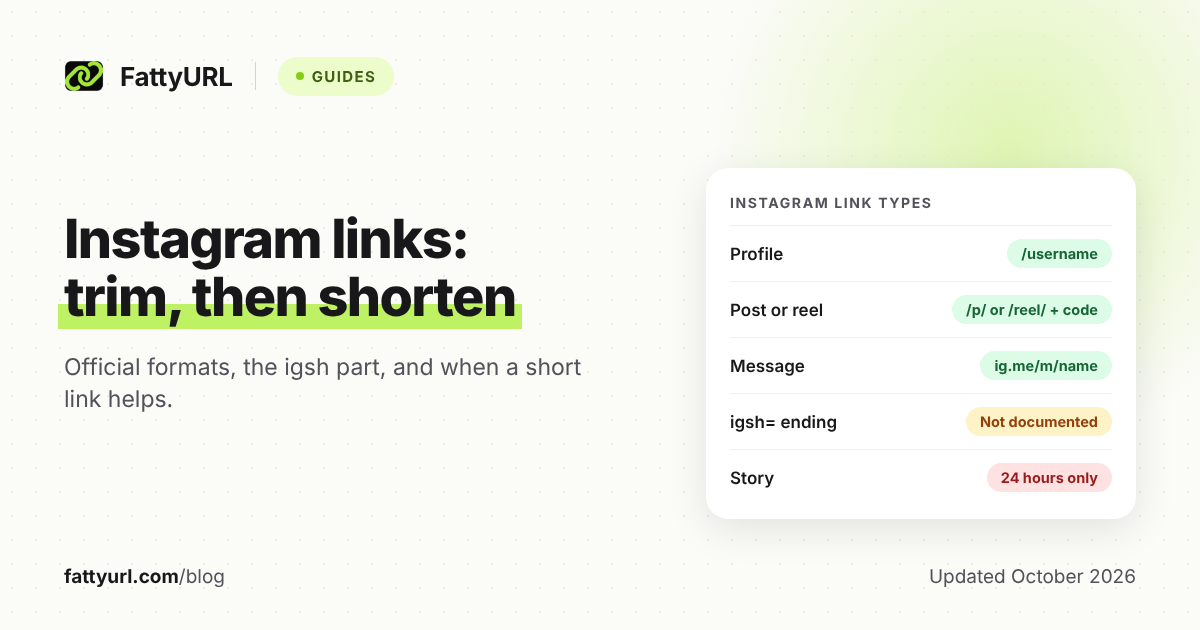
Profile and message links are short and readable, while post and reel links end in a shortcode of mixed letters and numbers. Story links are the trap, because Meta says stories are only available for 24 hours. The table lists each type's official format from Meta's own pages.
Checked 28 October 2026.
| Link type | Official format | Already short? |
|---|---|---|
| Profile | https://www.instagram.com/{username} | Yes: www.instagram.com/ is 18 characters, then your username |
| Post (single image or carousel) | https://www.instagram.com/p/{media-shortcode}/ | Fairly: Meta's sample, https://www.instagram.com/p/fA9uwTtkSN/, is 39 characters, but hard to type from paper |
| Reel or video | https://www.instagram.com/reel/{media-shortcode}/ | Same as a post, 3 characters longer |
| Story | No format in the Meta docs we checked | Short-lived: Meta says stories are only available for 24 hours |
| Highlight | No format in the Meta docs we checked | Share your profile link instead: Instagram's 2017 launch post puts highlights below your bio |
| Message (DM) | https://ig.me/m/{username} | Yes: opens a chat in the Instagram app; Meta says it isn't supported on Instagram Web |
Profile, post and reel formats come from Meta's oEmbed docs, stories from its Stories reference, and the message link from its messaging docs. One Meta page, for professional accounts, writes the message link without the /m/. Test whichever version you print on a phone with the Instagram app.
What is igsh in an Instagram link, and how do you remove it?
A link copied from Instagram can end with ?igsh= and a code, which makes it longer than it needs to be. We found no Instagram help page or Meta developer page that explains igsh, as of 28 October 2026. The profile, post and reel formats Meta does document stop before any question mark.
So the trimmed link is the documented form. To remove igsh, or anything else after the question mark:
- Paste the copied link somewhere you can edit it, such as a notes app.
- Delete the question mark and everything after it.
- Open the trimmed link in a private browser window and check it shows the right post, reel or profile.
- Share it as it is, or paste it into a shortener.
The same applies if you see igshid= or other text after the question mark. We can't tell you what igsh is for, because Meta's own pages don't say, and we won't guess. Trim before you shorten, since a short link forwards people to whatever link you saved in it.
When should you shorten an Instagram link?
Shorten an Instagram link when the official one can't give you what you need. That means a readable ending for print, a click count for each place you share it, or one address you can repoint later. For a profile on a business card, www.instagram.com/yourname is already short and needs no extra service.
| Where you share it | Best link | Why |
|---|---|---|
| Business card, shop sign or menu (your profile) | www.instagram.com/yourname | Readable, and nothing sits between the reader and your profile |
| Poster or flyer for one post or reel | A short link with a custom ending | A shortcode like fA9uwTtkSN is hard to type from paper |
| Email, newsletter, WhatsApp or a website | The trimmed Instagram link | Readers tap rather than type, so length matters less; shorten only to count clicks |
| A spot you reuse, such as "our latest reel" | An editable short link | Point it at each new reel without reprinting |
| Print that should survive a username change | An editable short link to your profile | Your profile address changes when your username does |
A short link with click analytics counts its own clicks, so a separate one for each place shows which place works. Our guide on how to track link clicks, with or without UTM tags covers the basics.
Printing a QR code instead? A code made from a trackable short link counts scans as clicks, as our guide to tracking QR code scans explains.
How do you shorten an Instagram link?
Copy and trim the Instagram link, paste it into a URL shortener, and add a custom ending if people will type it. FattyURL needs no account to shorten a link. Sign in to a free account for anything you print, because links made without one expire after 30 days without a click.
- Copy the profile, post or reel link, then delete everything from the question mark on.
- Sign in to a free FattyURL account if the link will be printed, counted or changed later.
- Paste the link into the box on the FattyURL home page.
- Add a custom ending of 6 to 100 characters, such as yourshop-reels, so it's easy to say and type. Our guide to making a custom short link for free has tips on picking one.
- Create the link, then open it in a private browser window to confirm it reaches the right post.
- Share it. To send it somewhere new later, edit the link's destination; the short address stays the same.
A free account keeps the link from expiring. It also shows total clicks, unique visitors, clicks over time, and clicks by country, city, device, browser, operating system and referrer. Free links may show ads; links on a paid plan never do.
Want the short link on your own domain? That's a paid feature on FattyURL: Pro, at $9 a month or $90 a year, includes 10 custom domains. Checked 28 October 2026.
Any shortener works the same way, so pick one whose free plan fits you; our comparison of free URL shorteners lays out the limits. For a profile alone, Instagram's own address is the better choice, since no extra service sits in between. If a short link won't open, work through our short link troubleshooting guide.
FAQ
Does Instagram have its own link shortener?
Not for posts or profiles, as far as Meta's documentation shows. Meta does document ig.me, a short domain that opens a message thread with an account in the Instagram app. Post, reel and profile links on instagram.com are already compact once you trim them.
Does a post link change when I change my username?
Meta's documented post and reel formats contain no username, only a shortcode. Its API docs describe a post's permalink as a "Permanent URL to the media." Your profile link is different: it contains your username, so it changes when the username does.
Do Instagram story links stop working?
Expect them to: Meta's developer docs say stories are only available for 24 hours, so a printed story link outlives the story. Instagram's 2017 launch post says highlights stay on your profile until you remove them. Add the story to a highlight and share your profile link instead.
Can I put a short link in my Instagram bio or a caption?
That depends on how Instagram treats links inside the app, which is a different question from sharing a link outside it. Our guide to short links on Instagram, TikTok, X and other platforms covers bios, captions and stories, with sources.
Sources
- Meta for Developers: Embed an Instagram Post (oEmbed) (profile, post and reel URL formats), read 28 October 2026
- Meta for Developers: Embed Button, read 28 October 2026
- Meta for Developers: IG Media reference (permalink and shortcode fields), read 28 October 2026
- Meta for Developers: Stories reference (24-hour availability), read 28 October 2026
- Meta for Developers: Using ig.me Links (Instagram messaging), read 28 October 2026
- Meta for Developers: ig.me Links (Instagram API with Instagram Login), read 28 October 2026
- Instagram Help Center: getting a link to a post, read 28 October 2026
- Instagram Help Center: embedding posts, reels and guides, read 28 October 2026
- Instagram: Introducing Stories Highlights and Stories Archive (5 December 2017), read 28 October 2026
- FattyURL pricing, read 28 October 2026
Disclaimer: This article is for general information only and is not legal or security advice. It was researched and drafted with the help of AI, and its facts were checked against the sources linked above, mostly each provider's own pricing, help and policy pages. URL shorteners, QR code tools and social platforms change their plans, prices and rules often, so confirm the details on the provider's website before you choose a plan, move your links or print a QR code. FattyURL is our own product. Spotted something out of date, or a FattyURL link being misused? Tell us and we will act on it.