How to Shorten a Spotify Link in 2026: spotify.link, Spotify Codes and QR Codes
To shorten a Spotify link, copy it from Spotify's Share menu and paste it into a URL shortener. Here is what spotify.link is, how to copy each link type, and when a Spotify Code or a QR code suits print.
To shorten a Spotify link, copy it from Spotify's Share menu and paste it into a URL shortener. Spotify links can also start with spotify.link, but Spotify documents no way to pick its ending or change where it points.
Your own short link fills those gaps. It can open a pre-save page today and the live song on release day. A QR code made from it also scans in phone camera apps.
Short answer: In Spotify, open the three-dot menu on a song, album, playlist, artist or episode, choose Share, and copy the link. Paste it into a URL shortener; for print, sign in first, since FattyURL's free-account links never expire and can be repointed. A QR code from that link works in phone camera apps, while a Spotify Code scans only inside the Spotify app.
How do you shorten a Spotify link?
Copy the link from Spotify's Share menu, paste it into any URL shortener, then test the result on a phone. Spotify's help lists songs, albums, artists, playlists, podcasts and your profile as things you can share. The steps are the same for each, though the menu wording varies.
- Open the song, album, playlist, artist or episode in Spotify.
- In the desktop app, right-click it or click the three dots next to it, then choose Share and Copy Link. In the mobile app, tap the three dots, tap Share and copy the link.
- Paste the full link into a URL shortener, such as the box on the FattyURL home page, and create the short link.
- Open the short link on your phone and check that it lands on the right item.
On desktop, Share also offers Copy embed code, for a player on your own website. Podcasts use slightly different labels, shown in the table below.
On FattyURL, you don't need an account, but links made without one expire after 30 days without a click. A free account keeps links from expiring, lets you change the destination later and shows click analytics. Free links may show ads; links on a paid plan never do.
A free account also lets you set a custom ending of 6 to 100 characters, such as your artist name and the release. Our guide to making a custom short link has naming tips. Other shorteners work similarly; Bitly, for one, publishes its own Spotify guide.
What is spotify.link, and does Spotify shorten links itself?
spotify.link is a second address for Spotify links, but Spotify documents no way to make one. Spotify's developer docs list it beside open.spotify.com as a base address. Its help pages don't say when Share gives you one, or how to request one.
Spotify's Share help page also mentions no click counts. For podcasts, Spotify says it can't track clicks on links shared from the Spotify app.
Spotify's regular links start with open.spotify.com, then a type such as /track/, /album/, /playlist/, /artist/, /show/ or /episode/, then an ID. Spotify's developer docs give open.spotify.com/track/6rqhFgbbKwnb9MLmUQDhG6 as an example. The docs say opening one launches the Spotify app when it's installed.
Some links also end with a question mark and a code, such as ?si= followed by a string of characters. Spotify's help pages don't explain it, and the docs' example has none.
Spotify's own newsroom links to one playlist twice on one page with different codes, and to several songs and artists with none. If you trim the code, open the trimmed link once before you share it.
The Spotify URI is different. It starts with spotify:, and you can paste it into the desktop app's search box or the Spotify Codes generator. Spotify's help says to hold Alt (Windows) or Option (Mac) on desktop if you need it.
Received a spotify.link or other short link and want to check where it goes? Our guide to checking where a short link leads before you click shows how.
How do you copy each type of Spotify link?
Every Spotify link comes from the same Share menu, but each type has its own address and best use. The table shows how to copy each one and what to use on social posts versus print. It draws on Spotify's help pages, developer docs and newsroom links.
Checked 28 October 2026.
| Link type and address | How to copy it | Social and print |
|---|---|---|
| Song: open.spotify.com/track/ | Right-click it or tap its three dots, then Share and copy the link | Social: the Spotify link, or a short link to count clicks. Print: a QR code from a short link you can repoint |
| Album or EP: open.spotify.com/album/ | The album's three dots, then Share | Before release: a Countdown Page if you qualify, or a pre-save page behind a short link |
| Playlist: open.spotify.com/playlist/ | Three dots at the top of the playlist, then Share | Make it public first. Print: a Spotify Code for Spotify users, or a QR code from a short link |
| Artist: open.spotify.com/artist/ | Desktop: three dots on the artist profile, then Share and Copy link to artist | Social bios and printed posters meant to outlast one release |
| Podcast: open.spotify.com/show/ or /episode/ | Desktop app or open.spotify.com: three dots, Share, then Copy Show Link or Copy Episode Link | Social: a Spotify for Creators link, which reports clicks and streams. Print: a QR code from a short link |
Two rows come with conditions. Episodes must be published before you can share them. Countdown Pages, Spotify's own pre-save pages, have eligibility rules, covered below.
How do you share a Spotify playlist link?
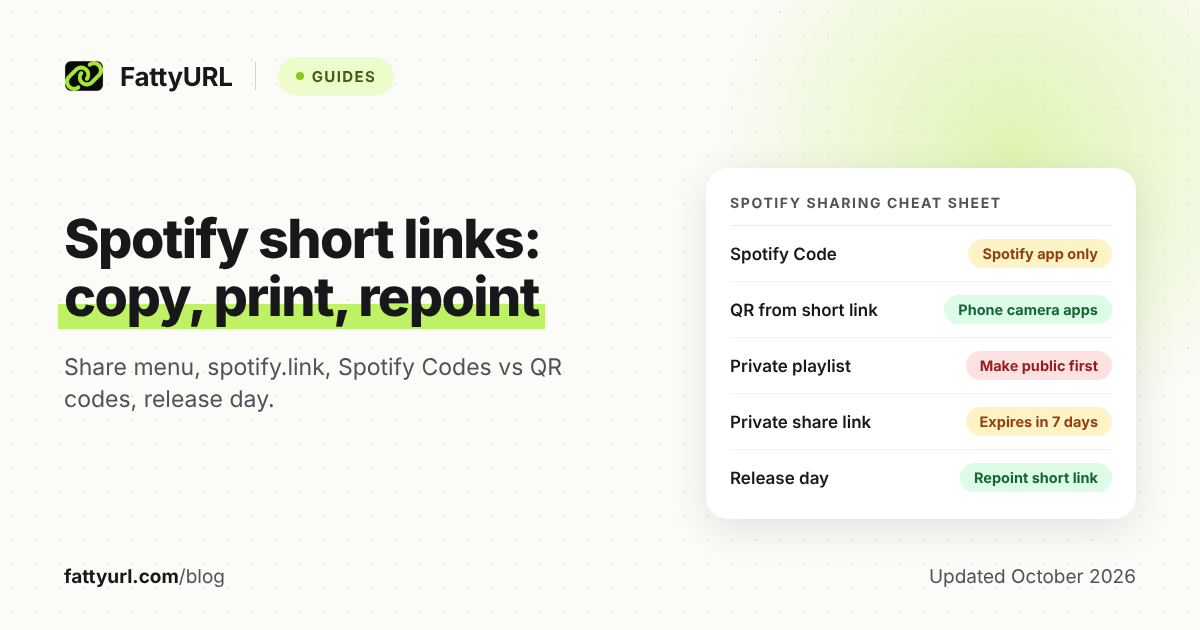
Open the playlist, tap or click the three dots at the top, choose Share, and copy the link. Check that the playlist is public before you shorten or print it. New playlists start public, but Spotify says nobody can open a private one, even with a link.
To switch, use the same three dots at the top of the playlist and choose Make public or Make private.
Spotify does let you share a private playlist with friends or family: a link sent from the app gives them view access. Those links expire after 7 days.
Collaborative playlist invites made with Invite collaborators are also valid for 7 days. Keep both kinds out of short links and printed codes.
A playlist is also the best match for a printed Spotify Code. Spotify's Codes FAQ says you can change a playlist's title and songs after making its code. The code should still work as long as the playlist's URI doesn't change, so don't delete and recreate the playlist.
Spotify Code vs QR code: which should you print?
Use a QR code from a short link when anyone might scan it, and a Spotify Code only for an audience already on Spotify. Spotify's Codes site says only the Spotify app's own scanner reads its codes. Phone camera apps, such as iPhone's Camera, read QR codes.
Spotify's help says a friend can scan your code "with their phone camera," but its steps run inside the Spotify app. Tap Search, tap the search bar, tap the camera, then tap SCAN and point it at the code.
Checked 28 October 2026.
| Question | Spotify Code | QR code from a FattyURL short link |
|---|---|---|
| Who can scan it? | Only the scanner in the Spotify app | Phone camera apps, such as the Camera app on iPhone and Pixel |
| Where can it lead? | Spotify items with a Spotify URI, never a web page | Wherever your short link points |
| Can it change after printing? | A playlist's title and songs can, while its URI stays the same | Yes: edit the short link's destination with a free account |
| Can you count scans? | No; Spotify says not at this time | Yes, with a free account: each scan counts as a click |
| Download formats | SVG, PNG or JPEG, from 320 to 1960 px | PNG or SVG, any colors, no watermark |
To make a Spotify Code on your phone, tap the three dots on an item and select Show Spotify Code at the bottom. For a high-resolution file, go to spotifycodes.com, paste the item's Spotify URI, choose format, size and colors, then create the code.
For a QR code, make it from your short link rather than the raw Spotify link, so you can count scans and repoint it. Our guide to making a QR code for a link covers file types and print checks. To read the numbers, see how to track QR code scans.
When is your own short link better than Spotify's link?
When the link must change, be counted or lead somewhere outside Spotify. A Spotify link always opens the same item, and a Spotify Code can't open a web page. A short link can send fans to a pre-save page today and to the live song on release day.
One link from pre-save to release day. On FattyURL, this needs a free account, since editing a link's destination does.
- Create the short link and point it at your pre-save page.
- Use it everywhere: your bio, your posts and the QR code on flyers and posters.
- On release day, copy the song or album link from Spotify's Share menu.
- Edit the short link's destination to that Spotify link.
- Scan an old flyer to confirm it now opens the release.
Spotify's own route is better if you qualify. With a Countdown Page, fans pre-save inside Spotify. On release day, Spotify notifies pre-savers and adds the music to their library.
Countdown Pages cover new albums and EPs, not singles. You also need enough monthly active listeners: 3,000 on Spotify's US help page, or 5,000 on its international page.
Click counts. A FattyURL short link on a free account shows total clicks, unique visitors and clicks over 7, 30, 90 or 365 days. It also breaks clicks down by country, city, device, browser, operating system and referrer.
Make one link per place, such as your bio, a flyer and a newsletter, to compare them. A click is a visit, not a stream. For the basics, see how to track link clicks for free.
Podcasters get more from Spotify itself. Links copied from Spotify for Creators report total clicks plus the Spotify users who started or streamed your show. Spotify credits a start or stream to a link only if it happens within 7 days of the click.
In Spotify for Creators, click Share on the Home tab, or Share episode from an episode's three dots. Select New link to make a separate, named link for each place you post.
Social posts. How a short link behaves differs by platform. Our guide to short links on each social platform covers Instagram, TikTok, YouTube, X and more.
FAQ
Why won't my Spotify Code scan?
Scan it with the Spotify app's scanner, not your camera app, and allow Spotify to use the camera. Spotify's Codes FAQ says codes need the Spotify logo at the front and enough contrast between the bars and background. Test printed codes at actual size, since the in-app camera doesn't zoom.
Can I make a Spotify Code before my song comes out?
Yes, if you have the release's Spotify URI. Spotify's Codes FAQ says you can generate a code for unreleased content that way. It also says a code can't point to a web page, so it can't open a pre-save page on another site.
Can I put a Spotify Code on merch?
Not on merch you sell: Spotify's Codes FAQ says that violates its Spotify Code Terms and Conditions. It says codes can otherwise go almost anywhere, including your social profile or website. On merch, use a QR code from a short link instead.
Do Spotify links expire?
The Spotify help pages we read set no expiry for ordinary song, album, artist or public playlist links. Two kinds do expire after 7 days: links that share a private playlist, and collaborative playlist invites. Short links follow their own service's rules, so check them before you print.
Sources
- Spotify Support: Share from Spotify, read 28 October 2026
- Spotify Support: Playlist privacy and access, read 28 October 2026
- Spotify Support: Collaborative playlists, read 28 October 2026
- Spotify Codes: code generator and FAQ, read 28 October 2026
- Spotify for Creators Support: Sharing and embedding shows and episodes, read 28 October 2026
- Spotify for Creators Support: Link sharing and referral data, read 28 October 2026
- Spotify for Artists Support: Getting started with Countdown Pages (US page; the international page says 5,000 listeners), read 28 October 2026
- Spotify for Developers: Spotify URIs and IDs, oEmbed API (spotify.link base address), Getting started with Web API (Copy link to artist) and Creating an Embed (web player at open.spotify.com), read 28 October 2026
- Spotify Newsroom pages with Spotify's own links: Spotify Singles: Holiday Collection (14 October 2026), Jão's return to the stage (23 October 2026) and Spotify and Joe Rogan partnership (8 October 2026), read 28 October 2026
- Apple Support: Scan a QR code with your iPhone or iPad, read 28 October 2026
- Pixel Phone Help: Scan QR codes with your Pixel phone, read 28 October 2026
- Bitly: How to shorten your Spotify links, read 28 October 2026
- FattyURL pricing, read 28 October 2026
Disclaimer: This article is for general information only and is not legal or security advice. It was researched and drafted with the help of AI, and its facts were checked against the sources linked above, mostly each provider's own pricing, help and policy pages. URL shorteners, QR code tools and social platforms change their plans, prices and rules often, so confirm the details on the provider's website before you choose a plan, move your links or print a QR code. FattyURL is our own product. Spotted something out of date, or a FattyURL link being misused? Tell us and we will act on it.