How to Shorten a Notion Link (and What It Does to Sharing) 2026
Shortening a Notion link never changes who can open the page. Set access in Notion first, then use a short link for your bio, email or QR code. Includes a settings table.
A short link can shorten how a Notion page link looks, but it cannot change who is allowed to open the page. The destination page keeps whatever access you set in Notion.
So the order matters: set the right access in Notion first, then shorten the link for your bio, email or QR code.
Short answer: Set who can open the page in Notion (Share, then General access, or the Publish tab), copy the link, and paste it into a shortener such as FattyURL. The short link only redirects. If the page is invite-only, people who click it still cannot get in.
How do I get a shareable Notion link in the first place?
Open the page and select Share at the top. Notion's help center says you can copy the page's link there, and the same menu holds the Publish tab. What the link allows depends on the access you pick.
- Open the page and select Share at the top.
- Under General access, choose who can open it: Only people invited, Everyone at your workspace, or Anyone on the web with link.
- Copy the page's link from the Share menu.
Notion lists Full access, Can edit, Can comment and Can view as page access levels. Can view means people can read the page but cannot comment, edit or share it. For a bio or email, Can view is usually the safest.
Does shortening a Notion link change who can open the page?
No. A short link is a redirect. Anyone who clicks it lands on the same Notion URL and meets the same access rules, so it can neither widen nor narrow access.
Two practical results follow. If the page is set to Only people invited, the click leads to a page the visitor cannot open unless you invited them. If it is set to Anyone on the web with link, everyone who gets the short link can open the page, and so can anyone you forward it to.
Notion also notes that a page can be reachable without its direct link in some cases, for example when it is nested inside, or linked from, a page that is shared more broadly. Check nested pages before you share widely.
Which Notion share settings does a short link help with?
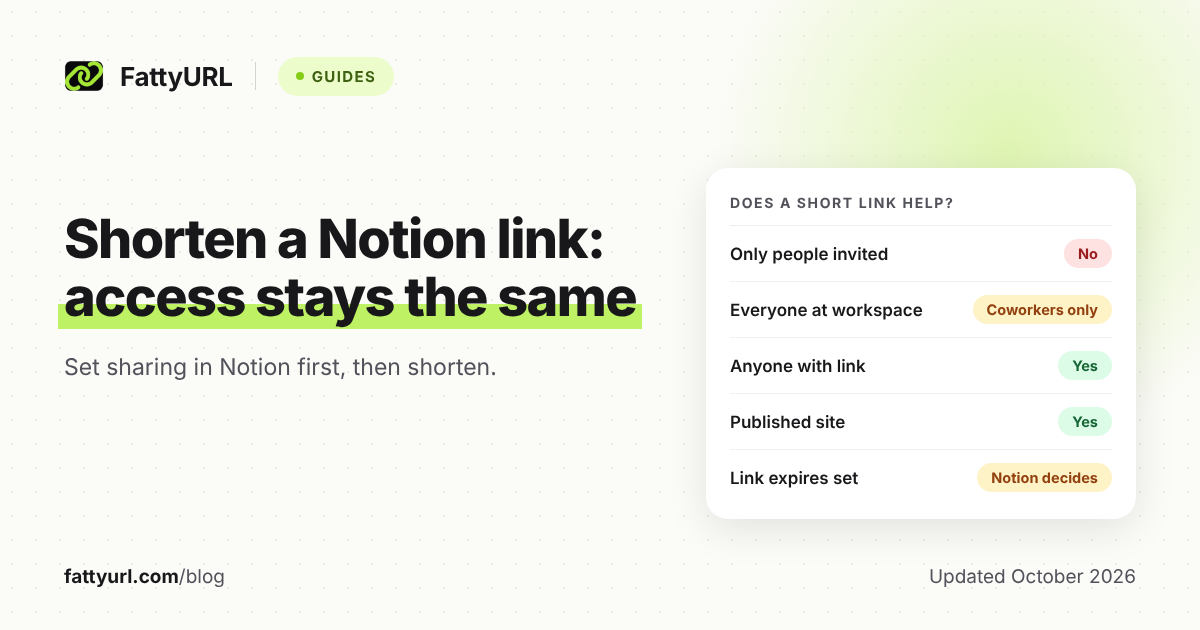
A short link helps only when the audience can already open the page without an invitation. The table below sets each Notion option against whether shortening is useful.
Checked 1 November 2026 against Notion's sharing help page.
| Notion setting | Who can open it | Does a short link help? |
|---|---|---|
| Only people invited | You and people you invite | No. Uninvited clickers are still blocked |
| Everyone at your workspace | Workspace members | Only for coworkers in that workspace |
| Anyone on the web with link | Anyone with the link, no Notion account needed | Yes. Works for bios, email and QR codes |
| Published as a Notion site (Publish tab) | Anyone on the web | Yes. A paid-plan custom slug is another option |
Guests invited by email need their own Notion account to open the page. A short link does not remove that requirement.
How do I make a Notion page link public and clean?
Use the Publish tab. Select Share, open Publish, then select Publish. Notion gives the site a notion.site address, and you can copy the live link with the link icon next to the URL.
Two cautions from Notion's help center. Publishing also publishes the page's subpages by default, so review them first. On a published or Anyone on the web with link page, metadata includes the names, profile photos and email addresses of contributors.
Notion says password protection is not currently available for pages. For private sharing, invite specific people through Share instead of publishing.
Can I customize the Notion URL itself?
On paid Notion plans you can edit the slug of a published page. Click the current slug, type a new one and save. Slugs can use letters, numbers and hyphens, up to 60 characters.
Home pages cannot have slugs, and subpages do not inherit a parent's slug. Using your own domain needs a paid plan plus a purchased add-on.
Notion also warns that if you change your workspace domain name, older links with the previous domain stop working. A short link from a free FattyURL account can be pointed at the new address, so links you already shared keep working.
How do I shorten a Notion link with FattyURL?
Paste the Notion link into FattyURL and create the short link. You do not need an account to shorten a link or make a QR code, but links made without one expire after 30 days without a click.
- Confirm the Notion page is set to Anyone on the web with link, or published.
- Open FattyURL and paste the full Notion link.
- Create the short link and test it in a private browser window, signed out of Notion.
- Use it in your bio, email signature or newsletter.
With a free account, links never expire, you can set a custom ending of 6 to 100 characters, and you can edit the destination later. That helps if you move content to a new Notion page: the short link stays the same.
Free links may show ads. Links on a paid plan never do.
For the general steps, read how to shorten a link. If your file lives elsewhere, see how to shorten a Google Docs link or how to shorten a OneDrive link.
Does a short Notion link work for email, bios and QR codes?
Yes, once the page is public. A shorter link looks cleaner in an email and fits more easily in a bio field. Test it in each app before you rely on it.
For print or slides, make a QR code from the short link rather than the long Notion URL. FattyURL QR codes are static, and they encode exactly the link you give them. If you create the QR code from a FattyURL short link with a free account, each scan counts as a click in that link's analytics. See how to make a QR code for a link.
Because the QR code points to the short link, a free account lets you change the destination later without reprinting.
How do I stop sharing a Notion page after sending a short link?
Change access in Notion, not in the shortener. The short link is only one route to the page. The Notion URL still works for anyone who has it.
To take a published page down, open Share, then Publish, and select Unpublish. Notion says the page may still be reachable through Anyone on the web with link. To stop that, open the dropdown next to that option and select Remove. You can also set a Link expires time in that same dropdown.
FAQ
Why is my Notion share link so long?
Notion's sharing and publishing help pages do not explain the parts of a page link. Whatever its length, you can paste it into a shortener, and the short link redirects to it unchanged.
Is a short Notion link less secure?
It is no more or less private than the page. Access is decided by Notion. A short link hides the destination text, so see are URL shorteners safe for how to check where a short link goes.
Do short Notion links expire?
The Notion page can expire if you set Link expires. A FattyURL link made without an account expires after 30 days without a click. Links from a free account never expire. More in do short links expire.
Can I use a shortened link for a private Notion page?
You can, but only invited people can open the page. Use Share to invite them. Guests need a Notion account.
What if I move the content to a new Notion page?
With a free FattyURL account you can edit the link's destination, so the short link stays the same.
Sources
- Notion Help: Sharing and permissions, read 1 November 2026
- Notion Help: Publish your page to the web, read 1 November 2026
- FattyURL promise page, read 1 November 2026
Disclaimer: This article is for general information only and is not legal or security advice. It was researched and drafted with the help of AI, and its facts were checked against the sources linked above, mostly each provider's own pricing, help and policy pages. URL shorteners, QR code tools and social platforms change their plans, prices and rules often, so confirm the details on the provider's website before you choose a plan, move your links or print a QR code. FattyURL is our own product. Spotted something out of date, or a FattyURL link being misused? Tell us and we will act on it.