How to Make a QR Code for a PDF for Free in 2026: Where to Host It and How to Test
A QR code can't store a PDF, only a link to one. Host the file where strangers can open it, put an editable short link in the code so you can swap the PDF later, and test a printed proof before you print hundreds.
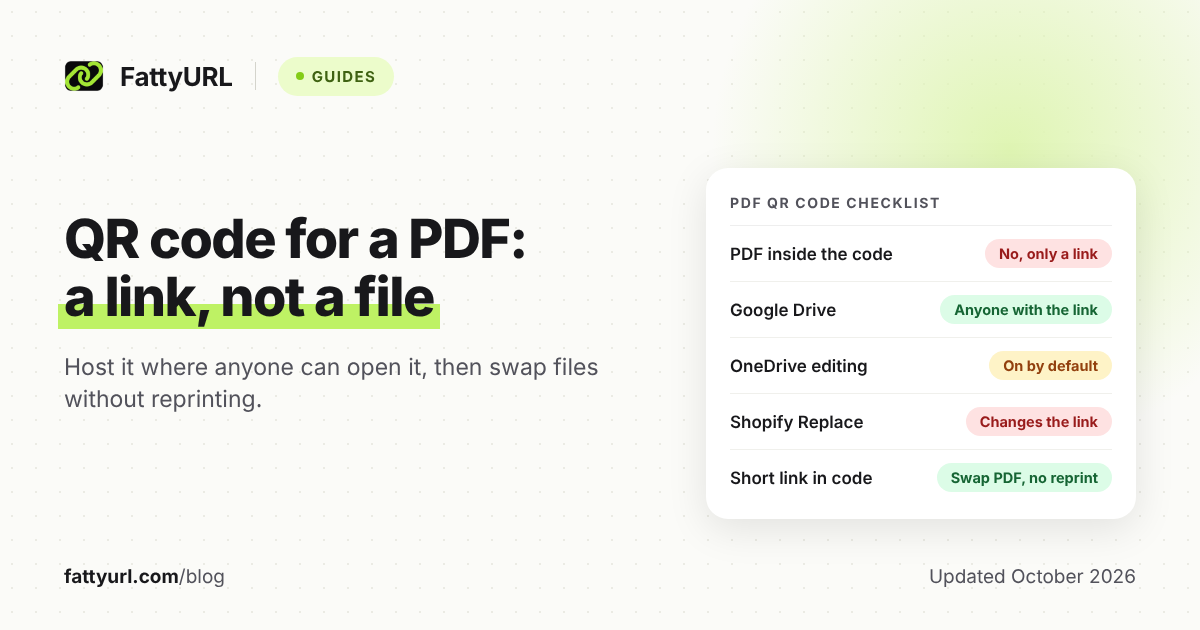
A QR code can't carry a PDF. It carries a web address, and the phone opens whatever lives there. So a PDF QR code takes two jobs: put the file where strangers can open it, then turn its link into a code.
Where you host the file also decides whether you can swap in a new PDF later without reprinting.
Short answer: Upload the PDF to Google Drive, Dropbox, OneDrive or your own website, and let anyone with the link open it. Shorten that link with an account that lets you edit it later, such as a free FattyURL account. Then make the QR code from the short link, and test it signed out, on two phones, at print size.
Can a QR code hold a PDF file?
No: a QR code tops out at "about 3 KB or less," says DENSO WAVE, which released it in 1994. That's for the largest code at its lowest error correction, and phone cameras may read far less: about 271 bytes in DENSO's example. That's room for a web address, not a document.
So every "PDF QR code" works the same way: the file sits on a server, and the code holds its address. Three things follow from that.
- The file must open for strangers, or scanners hit a sign-in or access-request page.
- The code works only while that address does: delete the file or close its sharing, and every printed copy fails.
- Swapping in a new PDF later depends on the host, unless the code holds a link you control.
How do you make a QR code for a PDF?
Upload the PDF, open it to anyone with the link, shorten that link, and make the code from the short link. These steps work with any host and any shortener that lets you edit a link later. The settings for each host follow in the next section.
- Finish the PDF. Check it, and keep the file small so it opens quickly on a phone.
- Upload it to a host you'll keep for as long as the code is in print.
- Open the sharing so anyone with the link can view it (settings below).
- Copy the link and test it in a private browser window where you aren't signed in.
- Shorten the link while signed in. On the FattyURL home page, a free account gives links that never expire and can be repointed later.
- Make the QR code from the short link, not the long one. FattyURL exports PNG or SVG, in any colors, with no watermark.
- Test before you print, using the checklist at the end.
For general QR steps, see our step-by-step guide to making a QR code.
Where should you host the PDF so anyone can open it?
Any host works if strangers can open the file without signing in. The hosts differ in the sharing switch you must flip, and in whether you can replace the PDF while keeping its link. We read each host's own help pages, and none promises that a link survives replacing the file.
Checked 28 October 2026.
| Host | What to set so anyone can open it | Replace the PDF, keep the link? |
|---|---|---|
| Google Drive | Share, then General access: Anyone with the link, role Viewer | Upload new version (in Manage versions) adds a version to the same file; Google doesn't mention the link, so test it |
| Dropbox | A Link for viewing, made on dropbox.com; no Dropbox account needed to open it | Not stated in the help pages we read; test it |
| OneDrive | Share, Copy Link, then the settings gear: Anyone, with Allow editing unchecked | Not stated in the help pages we read; test it |
| WordPress site | Upload to the Media Library, then copy the File URL | No replace option in its Media Library docs |
| Shopify store | Content, then Files; click the Link button | No: Replace keeps the file name but changes the link |
Google Drive: Google warns that work or school accounts might not be able to share outside the organization. Folder links, resource keys and other traps are in our guide to shortening a Google Drive link.
Drive has one more trap for big events. A file viewed or downloaded heavily in a short period can show "Too many users have viewed or downloaded this file recently." Google says the block typically resets within 24 hours.
Dropbox: On dropbox.com, hover over the file and click Share, then Copy link. Click Manage, select Link for viewing, then click Copy link again. Dropbox says people "don't need to create an account or log in" to open it.
Make it on the website: Dropbox's help pages disagree on desktop-app links, and one says recipients are prompted to request access.
OneDrive: Select the file, then Share, then Copy Link. Open the settings gear, choose Anyone, and uncheck Allow editing, which Microsoft turns on by default. Select Apply, then Copy.
Microsoft says that with Allow editing off, people can view or download without signing in. Work or school admins may disable Anyone links altogether.
Your own website: Watch what happens when you replace a file. Shopify says that on replace, "the file name stays the same, but the file's link changes." WordPress can file uploads in year and month folders; with that setting on, a PDF uploaded next month gets a new address.
Can you change the PDF later without reprinting the QR code?
Yes, if the code holds a short link you can edit. Scanners always land on the same short address, and you change where it forwards them. A code holding the host's own link keeps up only if the host keeps that link, which no host above promises.
Here is the honest catch with FattyURL. Its QR codes are static: each stores exactly the link you give it, up to 1,000 characters, and can't change once printed. The swap happens in the short link, so the code must hold that short link, not the raw host address.
Sign in to a free account before you shorten, because editing a destination needs one. Links made without an account also expire after 30 days without a click, which can strand a seasonal menu.
A free account also lets you pick a readable ending, such as /lunch-menu, to print under the code. Free links may show ads; links on a paid plan never do.
Each scan counts as a click in that short link's analytics, as our guide to tracking QR code scans explains. For the wider static versus dynamic question, read whether QR codes expire.
When the PDF changes, swap it in this order:
- Upload the new PDF, open its sharing and test its link signed out.
- Paste that link in as the short link's new destination.
- Scan a printed code and confirm the new file appears.
- Only then delete or unshare the old file.
Can a QR code make a PDF download instead of opening?
Not by itself. The code only opens an address; the host and the phone's browser decide whether the PDF displays or downloads. Dropbox documents a switch for this: change dl=0 in a shared link to dl=1, and the file downloads instead of opening.
- Dropbox: raw=1 does the opposite, skipping Dropbox's preview page so the browser renders the file.
- Google Drive: Leave download on; Google says owners can turn off download, print and copy for viewers and commenters.
- OneDrive: Leave Block download unchecked, since Microsoft says it stops people downloading.
- Your own site: The server can send the PDF as an attachment (the Content-Disposition header), which tells browsers to download it.
Shorten the final link, then test it on an iPhone and an Android phone, because the browser has the final say.
Should you upload the PDF to a QR code generator instead?
You can, and it's quick, but the file then lives on the generator's servers under its plan rules. Uniqode, which sells PDF QR codes, says editing and scan analytics deactivate when an account downgrades or closes. Its FAQ calls hosting the PDF on your own storage "the safer setup."
Free upload tools carry limits too. Hovercode's free PDF tool takes files up to 2 MB and locks the code to that file. A free Hovercode account adds a dynamic version for PDFs up to 10 MB (both checked 28 October 2026).
If you want one tool to host both the file and the code, that's the better fit. Compare more in our roundup of free QR code generators.
How big should you print a QR code for a PDF?
Print it as large as the space allows. DENSO WAVE recommends exactly that, and requires a blank margin four modules wide on every side. In our worked example below, GS1's 0.495 mm target module for product packs puts a short-link code at about 18 mm (0.72 in).
A code's width is its module count times the module size, plus the margin, and longer links need more modules. We counted modules with OpenCV's QR encoder at error-correction level M; higher levels make the code bigger.
Calculated 28 October 2026.
| Link length | QR grid at level M | Width at 0.495 mm per module, with margin |
|---|---|---|
| 31 characters (https://fattyurl.com/lunch-menu) | 29 x 29 modules | 18 mm (0.72 in) |
| 60 characters | 33 x 33 modules | 20 mm (0.80 in) |
| 100 characters | 41 x 41 modules | 24 mm (0.95 in) |
| 150 characters | 49 x 49 modules | 28 mm (1.11 in) |
For scale, Dropbox's documented link format reaches 58 characters for lunch-menu.pdf before its two ID tokens are added.
- Use the SVG file for print. MDN notes that SVG images render at any size without loss of quality, unlike PNG or JPEG.
- Go bigger for distance. GS1 wrote its target for product packs. DENSO says larger modules read more reliably, so posters seen from across a room need far bigger codes.
- Protect the margin. Keep text, borders and table edges out of the four-module margin.
If a printed code still won't scan, work through why a QR code isn't working and how to fix it.
What should you test before printing a PDF QR code?
Test three things: the link while signed out, the code on two kinds of phone, and one real print at final size. Each check below catches a different failure. All of them together cost less than reprinting a stack of menus.
- Open the link signed out. Use a private window; a sign-in or access-request page means sharing is still closed.
- Scan with an iPhone. Open the Camera app, hold it so the code appears, then tap the link that shows up.
- Scan with an Android phone. On a Pixel, use the Camera app with Camera scan suggestions on, or the Scan QR code tile in Quick Settings.
- Switch to mobile data. Turn off Wi-Fi and see how long the PDF takes to appear.
- Read it on the phone. Zoom in on the smallest text, such as prices.
- Try saving it if people should keep a copy.
- Check for expiry dates. Some Dropbox plans and Microsoft 365 subscribers can set one on a link. Leave it off, and make the short link while signed in.
- Run a trial swap. Point the short link at a test page, scan, then point it back.
- Print one proof at final size on the final paper, and scan it from where people will sit or stand.
FAQ
Can I make a QR code for a PDF for free?
Yes: a static QR code costs nothing to make, and FattyURL makes one with no account and no watermark. Hosting can be free too if you already have cloud storage or a website. Sign in to a free account so the short link never expires and stays editable.
Can one QR code open several PDFs?
Yes: point it at a shared folder instead of one file, or at a web page that lists the PDFs. Dropbox shares folders the same way as files. For Drive folder links and their risks, see our Google Drive guide.
Do people need an app to scan a PDF QR code?
No. Apple's help says the iPhone Camera app reads QR codes, and Google's Pixel help says the same of the Pixel Camera app. People tap the link that appears, and the PDF opens from the host.
Will a QR code for a PDF expire?
The code itself won't: a static code stores its link for good. The link can still fail: the file gets deleted, its sharing changes, or a link expiry date passes. A FattyURL link made without an account also expires after 30 days without a click.
Why does my PDF QR code open a sign-in page?
Usually because the file isn't open to anyone with the link yet. Fix the sharing at the host and the same printed code starts working. School and work accounts may need an administrator to allow sharing outside the organization.
Sources
- DENSO WAVE: QR Code FAQ (capacity and phone reading), read 28 October 2026
- DENSO WAVE: History of QR Code, read 28 October 2026
- DENSO WAVE: Information capacity and versions of the QR Code, read 28 October 2026
- DENSO WAVE: Error correction feature, read 28 October 2026
- DENSO WAVE: Point for determining the code area (four-module margin), read 28 October 2026
- DENSO WAVE: Point for setting the module size, read 28 October 2026
- GS1 UK: QR codes powered by GS1, design guidelines (0.495 mm target module), read 28 October 2026
- Google Drive Help: Share files from Google Drive, read 28 October 2026
- Google Drive Help: Check activity and file versions, read 28 October 2026
- Google Drive Help: Download a file, read 28 October 2026
- Google for Developers: Changes and revisions overview and Files and folders overview, read 28 October 2026
- Dropbox Help: How to share a Dropbox file or folder with someone who doesn't have a Dropbox account, read 28 October 2026
- Dropbox Help: How to share in Dropbox (desktop steps, link expiry plans), read 28 October 2026
- Dropbox Help: How to force a shared link to download or render, read 28 October 2026
- Microsoft Support: Share OneDrive files and folders, read 28 October 2026
- WordPress.org Documentation: Media Library Screen and Settings Media Screen, read 28 October 2026
- Shopify Help Center: Uploading and managing files, read 28 October 2026
- MDN Web Docs: Content-Disposition header and SVG: Scalable Vector Graphics, read 28 October 2026
- Apple Support: Scan a QR code with your iPhone or iPad, read 28 October 2026
- Google Pixel Help: Scan QR codes with your Pixel phone, read 28 October 2026
- Uniqode: Free PDF QR Code generator (FAQ), read 28 October 2026
- Hovercode: PDF to QR code, read 28 October 2026
- FattyURL pricing, read 28 October 2026
Disclaimer: This article is for general information only and is not legal or security advice. It was researched and drafted with the help of AI, and its facts were checked against the sources linked above, mostly each provider's own pricing, help and policy pages. URL shorteners, QR code tools and social platforms change their plans, prices and rules often, so confirm the details on the provider's website before you choose a plan, move your links or print a QR code. FattyURL is our own product. Spotted something out of date, or a FattyURL link being misused? Tell us and we will act on it.