QR Code for a Phone Number: Call and Text Templates (2026)
A phone QR code is text starting with tel: or sms:. Get copy-ready templates for calling, texting and pre-filled messages, plus broken examples and a pre-print test.
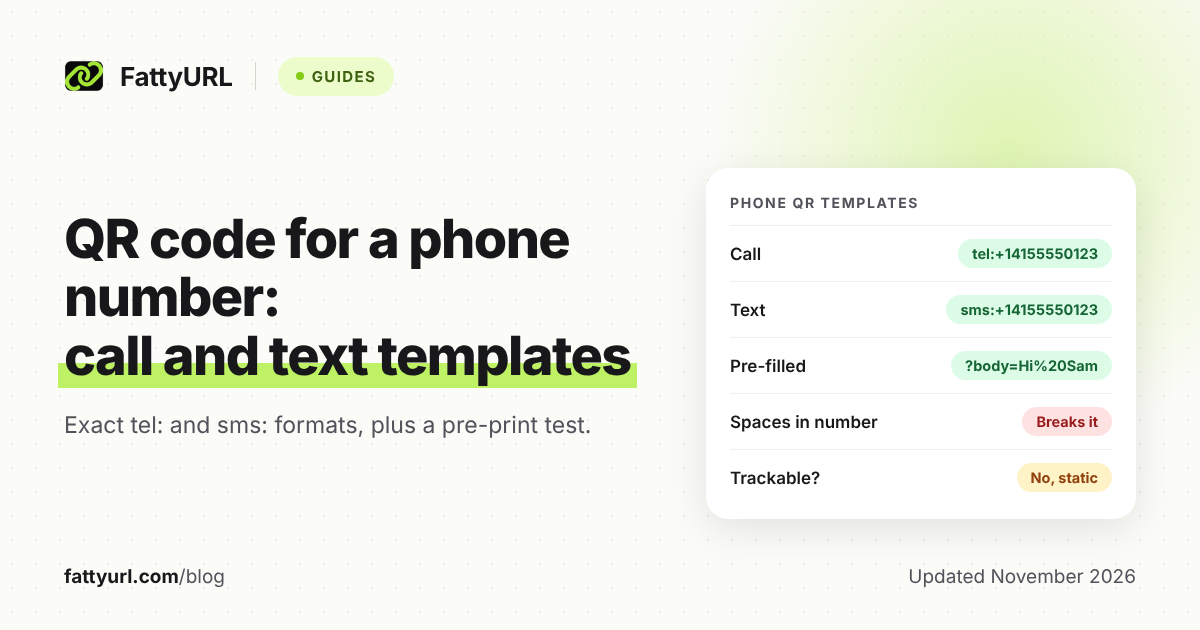
A QR code for a phone number is just a short line of text that starts with tel: or sms:. A phone reads the line and offers to call or text. You can make one in any QR maker that accepts plain text, including FattyURL's.
The trick is writing the line correctly. One stray space or a missing country code is enough to break it, so this guide gives exact templates and a pre-print test.
Short answer: To make a call QR code, encode
tel:+14155550123with your own number in international format. For a text, encodesms:+14155550123, or add?body=Helloto pre-fill a message. Paste the line into a QR maker that accepts text, download PNG or SVG, and test it on an iPhone and an Android phone before printing.
How does a QR code for a phone number work?
The QR code stores a URI, a short text string with a scheme in front. The scheme tel: means a phone number to call. The scheme sms: means a number to text. The phone does the rest.
The tel format is defined in IETF RFC 3966, and the sms format in IETF RFC 5724.
The ZXing project's Barcode Contents page catalogs possible standards for what a barcode encodes, with a suggested action for each. It says a scanner should open the dialer and pre-fill the number, but should not start the call by itself. For a text code, it says the scanner should open a new message the person can write and send.
The code does not rely on a server. The number is inside the printed pattern, which is why these codes work without internet access to a website, though the phone still needs a signal to call or text.
How do I write the number so it works everywhere?
Use the full international form: a plus sign, the country code, then the number, with no spaces. For a US number that looks like +14155550123. RFC 3966 says phone numbers must use this global form unless they cannot be written that way.
RFC 3966 allows hyphens, dots and parentheses only to aid reading, and it forbids spaces in a tel URI. Safest is digits only after the plus sign. RFC 5724 says text numbers should include the country code with a leading plus too.
The international numbering plan itself is ITU-T Recommendation E.164. The ITU status page lists the in-force edition but not the rules, so this guide relies on the RFCs for the formatting.
A local number without a plus sign needs extra context data, which RFC 3966 says to avoid, so skip it for signs and flyers.
What exactly do I paste for a call, a text or a pre-filled text?
Copy the pattern, swap in your number, and compare it with the broken versions below. The examples use the sample number 415 555 0123. The last row is the unofficial SMSTO form.
| Goal | Correct | Broken |
|---|---|---|
| Call | tel:+14155550123 | tel:+1 415 555 0123 (spaces) |
| Text, blank message | sms:+14155550123 | sms:4155550123 (no country code) |
| Text, pre-filled | sms:+14155550123?body=Hi%20Sam | sms:+14155550123?body=Hi Sam (raw space) |
| SMSTO form | SMSTO:+14155550123 | SMSTO+14155550123 (no colon) |
Checked 7 November 2026 against RFC 3966, RFC 5724 and the sources listed below.
How do I make a QR code that sends a pre-filled text message?
Add ?body= after the number and write your message after it. RFC 5724 says the body is UTF-8 text with reserved characters percent-encoded, so a space becomes %20. The field may appear only once.
The RFC also says following an sms link should not send anything without the person confirming. The sender can edit the text first. Keep the message short and plain, like a keyword the shop can recognize, such as BOOK.
The ZXing page also lists an SMSTO: form, followed by the number, and mentions a variant with a subject after a second colon. It says SMSTO has been seen in the wild, but its author is still looking for an official specification. Prefer sms: unless a tool you already use needs SMSTO, and test either one.
What happens when someone scans it?
Apple's help page says that after you point the Camera at a QR code, you tap the link that appears. It does not mention phone numbers, so the exact prompt for a call or text is not documented there.
Google's matching Android help page could not be read for this guide. Treat behavior as something to test: scan with the stock camera on an iPhone and on an Android phone, and note what each one offers.
- Expect the dialer or message app to open with your details filled in, as the ZXing page describes.
- Expect the person to press call or send themselves.
- Do not assume an old or third-party scanner app behaves the same way.
How do I make the code in FattyURL's QR maker?
FattyURL's QR maker accepts any text up to 1,000 characters, so a tel or sms line fits easily. It needs no account, exports PNG or SVG, lets you pick colors, and adds no watermark.
- Write your line using the table above.
- Open FattyURL and paste the line into the QR code maker.
- Choose colors with strong contrast, dark on light, and download SVG for print or PNG for screens.
- Run the checklist below before sending anything to a printer.
FattyURL's QR maker encodes exactly the text you paste, so you format the line yourself. Any other QR maker that accepts text works the same way.
Can I track or change a phone number QR code later?
No. A QR code made from tel: or sms: text is static: it holds exactly those characters. It cannot count scans, and you cannot change the number after printing. A new number means a new code.
Static codes do not expire on their own, which is covered in do QR codes expire. If you need scan counts, point the code at a short link instead, as explained in how to track QR code scans. Then the code opens a web page where people tap to call, which adds one step.
Two things are covered elsewhere. To share a full contact card, see the vCard QR code guide. To open a WhatsApp chat, a plain sms line will not do; see the WhatsApp link guide.
What should I check before printing?
Test the printed proof, not just the screen. Check the text line as well as the pattern. Run through this list with two different phones.
- Read the decoded text aloud: it starts with
tel:orsms:, a plus sign and the country code. - Confirm there are no spaces in the number and no raw spaces in the message.
- Scan on an iPhone and an Android phone with the stock camera.
- Confirm the dialer or message screen shows your exact number, and cancel without calling.
- Send one test text to yourself and check the pre-filled words.
- Print at final size on final material, then scan from the distance a customer will stand.
- Print the number in words beside the code as a backup.
If a code fails on the proof, see why a QR code stopped working.
FAQ
Does a QR code call the number automatically?
No. The ZXing contents page says the scanner should open the dialer with the number filled in. The person still presses call. A text code opens a new message the same way.
Can I use a local number without the country code?
Avoid it. RFC 3966 says to use the global form with a plus sign unless that is impossible, and a bare local number can reach the wrong place when a traveler scans it.
Can the text message include a link?
Yes, since the body is free text, but encode it properly and test it. If you plan to text links to customers at scale, read the rules in short links in SMS.
How long can the message be?
RFC 5724 notes that one SMS holds at most 160 characters, though longer messages can be joined. It leaves any length limit to the phone's app, so keep the message short.
Can the code be changed after printing?
A text QR code cannot. Reprint it, or use a short link to a page you control.
Sources
- IETF RFC 3966, The tel URI for Telephone Numbers (read 7 November 2026)
- IETF RFC 5724, URI Scheme for Global System for Mobile Communications (GSM) Short Message Service (SMS) (read 7 November 2026)
- ZXing project, Barcode Contents (read 7 November 2026)
- Apple Support, Scan a QR code with your iPhone or iPad (read 7 November 2026)
- ITU-T Recommendation E.164 status page (read 7 November 2026)
Disclaimer: This article is for general information only and is not legal or security advice. It was researched and drafted with the help of AI, and its facts were checked against the sources linked above, mostly each provider's own pricing, help and policy pages. URL shorteners, QR code tools and social platforms change their plans, prices and rules often, so confirm the details on the provider's website before you choose a plan, move your links or print a QR code. FattyURL is our own product. Spotted something out of date, or a FattyURL link being misused? Tell us and we will act on it.