How to Shorten a WhatsApp Link: wa.me Format, Business Link and QR (2026)
Build a wa.me link with digits only, add ?text= for a pre-filled message, then compare the WhatsApp Business short link with a custom short link and a QR code.
A WhatsApp click to chat link is a web address that opens a chat with your number in one tap. WhatsApp's own format is short already: wa.me, then your number. It only gets long and ugly once you add a pre-filled message.
This guide covers the exact link format and the mistakes to avoid. It also covers WhatsApp Business's built-in short link and QR code, and when a FattyURL short link adds something on top.
Short answer: Build the link as https://wa.me/ plus your full number in international format, with no plus sign, leading zeros, brackets or dashes. Add ?text= and a URL-encoded message if you want one. For a shorter, memorable address with click counts and an editable destination, put it behind a FattyURL short link from a free account.
How do I make a WhatsApp click to chat link (wa.me)?
Use https://wa.me/ followed by the full phone number in international format. WhatsApp's help page says to omit any zeroes, brackets or dashes. It also puts a plus sign in its example of a format not to use.
For a pre-filled message, add ?text= and the URL-encoded message. WhatsApp's own example is https://wa.me/1XXXXXXXXXX?text=I'm%20interested%20in%20your%20car%20for%20sale. The message appears in the chat text field for the customer to send.
You can also build a link with only a message and no number: https://wa.me/?text=urlencodedtext. WhatsApp then lets the person choose who to send it to.
- Take your full number with the country code, for example 1 for the US.
- Remove the plus sign, any leading zeros, spaces, brackets and dashes.
- Write https://wa.me/ and paste the digits after it.
- Optional: add ?text= and your message with spaces written as %20.
- Open the link on a phone and on a desktop to confirm it starts the right chat.
Which wa.me formats work and which should you avoid?
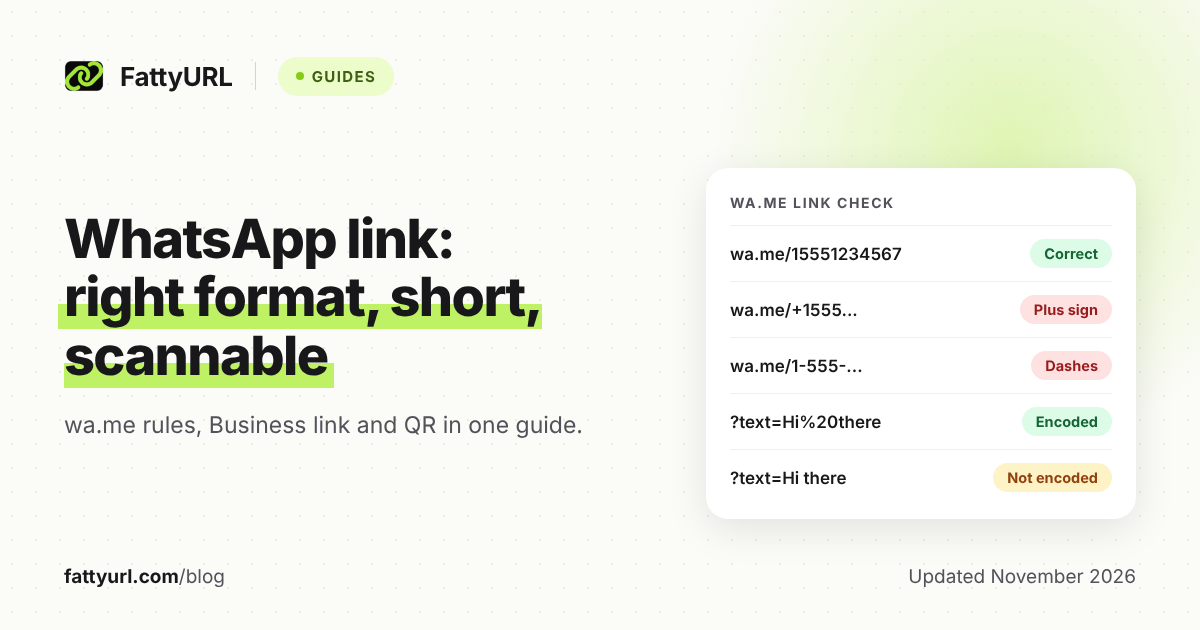
Only digits belong in the number part. The table below uses the rules on WhatsApp's click to chat page, plus the URL syntax rules in RFC 3986. The number is a placeholder.
| Link | What is wrong | Verdict |
|---|---|---|
| https://wa.me/15551234567 | Nothing: country code then digits | Correct |
| https://wa.me/+15551234567 | Plus sign; WhatsApp's example of a format not to use has one | Avoid |
| https://wa.me/1 555 123 4567 | Spaces in the number | Avoid |
| https://wa.me/1-555-123-4567 | Dashes; WhatsApp says omit them | Avoid |
| https://wa.me/(555)1234567 | Brackets and no country code | Avoid |
| https://wa.me/0015551234567 | Leading zeros; WhatsApp says omit them | Avoid |
| https://wa.me/15551234567?text=Hi there | Message is not URL-encoded; a space is not allowed in a URL | Risky |
| https://wa.me/15551234567?text=Hi%20there | Space written as %20 | Correct |
| https://wa.me/15551234567?text=Q%26A%3F | Reserved characters & and ? written as %26 and %3F | Correct |
Checked 7 November 2026. WhatsApp's international number page saves a US contact as +1 408 XXX XXXX; in a link, that is https://wa.me/1408XXXXXXX. Characters such as &, ?, # and % have special meaning in a URL, so encode them as %26, %3F, %23 and %25.
Can I shorten a WhatsApp link?
Yes. A wa.me link is an ordinary web address, so a URL shortener can sit in front of it. You have three routes: the WhatsApp Business app's own short link, the bare wa.me link, or a short link from a shortener.
Checked 7 November 2026. Each row is limited to what the cited pages state.
| Option | What it gives you | Limits to know |
|---|---|---|
| WhatsApp Business app short link | Created automatically with a Business account. Opens a chat, or a business info page in a browser. Pre-filled message can be edited later. | WhatsApp's page says a custom, easy-to-remember link is available with WhatsApp Business Premium. It lists no click counts. |
| wa.me link | Works for any WhatsApp number. Number and message sit inside the address. | Changing the number or text means a new link. WhatsApp's click to chat page does not mention click counts. |
| FattyURL short link (free account) | Custom ending of 6 to 100 characters, click analytics, and you can edit the destination later. | Free links may show ads; links on a paid plan never do. It points at your wa.me or Business link; it does not build the WhatsApp link for you. |
What is the WhatsApp Business short link?
It is a link WhatsApp Business creates for you. Customers who tap it open a chat with your business. From a web browser they land on a page with your business information and a button to open the chat.
WhatsApp's help page says the app generates it automatically, so there is nothing to set up. To find it, open Business tools from the More options menu, then find Short Link. From there you can copy it or send it to customers.
You can switch on a default message that customers see when they open the link, and edit it later. Unlike a wa.me link with ?text=, the message is not baked into the address.
Developers using the WhatsApp Business Management API have a similar feature. Its documentation describes wa.me/message/ links followed by a random code, with prefilled messages up to 140 characters. That limit appears on the developer page, not on the app help page.
How do I make a QR code for a WhatsApp chat?
You have two routes. The WhatsApp Business app has its own QR code, and any QR maker can encode your wa.me link. For a chat you plan to print and keep, the best route is a QR code made from a short link you can edit.
WhatsApp's help page says the Business QR code stays valid until you reset it or delete your Business account. To view it, go to More options, Business Tools, Short link, then View QR Code. The page does not mention scan counts.
FattyURL's QR maker encodes any text or link up to 1,000 characters, as a static code with PNG or SVG download. Pasting a wa.me link there gives a code that cannot be edited or tracked afterward.
To count scans and change the destination without reprinting, make a FattyURL short link with a free account, then a QR code from it. Each scan opens the short link and counts as a click. Our guide to making a QR code for a link walks through the steps, and tracking QR code scans explains the numbers.
When does a FattyURL short link help a WhatsApp link?
It helps when the link is printed, spoken or posted where you cannot edit it later. A short link is the layer you can change after the link is out in the world.
- Memorable ending: with a free account you can choose a custom ending of 6 to 100 characters, such as a shop name. See how to make a custom short link.
- Click counts: a free account shows total clicks, unique visitors, clicks over time, country, device and referrer. See how to track link clicks.
- New number later: edit the destination from the old wa.me link to a new one. Flyers, packaging and QR codes keep working.
A click is counted when someone taps the short link, not when they send a message. Treat clicks as interest, not as conversations.
You can shorten your wa.me link on FattyURL without an account. Without one, links expire after 30 days without a click, and you cannot edit or choose the ending. If you post the link on social platforms, read how short links behave on social platforms first.
Is it safe to share and tap a WhatsApp short link?
A short link hides the address behind it, so customers should be able to trust where it goes. Share only links you made, and check any short link you receive before tapping it, especially if it asks for payment or a login.
Our guide on how to check where a short link goes shows how. FattyURL checks every link against Google Web Risk when it is created, edited and clicked, and pauses harmful ones.
FAQ
Do I include the plus sign in a wa.me link?
No. WhatsApp's click to chat page includes a plus sign in its example of a format not to use. Use the country code and number as digits only.
Can I add a pre-filled message?
Yes. Add ?text= after the number and URL-encode the message, for example with %20 for spaces. The text appears in the chat field for the customer to send.
Can I change the number behind a link I already printed?
Not in a wa.me link. A wa.me link holds the number itself. If you printed a FattyURL short link or a QR code made from one, you can edit the destination with a free account.
Does WhatsApp show how many people tapped my link?
WhatsApp's help pages used here do not mention click or scan counts. Meta's developer page says analytics are not available for the QR codes and short links it covers. A short link with click analytics, such as a free FattyURL account, does.
Is FattyURL a WhatsApp link generator?
No. You build the wa.me link yourself, or copy your Business short link. Then paste it into FattyURL to shorten it or turn it into a QR code.
Sources
- WhatsApp Help Center: How to use click to chat, read 7 November 2026
- WhatsApp Help Center: How to add an international phone number, read 7 November 2026
- WhatsApp Help Center: How to create short links, read 7 November 2026
- WhatsApp Help Center: About QR code for WhatsApp Business, read 7 November 2026
- Meta for Developers: WhatsApp QR codes and short links, read 7 November 2026
- RFC 3986: URI Generic Syntax, read 7 November 2026
- MDN Web Docs: encodeURIComponent(), read 7 November 2026
- FattyURL pricing, read 7 November 2026
Disclaimer: This article is for general information only and is not legal or security advice. It was researched and drafted with the help of AI, and its facts were checked against the sources linked above, mostly each provider's own pricing, help and policy pages. URL shorteners, QR code tools and social platforms change their plans, prices and rules often, so confirm the details on the provider's website before you choose a plan, move your links or print a QR code. FattyURL is our own product. Spotted something out of date, or a FattyURL link being misused? Tell us and we will act on it.