How to Shorten a Calendly Link: Edit It in Calendly or Add a Short Link (2026)
Shorten a Calendly link by editing your link and event slug in Calendly. Add a short link when you need click stats, a QR code, or a link you can repoint without reprinting.
A Calendly link is only as long as its two parts: your landing page name and the event name. You can edit both inside Calendly for free, and that often gives you a short, clean link without any other tool.
A separate short link still helps in three cases: you want click counts, you want a QR code that survives a rename, or you want one link you can repoint later. This guide covers both routes.
Short answer: First shorten the link inside Calendly: change your link under Settings, then My link, and edit the event slug under Booking page options. Calendly says old links stop working after a change. If you need click stats or a QR code you can repoint, put a short link in front of the Calendly page.
How do I make my Calendly link shorter?
Calendly lets you edit the two parts of your link yourself. Your landing page link covers all your events, and each event type has its own slug. Shortening either one makes the full URL shorter without a third-party tool.
Calendly's help center describes two edits:
- Landing page link: go to Settings, then My link, change your link, and select Save Changes.
- Event link: go to the Scheduling page, choose the event type, select More options at the bottom of the editor, expand Booking page options, edit the event slug, and select Save changes.
Pick short, readable words, such as your name and a plain event name like "intro". The help page does not state a character limit or which characters are allowed, so if Calendly rejects an entry, try a simpler one.
Is my Calendly link too long, and does it matter?
A long link works fine when someone clicks it. It matters in places where people read, type or scan the link: a printed card, a podcast mention, a text-heavy email signature, or a QR code that has to be easy to scan.
Shared event types are a special case. Calendly says their URLs are generated automatically and cannot be customized. For a custom URL there, Calendly suggests creating a Team Event Type instead.
What happens to old links when I change my Calendly link?
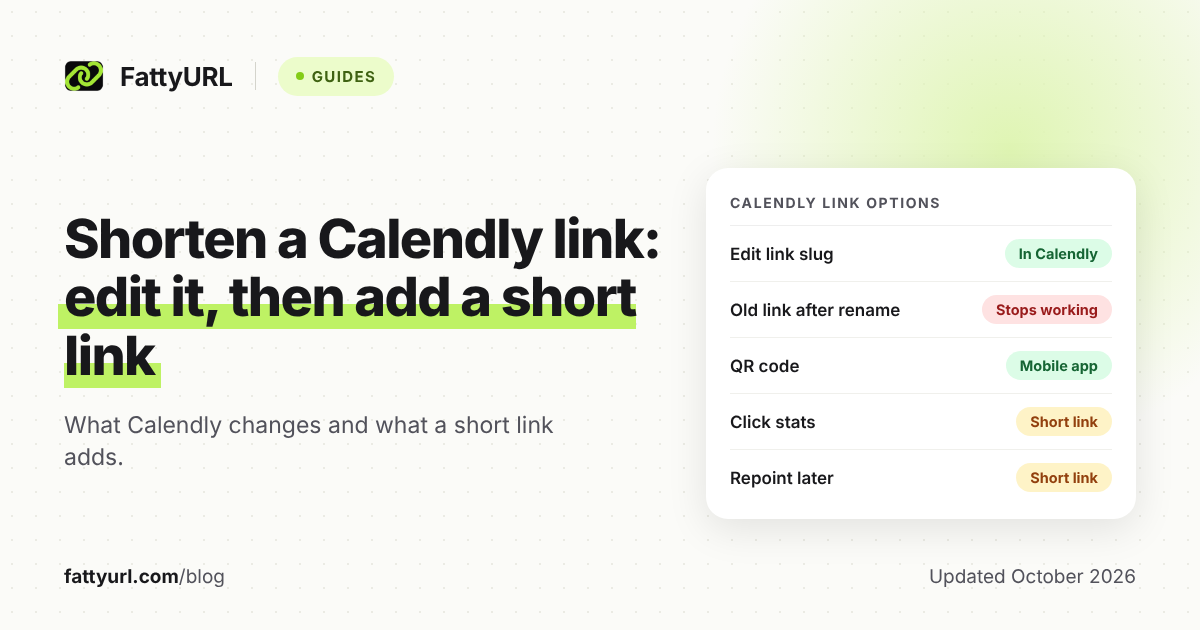
Calendly states that old links stop working after you change a slug, and that they do not redirect. If you keep the new link, you must update emails, website links, QR codes and printed materials. To restore the old link, change the slug back.
This is the biggest risk of renaming. Anything already printed or sent breaks. Do the rename once, early, before you print a card or hand out a QR code.
What does Calendly change, and what does a short link add?
Calendly controls the words in its own URL. A short link sits in front of that URL and gives you a different set of controls. The table compares them using Calendly's help pages and FattyURL's own product facts.
Checked 1 November 2026.
| What you want | Inside Calendly | With a short link in front |
|---|---|---|
| Shorter URL | Edit your landing page link and event slug | A short domain plus an ending you choose |
| Old printed links after a rename | Stop working, no redirect | Printed short link stays; you change where it points |
| QR code | Mobile app: event type, More share options, Create QR code | QR code made from the short link, PNG or SVG |
| Count clicks or scans | Not stated on Calendly's help pages | Free account: clicks, country, device, referrer; QR scans count as clicks |
| Repoint to a new event | Change the slug; old link breaks | Free account: edit the destination later |
Everything in the right column needs a free FattyURL account except shortening a link and making its QR code. Without an account, links expire after 30 days without a click, a risk for a link that lives in a signature.
How do I add a Calendly link to my email signature?
Hyperlink a few words, such as "Book a call", to your Calendly link rather than pasting the full URL. Calendly's help center describes two ways: link text, or a scheduling button image with your link attached.
- Copy the link from your Scheduling page.
- Open your email program's signature editor.
- Highlight your text, click the insert link icon, paste the link, and save.
- For a button, save an image from Calendly's button gallery, insert it in the signature, then link it the same way.
Which link should you use? Calendly describes a landing page link that shows all active event types, and an event link for one specific event. For a signature, the landing page suits a general invitation, and an event link suits one clear action. Single-use links expire after one booking, so they do not suit a signature.
When is a FattyURL short link worth adding?
Add one when Calendly's own edit does not cover your need. Calendly's pages I read do not describe click analytics for the link, so if you want to know how many people used the link in a signature versus a bio, a tracked short link answers that.
A free FattyURL account gives you click totals, unique visitors, clicks over time, country, city, device, browser, operating system and referrer. Make a separate short link per place, one for your signature, one for your bio, one for your card, and compare them. For more on tracking, see how to track link clicks.
Custom endings on a free account are 6 to 100 characters long. For choosing a good ending, read how to make a custom short link.
Honest trade-off: if your only goal is a shorter, nicer URL, Calendly's own edit is simpler and adds no extra redirect. Free FattyURL links may show ads, and links on a paid plan never do. Check that before using one on a client-facing signature.
How do I make a Calendly QR code?
Calendly's blog (November 2024) says QR creation is built into its mobile app. Calendly's help center says to tap the event you want to share, then More share options, then Create QR code. The blog says you can show it on screen or save it to your photo album.
That QR code points at the event page. If you later rename the slug, a printed code stops working. The Calendly article I read does not mention that risk.
The alternative is to create the QR code from a short link. FattyURL makes PNG or SVG codes in any colors with no watermark, and each scan opens the short link and counts as a click in that link's analytics (free account needed). You can change where the link points later without reprinting. The steps are in how to make a QR code for a link, and the scan stats are in how to track QR code scans.
When you are ready, shorten your Calendly link or make the QR code at FattyURL. For the general steps behind any long URL, see how to shorten a link.
Which option should I pick?
Use this rule. If you have not printed or sent anything yet and you only want a tidy URL, edit the slugs in Calendly. If anything is already printed, or you want numbers per placement, use a short link and keep it pointed at the right event.
- New account, no printed material: rename in Calendly.
- Already on cards or slides: add a short link, do not rename the slug.
- Want clicks per channel: one short link per channel.
- Want a code you can fix after printing: QR from a short link.
FAQ
Can I change my Calendly link for free?
Calendly's help page says link customization is listed for all plans, but feature access can vary by plan, account creation date and add-ons. Check your own Settings, then My link, to see what your account allows.
Does a Calendly custom link keep working after I rename it?
No. Calendly says old links stop working and do not redirect. Update every place you used the old link, or change the slug back to restore it.
Can I put a Calendly link in my email signature?
Yes. Calendly's help center explains how to hyperlink text or add a scheduling button image to your signature in your email program.
Does Calendly make QR codes?
Yes, in its mobile app, per Calendly's help center and blog. Tap the event you want to share, then More share options, then Create QR code. The article does not state plan limits.
Will a short link change what my invitee sees?
The short link redirects to your Calendly page, so the booking page itself is the same. Test the short link on your phone and computer before you print or send it.
Sources
- Calendly Help: How to customize your scheduling page links, read 1 November 2026
- Calendly Help: How to add your scheduling link to your email signature, read 1 November 2026
- Calendly Help: How to share your scheduling link, read 1 November 2026
- Calendly Help: How to create a single-use link, read 1 November 2026
- Calendly blog: How to create a Calendly QR code, read 1 November 2026
- Calendly Help: How to share your link from the mobile app, read 1 November 2026
- FattyURL promise page, read 1 November 2026
Disclaimer: This article is for general information only and is not legal or security advice. It was researched and drafted with the help of AI, and its facts were checked against the sources linked above, mostly each provider's own pricing, help and policy pages. URL shorteners, QR code tools and social platforms change their plans, prices and rules often, so confirm the details on the provider's website before you choose a plan, move your links or print a QR code. FattyURL is our own product. Spotted something out of date, or a FattyURL link being misused? Tell us and we will act on it.