How to Shorten a Microsoft Forms Link and Make a QR Code (2026)
To shorten a Microsoft Forms link, select Collect responses, choose who can respond, tick Shorten URL and copy the link. Here is when to use the QR code, embed or email instead, and when your own short link helps.
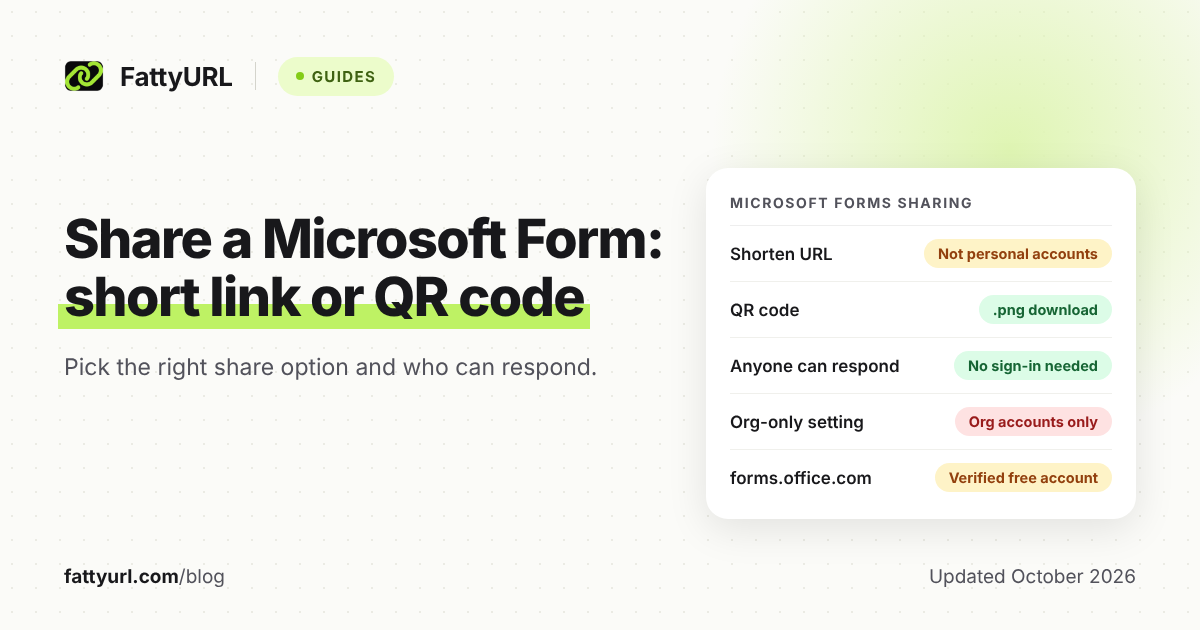
To shorten a Microsoft Forms link, open the form and select Collect responses. Choose who can respond, tick Shorten URL, then select Copy link. Microsoft says Shorten URL isn't available with a personal Microsoft account or on the mobile site.
The same panel makes a QR code, embed code and email invitation. Your own short link adds three things Microsoft doesn't document: moving to next month's form, click counts and a readable ending. On FattyURL, forms.office.com links need a verified free account, so sign in first.
Short answer: In Microsoft Forms, select Collect responses and pick who can respond; choose Anyone can respond if outsiders must answer. Then tick Shorten URL and select Copy link, or download the QR code for print. To reuse, count or customize the link, shorten it with a service such as FattyURL, which needs a verified free account for forms.office.com links.
How do you shorten a Microsoft Forms link?
Microsoft Forms has its own Shorten URL checkbox next to Copy link in the Collect responses panel. Microsoft names two cases where it's missing: a personal Microsoft account (Hotmail, Live or Outlook.com) and the mobile site. In either case, copy the full link and paste it into any URL shortener.
- Go to forms.office.com, sign in with your work, school or personal Microsoft account, and open the form.
- Select Collect responses in the upper-right corner. The Send and collect responses panel opens.
- Choose who can respond. The next sections explain each option.
- Tick Shorten URL, then select Copy link.
- Paste the link where your audience will see it, such as a class notebook, a chat or a slide.
- Open the link in a private browser window that isn't signed in. That shows you what a guest gets.
On the mobile site, Microsoft says to open the Questions tab and press the arrow button in the center. That opens the sending options, but Microsoft says Shorten URL isn't offered there.
To shorten the link yourself, paste it into a shortener such as the box on the FattyURL home page. FattyURL shortens forms.office.com links only for verified free accounts, a safety rule it applies to a list of free site and form builder addresses. That account also keeps your links from expiring and lets you edit them later.
For the basics, see our step-by-step guide to shortening any link. Using Google Forms instead? See how to shorten a Google Form link and make its QR code.
Which Microsoft Forms share option should you use?
Use Copy link for chats and posts, Shorten URL when people must type the link, and the QR code for anything printed. Use Embed to show the form inside a web page, and Email or Invitation for a known list of people. Microsoft puts all of them in the Collect responses panel.
Checked 28 October 2026 against Microsoft's help pages.
| Option | What you get | Best for |
|---|---|---|
| Copy link | The form's unique link | Chats, class notebooks, posts and slides |
| Shorten URL (checkbox by Copy link) | A shorter link; not offered with personal accounts or on the mobile site | Links people read aloud or type |
| QR code | A .png file to download and insert | Posters, handouts and slides shown in a room |
| Embed | Code to paste into a web page, Sway or document | Answering without leaving your page |
| Your email app opens with a short note and the link | Sending from your own mailbox | |
| Invitation | Sent through Outlook, Teams or both, to up to 500 recipients | A class, team or group you can name |
| Your own short link | A link you can edit, count and give a custom ending | Repeating forms and posters that outlast one form |
Microsoft's two sharing help pages show this step differently: one has an Email button, the other an Invitation icon. Your version of Forms may show either. One invitation supports one group, and through Teams you can send only to groups of up to 200 members.
Microsoft also warns that anyone who gets your email can forward it. With Anyone can respond, whoever it reaches can fill in the form.
Who can open your Microsoft Forms link?
The who-can-respond setting decides, not the link: Anyone can respond lets people inside or outside your organization answer without signing in. The two organization options accept only people from your organization signed in with a work or school account, even if your email gets forwarded.
Checked 28 October 2026.
| Setting | Who can submit | Names recorded? |
|---|---|---|
| Anyone can respond | Anyone inside or outside your organization, with no sign-in | No, responses arrive without names |
| Only people in my organization can respond | People in your organization signed in with a work or school account | Only if Record name is ticked |
| Specific people in my organization can respond | Only the people or groups you add: up to 100, including up to 20 groups | Only if Record name is ticked |
Microsoft's sharing help doesn't show the screen an outsider gets on an organization-only form. That's why the private-window test in the steps above matters before you print anything.
Pick the setting by audience:
- Parents, job candidates and event guests: Anyone can respond.
- Staff or student surveys that need names: Only people in my organization can respond, with Record name ticked.
- Anonymous staff feedback: an organization option with Record name cleared. Microsoft notes that a question asking for names, or a form sent to only a few people, can still reveal who answered.
The organization options exist only for Office 365 Education and Microsoft 365 Apps for business users. With a personal Microsoft account, Record name isn't available and responses arrive without names.
At work or school, your admin also decides whether form links can reach people outside the organization. Microsoft lists this under External sharing in the Microsoft 365 admin center, turned on by default.
How do you make a QR code for a Microsoft Form?
Select Collect responses, then the QR code button, then Download, and Forms saves a .png file for your handout, slide or poster. That code opens this one form. If the poster will outlast the form, make the QR code from your own short link.
Set who can respond before you print. A QR code on a public poster only helps outsiders if the form is set to Anyone can respond.
To make a reusable code from your own short link:
- Sign in to a free FattyURL account, verified if your form link starts with forms.office.com.
- Shorten the form link, with a custom ending if you like.
- Make the QR code from the short link: PNG or SVG, any colors, no watermark.
- Print one test copy and scan it with a phone browser that isn't signed in to Microsoft.
Each scan opens the short link and counts as a click in its analytics. When the next form opens, edit the short link's destination and the printed code follows.
For general steps, see how to make a QR code for any link. To learn what scan counts can tell you, read how to track QR code scans.
When is your own short link better than Microsoft's?
When the form repeats, when you want to count opens, or when people must type the link. Microsoft gives each form its own unique link. A short link you control can move to next month's form, count clicks and QR scans, and carry an ending people can read aloud.
- One link for a repeating form. A monthly pulse survey or weekly exit ticket often means a new form each time. Point one short link at the current form, then edit its destination when the next one opens.
- Opens versus responses. Forms reports responses; a short link counts clicks and unique visitors. Compare unique visitors with responses to see roughly how many people opened the form but didn't submit.
- One link per channel. Give the staff email and the break-room poster separate short links to the same form. Clicks per link, with country, device and referrer, show which channel works.
- A readable ending. A free FattyURL account lets you set a custom ending of 6 to 100 characters, such as staff-survey.
- Personal accounts. Without the Shorten URL checkbox, a shortener is how you get a short link at all.
Microsoft's own link and QR code are the simpler choice for a one-off form you won't reuse or measure. They come straight from Microsoft and need no other account. Free FattyURL links may show ads; links on a paid plan never do.
FattyURL checks every link against Google Web Risk when it's created, edited and clicked. Any shortener that lets you edit a link's destination can do the same job.
Why isn't my Microsoft Forms link working?
A short link only forwards people to your form, so Microsoft's settings still decide who gets in and whether answers are accepted. Match what you or your respondents see to a row below. The fixes come from Microsoft's help pages, apart from the two FattyURL rows.
Checked 28 October 2026.
| What you see | Likely cause | Fix |
|---|---|---|
| No Shorten URL checkbox | A personal Microsoft account, or the mobile site | Use a work or school account on a computer, or any URL shortener |
| People outside your school or company can't respond | An organization-only who-can-respond setting | Choose Anyone can respond; at work, ask whether your admin allows external sharing |
| A colleague can't respond | Specific people is set and they aren't on the list | Add them; the list holds up to 100 names or groups |
| Respondents can't submit | Accept responses is off, or the end date has passed | Tick Accept responses again, or move the end date in Settings |
| The form suddenly stops collecting responses | Microsoft's automated phishing checks may have blocked it | Ask a global or security admin to review it, or edit out the flagged wording |
| Invitees can't open the link you sent | You sent the collaborate link, not the response link | Copy the link from Collect responses instead |
| FattyURL won't shorten the form link | forms.office.com links need a verified free account | Sign in with a verified free account, then shorten again |
| The short link opens last month's form | It still points there | Edit the short link's destination |
Microsoft scans forms for malicious password collection, so never ask respondents for a password. If the short link itself shows an error, see what to check when a short link stops working.
FAQ
Do Microsoft Forms links expire?
Microsoft's help pages don't mention an expiry date for form links. A form stops taking answers when you turn off Accept responses or its end date passes. Short links on a free FattyURL account never expire; see how expiry works across URL shorteners.
Can I customize the Microsoft Forms URL?
Microsoft's help documents only the Shorten URL checkbox, with no way to choose the ending. For a readable link, use a shortener with custom endings. On a free FattyURL account, an ending can be 6 to 100 characters long.
Can people without a Microsoft account fill out my form?
Yes, when you choose Anyone can respond: Microsoft says those responses don't require sign-in. The two organization settings need a work or school account in your organization.
Can I see how many people opened my Microsoft Form?
Microsoft's results pages describe responses and average completion time, with no view count. To count opens, including QR scans, share a short link that has click analytics.
How many responses can a Microsoft Form collect?
Up to 5,000,000 per form for most work and school accounts, or 50,000 on GCC High and DoD, per Microsoft (checked 28 October 2026). Personal Microsoft accounts allow 200 responses per form on a free account and 1,000 on a paid one. If you need more, Microsoft suggests exporting responses to Excel, then clearing them from the form.
Sources
- Microsoft Support: Send a form and collect responses (Shorten URL, Invitation, QR code, Embed, who can respond, invitation limits), read 28 October 2026
- Microsoft Support: Share a form (Collect responses, Copy link, QR code, Embed, Email), read 28 October 2026
- Microsoft Support: Adjust your form or quiz settings (who can respond, Accept responses, start and end dates), read 28 October 2026
- Microsoft Support: Set up your survey so names aren't recorded, read 28 October 2026
- Microsoft Support: Form, question, response and character limits, read 28 October 2026
- Microsoft Support: Check and share your form results, read 28 October 2026
- Microsoft Support: View results of your form, read 28 October 2026
- Microsoft Support: Share a form to collaborate (collaborate links), read 28 October 2026
- Microsoft Support: Create a form with Microsoft Forms (forms.office.com, account types), read 28 October 2026
- Microsoft Support: Microsoft Forms and proactive phishing prevention, read 28 October 2026
- Microsoft Learn: Administrator settings for Microsoft Forms (External sharing), read 28 October 2026
- Microsoft Learn: Review and unblock forms or users detected and blocked for potential phishing, read 28 October 2026
- FattyURL pricing (ads on free and paid links), read 28 October 2026
- FattyURL promise (free-account links never expire), read 28 October 2026
Disclaimer: This article is for general information only and is not legal or security advice. It was researched and drafted with the help of AI, and its facts were checked against the sources linked above, mostly each provider's own pricing, help and policy pages. URL shorteners, QR code tools and social platforms change their plans, prices and rules often, so confirm the details on the provider's website before you choose a plan, move your links or print a QR code. FattyURL is our own product. Spotted something out of date, or a FattyURL link being misused? Tell us and we will act on it.