vCard QR Code: How to Make One for a Business Card (2026)
Make a vCard QR code by pasting contact text into a QR maker: it works offline but cannot be edited. Or link to a profile page you can change later. Includes a template.
A vCard QR code, often called a contact QR code, is a QR code whose content is a contact card written as plain text. You can build one yourself and paste it into any QR maker that accepts text. You can also point a QR code at an online contact page instead.
Both routes work for business cards, name badges and email signatures. They differ on one thing that matters after printing: whether you can change anything later.
Short answer: Write the contact as vCard text, then paste it into a QR maker that takes plain text, and the code carries your details with it, works offline, and can never be edited. If your details change, or you want scan counts, make a QR code from a short link to a profile page instead.
What is a vCard QR code?
A vCard QR code stores a contact card as text inside the QR pattern. The card format is vCard, defined by the IETF in RFC 6350 (version 4.0) and, before it, RFC 2426 (version 3.0). The code holds the whole card, so nothing is fetched from the internet when someone scans it.
The specification says a vCard must start with BEGIN:VCARD and end with END:VCARD. Version 4.0 requires a VERSION line and an FN (formatted name) line. Version 3.0 also requires an N (structured name) line.
The specifications do not say which version a given phone accepts, so test your finished code on the phones your contacts are likely to use. The specifications also do not describe what a phone camera does with a contact code.
What does a minimal vCard look like?
A minimal business card vCard is ten short lines: begin and end markers, the version, two name lines, company, title, phone, email and URL. The example below uses version 3.0 and made-up details. Replace each value after the colon with your own.
BEGIN:VCARD
VERSION:3.0
N:Rao;Asha;;;
FN:Asha Rao
ORG:Example Health
TITLE:Product Manager
TEL;TYPE=WORK,VOICE:+1-555-010-0100
EMAIL;TYPE=INTERNET:[email protected]
URL:https://example.com/asha
END:VCARD
Each line is one property. N is family name, then given name, separated by semicolons. ORG, TITLE, TEL, EMAIL and URL are defined in RFC 2426. Put each property on its own line.
Keep each line under 75 characters. RFC 2426 says longer lines should be folded, and a QR maker may not fold them for you. The longest line above is 36 characters.
Which fields should you include?
Include only what a stranger needs to reach you: name, one phone or email, and one URL. Everything else is optional under the specification, and every optional line adds characters to the code.
- Required:
BEGIN,VERSION,FN,END(plusNin version 3.0). - Worth adding:
TELorEMAIL, and aURLto your profile. - Usually skippable: street address, birthday, notes, a second phone, a photo.
How do you make a vCard QR code?
Write the vCard text, paste it into a QR maker that accepts plain text, download the image and test it. No special vCard mode is needed, as long as the maker encodes your text exactly as typed.
- Copy the template above into a plain text editor and replace the sample values.
- Check that each property sits on its own line and nothing is missing.
- Open a QR maker that accepts any text. FattyURL's QR maker does: it encodes any text up to 1,000 characters, and exports PNG or SVG with no watermark.
- Paste the full text, generate the code and download it. Use SVG for print.
- Scan the result with at least two phones before you print. Confirm the name, number and email all land in a new contact.
FattyURL is not a vCard generator. It is a QR maker that encodes whatever text you give it, and a code made this way is static: it cannot be edited or tracked afterward.
How many characters will your vCard use?
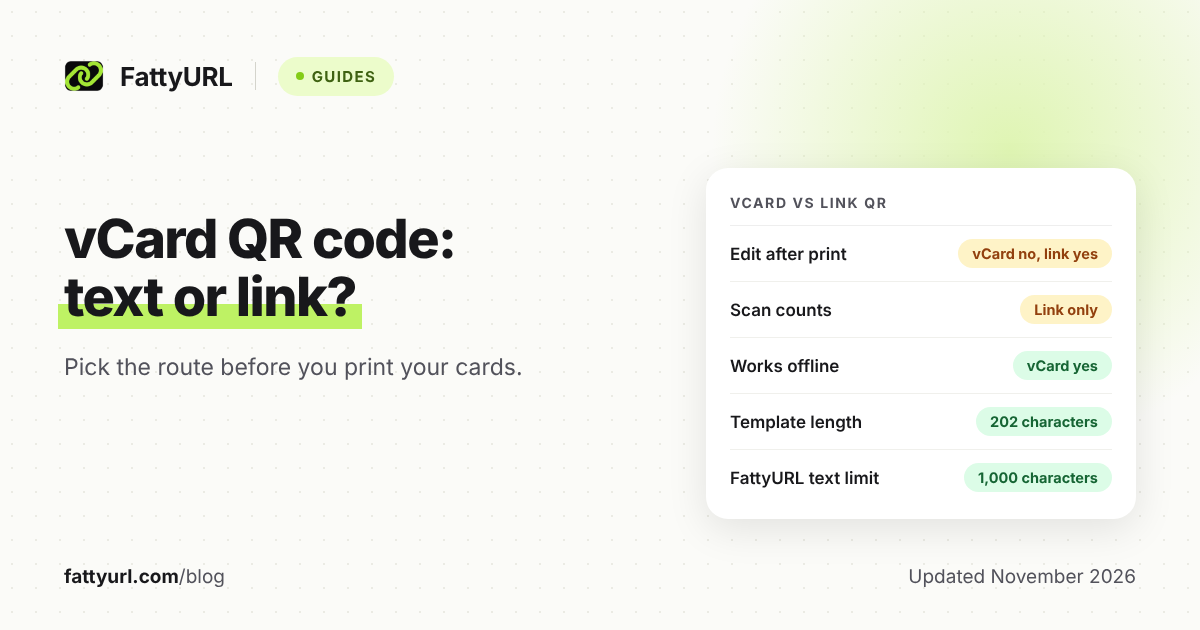
The template above is 202 characters, counting each line break as one character. Dropping to the bare minimum (begin, version, N, FN, end) is 59 characters. That gap is why field choice matters.
| Version of the card | Characters | Fields |
|---|---|---|
| Bare minimum | 59 | Name only |
| Template above | 202 | Name, company, title, phone, email, URL |
| FattyURL's text limit | 1,000 | Maximum for any text |
Checked 7 November 2026, with counts from the template in this post. More data means more modules in the QR pattern, according to Denso Wave's QRcode.com. More modules means each square is smaller at a given print size, so small prints get harder to scan.
A 202-character code is a sensible target for a business card. Past that, either enlarge the printed code or switch to the link route below.
What is the link alternative to a vCard QR code?
The alternative is a QR code that opens a web page with your contact details. You make a short link to that page, then make the QR code from the short link. The code stays small because it holds only a short URL.
With a free FattyURL account, you can change where that short link points later, and each scan is counted as a click in the link's analytics. Free-account links never expire, so printed cards keep working when details change; links made without an account expire after 30 days without a click. Note that scanning opens the page in a browser, so the person needs a connection and must tap to save your details.
For the full steps to turn a link into a code, see how to make a QR code for a link. To read the counts, see how to track QR code scans.
Which should you choose: vCard text or a link?
Choose vCard text when your details will not change and the code must work with no signal. Choose a link when your details may change, or when you want to know whether cards and badges actually get scanned.
| Question | vCard text QR | Link QR via short link |
|---|---|---|
| Can you edit it after printing? | No | Yes, change the destination (free account) |
| Are scans counted? | No | Yes, as clicks (free account) |
| Works offline? | Yes, details are in the code | No, it opens a web page |
| Saves to contacts directly? | That is its purpose; test on your phones | Not by itself; the page must offer it |
Checked 7 November 2026 against RFC 6350, RFC 2426 and FattyURL's own account features.
A simple rule: if you would be annoyed to reprint 500 cards when your number changes, use the link route. If you are printing a one-day event badge and want zero dependence on Wi-Fi, use vCard text.
Whichever you pick, a printed code is permanent. For what changes a QR code over time, read do QR codes expire.
How big should the printed code be, and where does it go?
Print it as large as your layout allows, keep a blank margin around it, and test the printed copy. Dense vCard codes need more room than short-link codes. No official size rule applies to every card, so a test print is the only reliable check.
On a business card, put the code on the back with a short line such as "Scan to save my contact." In an email signature, use a link code, since the image can stay the same while the page behind it is updated. If you are comparing makers, see best free QR code generators.
FAQ
Can I change a vCard QR code after printing it?
No. The details are the pattern itself. A new number or title means a new code. Use a QR code made from a short link if you want to change the destination later.
Does a vCard QR code work offline?
The contact data is inside the code, so reading it needs no internet. What a phone does next depends on the phone, so test yours.
Is vCard 3.0 or 4.0 better for a QR code?
RFC 6350 defines 4.0 and replaces RFC 2426 (3.0). The specifications do not say which one phones accept, so test both on the devices you care about. The template here is 3.0.
Why will my vCard QR code not scan?
Check two things: too much text for the print size, and a missing margin (Denso Wave specifies four modules on all sides). Remove optional lines, print larger and test again. See also why a QR code stopped working.
Can I track scans of a vCard QR code?
Not a text one. A code that holds the card itself opens nothing online, so there is nothing to count. With a free FattyURL account, make the code from a short link to a profile page to count scans.
Sources
- RFC 6350: vCard Format Specification, read 7 November 2026
- RFC 2426: vCard MIME Directory Profile, read 7 November 2026
- Denso Wave: QR Code versions and data amount, read 7 November 2026
- Denso Wave: Point for determining the code area, read 7 November 2026
- Denso Wave: Point for setting the module size, read 7 November 2026
Disclaimer: This article is for general information only and is not legal or security advice. It was researched and drafted with the help of AI, and its facts were checked against the sources linked above, mostly each provider's own pricing, help and policy pages. URL shorteners, QR code tools and social platforms change their plans, prices and rules often, so confirm the details on the provider's website before you choose a plan, move your links or print a QR code. FattyURL is our own product. Spotted something out of date, or a FattyURL link being misused? Tell us and we will act on it.