QR Code Size for Print: Minimum Size by Use (2026)
There is no single minimum QR code size. Module size, a 4-module margin and link length decide it. See what DENSO WAVE and GS1 say, plus vendor sizes for cards, flyers and posters.
A QR code can be as small as the printer and the phone camera can resolve, but not smaller. The size you need depends on two things: how many modules (the small squares) the code has, and how wide each printed module is.
Fewer characters mean fewer modules, so a short link can be printed smaller than a long URL. This guide uses DENSO WAVE, the inventor of the QR code, and GS1 for the rules, and flags where only vendors give a number.
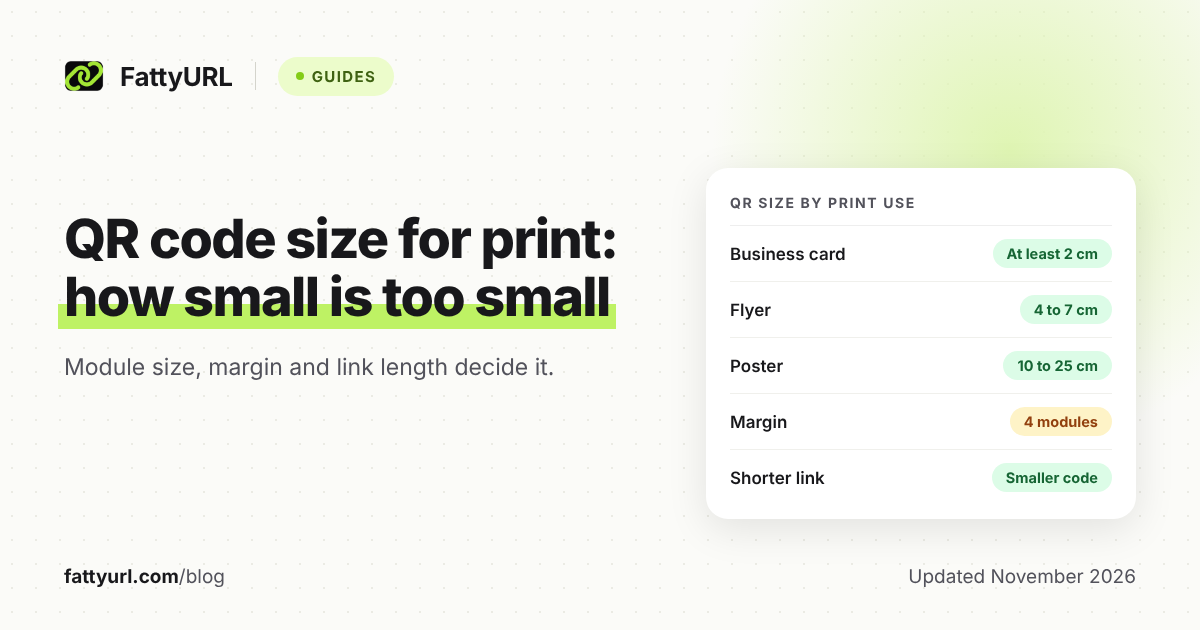
Short answer: DENSO WAVE gives no minimum size in centimeters. It says each module should be 4 or more printed dots, the margin should be 4 modules, and bigger is better. Vendors suggest at least 2 cm (0.8 in) for a business card. Keep the link short, leave the margin, and test a printed proof.
What is the minimum QR code size for print?
There is no single minimum in centimeters. DENSO WAVE sets limits per module: print each module with 4 or more dots, and check the smallest module your scanner can read. Vendor guides then turn this into rough sizes, such as 2 cm (0.8 in).
DENSO WAVE says the larger the module, the more stable and easy to read the code is. It recommends printing a QR code as large as the print area allows.
It lists scanner readability limits from 0.1 mm to 0.25 mm per module on its own examples. A 4-dot module works out to 0.17 mm on a 600 dpi laser printer and 0.5 mm on a 200 dpi thermal printer. Its list gives no figure for phone cameras.
Vendors fill the gap. Bitly suggests at least 2 cm by 2 cm for most scanners. Uniqode calls 2 cm the recommended minimum and says 1 cm can work under ideal conditions. These are vendor suggestions, not standards.
Why does a shorter link let you print a smaller QR code?
More data needs more modules. DENSO WAVE says versions run from Version 1 (21 by 21 modules) to Version 40 (177 by 177), adding 4 per side each step. Fewer modules means each one can be wider at the same printed size.
A worked example shows the effect. Take a 27-character short link, such as a FattyURL link with a six-character custom ending, and a hypothetical 150-character URL with tracking tags. Both are plain ASCII, so they encode in byte mode at about one byte per character.
The capacity figures below are Keyence's Model 2 byte table. At level M, Version 2 holds 26 bytes and Version 3 holds 42. Version 7 holds 122 and Version 8 holds 152.
Checked 7 November 2026. The module widths are our arithmetic, assuming a code plus its 4-module margin fits in a 20 mm square.
| Measure | 27-character link | 150-character URL |
|---|---|---|
| Smallest version at level L | Version 2 (25 modules) | Version 7 (45 modules) |
| Smallest version at level M | Version 3 (29 modules) | Version 8 (49 modules) |
| Module width at level M in 20 mm | about 0.54 mm | about 0.35 mm |
The long URL needs modules about one third narrower at the same printed size. Narrow modules read less reliably, and DENSO WAVE says module size must suit both the printer and the scanner.
Error correction pulls the same way. DENSO WAVE says a higher level adds data and makes the code bigger. Level M (15%) is the most common choice, and DENSO WAVE suggests level Q or H where the code may get dirty.
To make the link short, create a FattyURL short link and build the QR code from it. Use a free account for anything you print: links made without one expire after 30 days without a click.
FattyURL's QR codes are static, so they encode exactly the text you give them, up to 1,000 characters. Read static versus dynamic QR codes before you print.
How much blank space does a QR code need around it?
A QR code needs a blank margin of at least 4 modules on every side. DENSO WAVE states this for standard QR codes. GS1 UK also requires 4 times the module width on all four sides of GS1 QR codes.
Count the margin when you set the size. A Version 1 code is 21 modules wide, but with its margin it needs 29. DENSO WAVE says the final area comes from the version, the module size and the margin.
Do not trim the margin to fit a design. If a card edge, border or photo sits inside the margin, a scanner can fail to find the code.
How big should a QR code be on a business card, flyer, poster or sign?
Neither DENSO WAVE nor GS1 UK gives a size for any of these. Only GS1 covers a printed product, and only for consumer packaging. For the other uses you are relying on vendor rules of thumb, and the two vendors below do not fully agree.
Checked 7 November 2026. Primary pages first:
| Print use | DENSO WAVE | GS1 UK |
|---|---|---|
| Business card | Not stated | Not stated |
| Flyer | Not stated | Not stated |
| Poster | Not stated | Not stated |
| Packaging | Not stated by product | Module 0.396 to 0.990 mm at retail point of sale |
| Sign | Not stated | Not stated |
GS1's range is for QR codes powered by GS1 that are scanned at retail point of sale. GS1 UK works out a 29-module code at 14.652 mm to 36.63 mm square, including the margin. Use it only if you print retail packaging.
Checked 7 November 2026. Vendor suggestions, from each vendor's own page:
| Print use | Uniqode | Bitly |
|---|---|---|
| Business card | At least 2 cm, 2.5 cm recommended | At least about 2 cm |
| Flyer | 4 to 7 cm | Start around 2 cm |
| Poster | 10 to 25 cm | At least about 10 cm |
| Packaging | At least 2.5 cm, flat | About 2 to 9 cm |
| Sign | 10 to 25 cm | Not stated (billboards 75 cm or more) |
Treat these as starting points. If your card or flyer carries a long URL, size up. A contact card has its own pitfalls, covered in our contact QR code guide.
How far away can a QR code be scanned?
DENSO WAVE and GS1 UK do not state a scanning distance rule. The common rule of thumb comes from vendors: Bitly says the distance is about 10 times the code width. A 1 cm code scans from about 10 cm.
Uniqode turns this around: divide the distance by 10 to get the size. Then add 20 to 30 percent for poor light, motion or curved surfaces. These are vendor rules, not standards, so confirm them with a test.
For a poster read from 2 meters, the rule suggests roughly 20 cm. That sits inside Uniqode's poster range above. For an exact answer, scan your printed proof from the real distance.
How do I check my QR code size before printing?
Test a printed proof on the real surface, with at least two phones, from the real distance. A screen preview cannot show you the ink spread, paper texture or glare that decide whether a small code scans.
- Shorten the link first, then generate the code. Fewer modules give you wider ones.
- Pick the print size from the table above, and keep the 4-module margin inside it.
- Export at high resolution. Uniqode recommends vector formats such as SVG so the code scales cleanly. FattyURL exports PNG or SVG.
- Print one proof on the final stock and scan it from the real distance.
- If it fails, check the causes in why a QR code stops working, then enlarge or shorten the link.
New to QR codes? Start with how to make a QR code for a link. To count scans from a printed code, see how to track QR code scans. To compare tools, see free QR code generators.
FAQ
What is the smallest QR code that still scans?
DENSO WAVE gives no centimeter figure. Vendors suggest at least 2 cm, and Uniqode says 1 cm can work in ideal conditions. Your printer, paper and the link length decide the real limit.
Does a longer URL make the QR code bigger?
Yes. DENSO WAVE says more data needs more modules. For the same printed width, that makes each module narrower and harder to read.
Can I make a QR code too big?
Bitly says there is no maximum size, but larger codes must be scanned from proportionally farther away. GS1 UK warns that a code that is too large may be hard to scan up close.
Does the margin count toward the size?
Yes. Measure the code plus its 4-module margin when you check that it fits your layout.
What size should a QR code be on a product package?
For GS1 codes scanned at retail point of sale, GS1 UK allows a module of 0.396 to 0.990 mm. For other packaging, Uniqode suggests at least 2.5 cm on flat surfaces, and Bitly about 2 to 9 cm.
Sources
- DENSO WAVE: Cell (module) size, read 7 November 2026
- DENSO WAVE: Versions and modules, read 7 November 2026
- DENSO WAVE: Generating a QR code, read 7 November 2026
- DENSO WAVE: Types of QR code and margin, read 7 November 2026
- DENSO WAVE: Error correction, read 7 November 2026
- DENSO WAVE: History of QR Code, read 7 November 2026
- Keyence: QR code capacity table (Model 2), read 7 November 2026
- GS1 UK: How big should a QR code powered by GS1 be, read 7 November 2026
- GS1 UK: QR codes powered by GS1 design guidelines, read 7 November 2026
- Uniqode: How to size your QR codes, read 7 November 2026
- Bitly: Minimum size for a QR code, read 7 November 2026
Disclaimer: This article is for general information only and is not legal or security advice. It was researched and drafted with the help of AI, and its facts were checked against the sources linked above, mostly each provider's own pricing, help and policy pages. URL shorteners, QR code tools and social platforms change their plans, prices and rules often, so confirm the details on the provider's website before you choose a plan, move your links or print a QR code. FattyURL is our own product. Spotted something out of date, or a FattyURL link being misused? Tell us and we will act on it.