How to Shorten a Google Meet Link (and Keep It Working) in 2026
Shorten a Google Meet link with a readable custom ending, click counts and a destination you can change later. Includes how long each Meet link type lasts, per Google.
A Google Meet link is already fairly short, but it is hard to remember, easy to mistype on a printed handout, and it can stop working. With a free account, a FattyURL short link gives you a readable ending, a click count, and a destination you can change without reprinting.
This guide covers what Google says about Meet links, which ones keep working, and how to put a stable short link on slides, bios and paper.
Short answer: To shorten a Google Meet link, paste the meeting link from Meet or Calendar into FattyURL and pick a custom ending on a free account. Meet links do not all last equally long, so use the short link everywhere and repoint it if the Meet code ever changes. Make the QR code from the short link.
What does a Google Meet link look like and how do I get one?
A Meet link is an address on meet.google.com that carries a meeting code. Google's help page says each meeting gets a unique code, but it does not describe the code's format. Here are three common ways to get one.
- Instant meeting: on meet.google.com, create a new meeting and join the meeting directly.
- Meeting for later: create a meeting for later, then copy the meeting link to share it. Google says you can also paste the link into a browser to start the meeting.
- Google Calendar: create an event and add a video meeting link. Google notes that Google Workspace Essentials users cannot schedule a meeting in Google Calendar.
Pick the Calendar route for classes and team calls that repeat, because that code is tied to future events (see the table below).
Does a Google Meet link stay the same or expire?
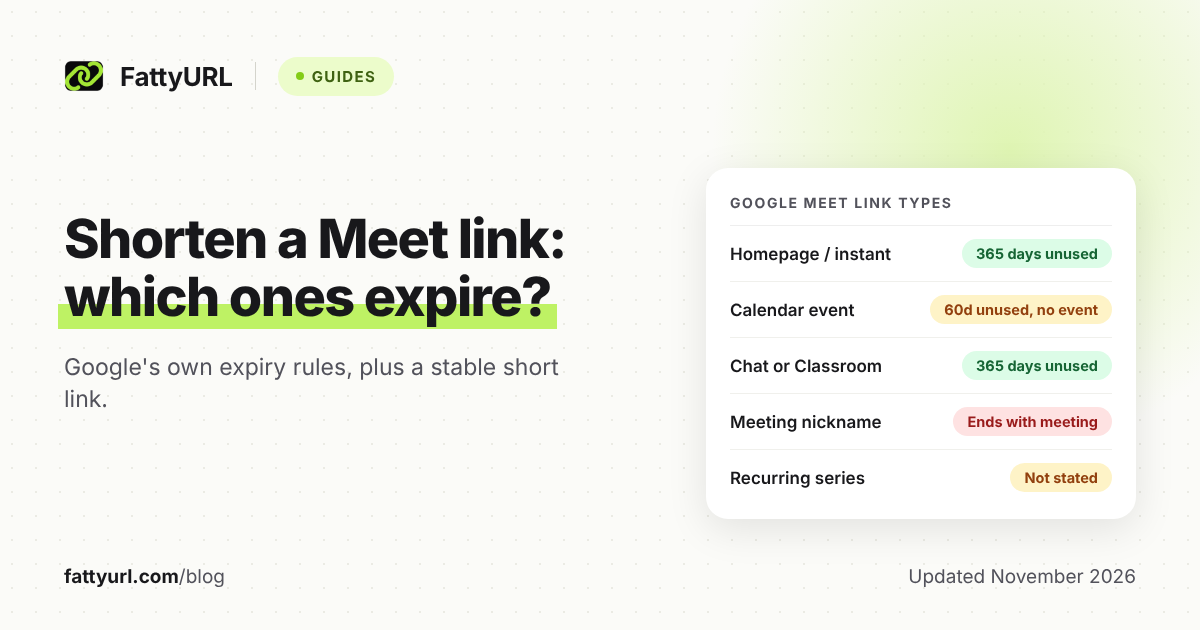
It depends on where the code was created. Google's meeting codes page sets an expiry rule for each source. Calendar codes expire after 60 days unused with no future event; most others, 365 days after last use; a few, the moment everyone leaves.
Checked 7 November 2026, from Google's "Learn about meeting codes in Google Meet" page:
| Where the Meet link was made | Does the code stay the same? | When it expires, per Google |
|---|---|---|
| Instant or "for later" (meet.google.com homepage) | Yes, until it expires | 365 days after last use |
| Google Calendar event | Yes, until it expires | 60 days unused, no future event |
| Recurring Calendar event | Not stated for recurring events | Same Calendar rule; the page does not address recurring |
| Google Chat, Classroom or Gmail | Yes, until it expires | 365 days after last use |
| Third-party software, such as Outlook | Yes, until it expires | 365 days after last use; each use adds another 365 |
| Meeting nickname (Workspace only) | No | Instantly once all users leave |
| Meeting room hardware | No | Instantly once all users leave |
| Breakout room | No | Instantly once the main meeting ends |
Two cautions. Google's page does not say whether a recurring series keeps one code, so check your own event. And an older Google Workspace Updates post from 2021 gave 365 days for Calendar codes, while today's help page says 60 days, so trust the current page.
A code can also be replaced. Google's scheduling page says a new meeting code might be generated automatically for privacy and security, and that you get an email if so. That is one more reason to share a short link you can repoint.
Can I get a custom Google Meet link that does not change?
Google documents meeting nicknames for Workspace accounts, but the codes they create are not permanent. Google's page says only Google Workspace users can create meetings with nicknames, and that those codes expire instantly once all users leave the meeting.
For a link that does not change in practice, create it in Calendar as a recurring event, or create a meeting for later and keep using it. The code lasts only while the rule in the table is met. Google does not promise a link that never changes.
That is where a short link helps. Put the short link on everything you share. If the Meet code ever dies, you edit one destination instead of replacing every slide and flyer.
Who can join a Meet link without asking?
It depends on the meeting access setting, which hosts control under Host controls. Google's help page lists three access types, and the strictest is not available to personal accounts.
- Open: anyone with a meeting link can join, and no one has to knock.
- Trusted: anyone in the host's organization can join without knocking. Per Google, people invited through a Calendar event can also join without knocking.
- Restricted: only people invited through a Calendar event, or by a host from inside the meeting. Not available for consumer users.
Google says new meetings default to Trusted for both enterprise and consumer users. If you post a Meet link publicly in a bio or on a poster, check this setting first, because a short link does not add any access control. The same Meet rules apply to the short link as to the original.
How do I shorten a Google Meet link with FattyURL?
You can shorten a Meet link on FattyURL without an account. With a free account you also get a custom ending of 6 to 100 characters, so the link can read like a class name, such as fattyurl.com/yourclass-meet.
- Copy the Meet link from the Calendar event or from meet.google.com.
- Paste it into FattyURL and shorten it. Sign in to choose your own ending.
- Test the short link in a private window to confirm it opens the right meeting.
- Use the short link in emails, slides, bios and handouts.
Without an account, links expire after 30 days without a click, so a link for a semester-long class is safer on a free account. Free accounts keep links from expiring. Free links may show ads; links on a paid plan never do.
What do I gain over pasting the Meet link directly?
Three things, all on a free account: a readable custom ending, click counts, and an editable destination. Everything below follows FattyURL's published account features.
- Readable: a custom ending is easier to say aloud, type from a printout, and recognize.
- Counted: analytics show total clicks, unique visitors and clicks over time, so you can see how often the link was opened. See how to track link clicks.
- Editable: you can change where the link points later. If Google retires the code, point the same short link at a new Meet link.
Read more on choosing endings in custom short links.
How do I make a QR code for a Google Meet link?
Make the QR code from the short link, not from the raw Meet link. A code made from the short link keeps working when you change the destination, so you do not reprint the handout. A code made from the raw Meet link is fixed to that exact text.
- Shorten the Meet link with a free account.
- Open FattyURL's QR maker and make the code from the short link. You can download it as PNG or SVG.
- Print it on the handout next to the short link, so people can type it if scanning fails.
- Scan it once from the printed page before you copy it to every sheet.
With a free account, each scan opens the short link and counts as a click. For printing basics, read how to make a QR code for a link.
What about Zoom and Teams links?
Those have their own rules. See how to shorten a Zoom link and how to shorten a Teams meeting link. For any other address, how to shorten a link covers the basics.
FAQ
Does a Google Meet link expire?
Yes. Per Google, most codes expire 365 days after last use, Calendar codes lapse after 60 days unused with no future event, and nickname, hardware and breakout codes expire once the meeting ends.
Can I change a Meet link after I print it?
Not the Meet link itself. If you printed a FattyURL short link or a QR code made from it, you can point that short link to a new Meet link without reprinting. Changing the destination is a free-account feature.
Can I shorten a Meet link without an account?
Yes. Without an account, though, you get no custom ending, and links expire after 30 days without a click. Use a free account for anything you will reuse.
Does a short link change who can join?
No. It opens the same Meet link, so Google's meeting access setting still applies. Check Host controls before posting a link publicly.
Will a Meet code keep working if I keep using it?
Often, yes. Google says homepage, Chat, Gmail and Classroom codes expire 365 days after last use, and third-party codes get another 365 days on each use.
Sources
- Google Meet Help: Start or schedule a Google Meet video meeting, read 7 November 2026
- Google Meet Help: Learn about meeting codes in Google Meet, read 7 November 2026
- Google Workspace Updates, 12 May 2021: meeting code expiry, read 7 November 2026
- FattyURL pricing, read 7 November 2026
Disclaimer: This article is for general information only and is not legal or security advice. It was researched and drafted with the help of AI, and its facts were checked against the sources linked above, mostly each provider's own pricing, help and policy pages. URL shorteners, QR code tools and social platforms change their plans, prices and rules often, so confirm the details on the provider's website before you choose a plan, move your links or print a QR code. FattyURL is our own product. Spotted something out of date, or a FattyURL link being misused? Tell us and we will act on it.