How to Shorten a TikTok Link and Find Your Profile Link (2026)
Your TikTok profile link is tiktok.com/@ plus your username, and video links come from the Share button. Here is how to copy each TikTok link type, which ones are already short, and when your own short link helps.
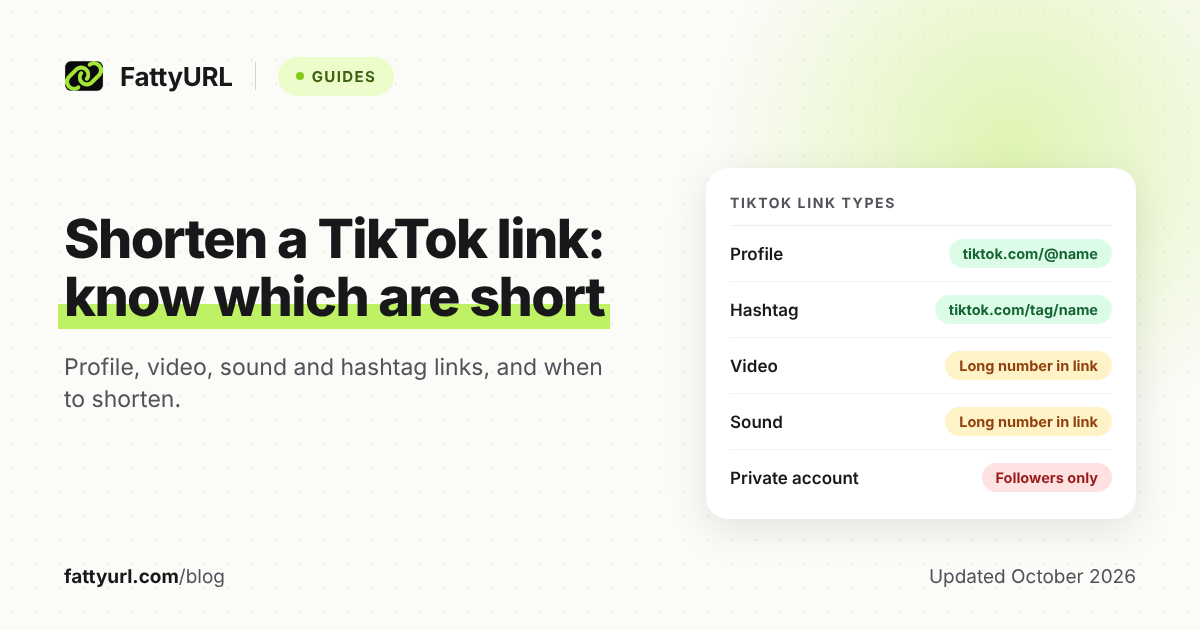
Your TikTok profile link is already short: tiktok.com/@ followed by your username. Video links come from the Share button on the side of a post, and the full address ends in a long number.
Shorten a TikTok link when you need a printed address you can repoint later, or click counts for each place you share it. For a quick share in a chat, TikTok's own link does the job.
Short answer: Share a profile with tiktok.com/@yourusername, or tap Profile, then Share profile. For a video, tap the Share button on the side of the post and choose how to share it. Profile links are already short, so make your own only for print, click counts, or one address you can repoint to new videos.
What is my TikTok profile link?
Your profile link is tiktok.com/@ followed by your username. TikTok's developer pages write it in full as https://www.tiktok.com/@scout2015 for their example account. To share it from the app, tap Profile at the bottom, then Share profile, and choose how you'd like to share it.
To share another creator's profile, open it and tap their profile picture or the Share button at the top. On a computer, open the profile on tiktok.com and copy the address from your browser.
Because anyone can read and type it, a profile link rarely needs a shortener. TikTok also makes a QR code for your profile: tap Profile, then the Menu button at the top, then My QR code.
On a private account, only approved followers can watch your videos. Your name, username and profile photo stay visible to everyone, including people not on TikTok.
Because the username is part of the address, a new username means a new profile link. If you might change your username, print a short link you control, so you only change its destination later.
How do you copy a TikTok video link?
In the TikTok app, go to the post, tap the Share button on the side, and choose how you'd like to share it. On a computer, open the video's page on tiktok.com and copy the address from your browser. That full address reads tiktok.com/@username/video/ followed by a long number.
- In the TikTok app, go to the post.
- Tap the Share button on the side of the post.
- Choose how you'd like to share it: pick an app from the list, or copy the link to paste anywhere.
- Open the pasted link once on another device to check it lands on the right post.
TikTok's sharing help says to "choose how you'd like to share" and doesn't name the copy option. Its crediting help does confirm you can copy and paste a video's URL.
Sharing to another app has a side effect that TikTok spells out. When you send a post to a friend on another platform, TikTok also sends it to them on TikTok. That happens if they tap the link and allow direct messages from others.
For your own website, TikTok offers an official embed instead of a link. Its developer guide says to open the video on tiktok.com in a non-mobile browser, click the Share button (the right-facing arrow), then Embed. Paste the code into your page; profiles have a similar Embed option, except private and underage accounts.
Why does a copied TikTok link look like vm.tiktok.com?
Links copied from the app's share panel can come out as a short code on vm.tiktok.com or under tiktok.com/t/, instead of the full address. TikTok's sharing help doesn't explain these formats, and the developer pages we checked show only full addresses. Both sit on TikTok's own domain, so they're TikTok's links, not a third party's.
They're already short, so shortening one again adds little. Make your own link from it only when you want a readable ending, click counts you can see, or a destination you can change.
When you can, shorten the full tiktok.com address instead. It's the format TikTok documents, and your link list then shows at a glance whose video each link opens.
Which TikTok links are already short?
Profile and hashtag links are short and readable. Video and sound links carry long numbers, so those are the ones worth shortening for print or speech. The table pairs the sharing steps from TikTok's Help Center with the address formats on TikTok's developer pages.
Checked 28 October 2026.
| Link | How to share it in the app | Address and length |
|---|---|---|
| Your profile | Profile, then Share profile | tiktok.com/@username: already short |
| Another creator's profile | Their profile picture, or the Share button at the top | tiktok.com/@username: already short |
| Video (post) | Share button on the side of the post | tiktok.com/@username/video/ plus a long number (19 digits in TikTok's example): long |
| Sound | Sound button at the bottom of a post, or search; then Share at the top | tiktok.com/music/ plus a name and a long number: long |
| Hashtag | Tap it in a description or search; open the Hashtags tab, tap the hashtag, then Share at the top | tiktok.com/tag/ plus the hashtag: short |
TikTok's own example of a sound address is tiktok.com/music/original-sound-6689804660171082501. TikTok's sharing help has no section on LIVE, so LIVE isn't in the table.
When should you make your own short link for TikTok?
Make your own short link for three jobs. Use it on print you may need to repoint, to count clicks from each place you share, and as a "latest video" link. For a quick share in a chat, TikTok's own link is enough.
| Where the link goes | Best link | Why |
|---|---|---|
| One video sent in WhatsApp, a text or an email to a friend | TikTok's share link | Fine for a one-off; nothing to update later |
| Your profile on a website, email signature or business card | tiktok.com/@username | Short and readable; use your own link if you want click counts |
| Flyers, menus, stickers or packaging | Your own short link, plus a QR code made from it | You can repoint it later without reprinting |
| A "latest video" link in a newsletter or on another site | One short link you edit after each post | Same address, new destination |
| Comparing which place sends the most clicks | One short link per place | Each link's clicks show which place works |
| A video on your own website | TikTok's Embed code | The video loads on your page |
Repointing is the main reason to bother. Print a link such as fattyurl.com/yourname-latest once, then change its destination each time you post. Every flyer and old email follows.
TikTok's rules for clickable links in your bio are covered in our guide to how short links behave on each social platform. Instagram has its own guide to shortening Instagram links.
How do you shorten a TikTok link?
Copy the TikTok link, paste it into a URL shortener, and create the short link. FattyURL needs no account for a quick link. For anything printed or long-lived, sign in to a free account, because links made without one expire after 30 days without a click.
- Copy the TikTok link, ideally the full tiktok.com address.
- Sign in to a free FattyURL account, so the link never expires and you can edit it later.
- Paste the link into the box on the FattyURL home page and create the short link. Your free account lets you set a custom ending of 6 to 100 characters, such as yourname-tiktok.
- Open the short link in a private browser window and check it lands on the right profile or post.
- For print, make the QR code from the short link. FattyURL exports PNG or SVG in any colors, with no watermark.
Each scan of that QR code counts as a click on the short link. On a free account, analytics show total clicks, unique visitors, and clicks over 7, 30, 90 or 365 days. They also break clicks down by country, city, device, browser, operating system and referrer.
For readable endings, see how to choose a custom short link. To compare places with tagged links, read how to track link clicks with UTM tags. For print, see our guide to making a QR code for a link.
Free links may show ads; links on a paid plan never do. FattyURL has no team workspaces or integrations, and its API and bulk CSV import are paid only. If a team manages your links, or you want links made automatically, a shortener with those features fits better.
Why won't my TikTok link open for other people?
Check privacy first, because the post's and account's settings decide who can watch, not the link. In TikTok's post settings, only Everyone covers "people on or off TikTok"; Friends and Only you are narrower. On a private account, only approved followers can watch your videos.
Checked 28 October 2026.
| Problem | Likely cause | Fix |
|---|---|---|
| Others see your name and photo, but no videos | Private account: only approved followers can watch | Approve them as followers, or turn off Private account: Profile, Menu, Settings and privacy, Privacy |
| One post won't play for others, though the rest do | The post is set to Friends or Only you | Profile, open the post, More options, Privacy settings, then Everyone (public accounts) |
| You can't switch a post to Everyone | Depending on age and location, posts can default to Only you until a certain age | TikTok doesn't allow the change until then |
| A profile embed on your website shows the account as private | Private and underage accounts can't be embedded; accounts with no age set show as private | Embed from a public account with its age set |
| A printed profile link after a username change | The printed address holds the old username | Point your short link to the new tiktok.com/@ address; reprint a raw address |
| A FattyURL link made without an account stopped working | Those expire after 30 days without a click | Make links with a free account; those never expire |
For anything else, such as a short link that opens an error page, see our short link troubleshooting guide.
FAQ
How do I find my TikTok profile link?
It's tiktok.com/@ followed by your username. In the app, tap Profile, then Share profile, and choose how to share it. On a computer, open your profile on tiktok.com and copy the address from your browser.
Do TikTok links work for people without the app?
TikTok's Everyone setting includes people who aren't on TikTok, so a public post's link can reach people without the app. TikTok's developer docs note that its website behaves differently on mobile and desktop, so test your link on both before you print it.
Will my TikTok link change if I change my username?
Your profile address will, because it contains your username. Full video addresses include the username too, so test them after the change. A short link you control fixes printed copies: edit its destination to the new address.
Should I shorten a vm.tiktok.com link?
Only if you need click counts, a readable ending, or a link you can repoint. It's already short, and TikTok's sharing help doesn't document the format, so shorten the full tiktok.com address when you can.
How do I count clicks on a TikTok link I share?
Shorten it with a tool that has click analytics, and use a separate short link for each place you share it. On a free FattyURL account, each link shows total clicks and unique visitors, with country, device and referrer breakdowns.
Sources
- TikTok Help Center: Sharing on TikTok (posts, profiles, profile QR code, sounds, hashtags), read 28 October 2026
- TikTok Help Center: Post privacy settings, read 28 October 2026
- TikTok Help Center: Choosing between a private or public account, read 28 October 2026
- TikTok Help Center: Credit a video (copying a video URL), read 28 October 2026
- TikTok for Developers: Embed Videos (video, profile, sound and hashtag address formats; embed steps), read 28 October 2026
- TikTok for Developers: Embed Creator Profiles (private and underage accounts), read 28 October 2026
- TikTok for Developers: Video Object (share_url note on mobile and desktop), read 28 October 2026
- FattyURL pricing, read 28 October 2026
Disclaimer: This article is for general information only and is not legal or security advice. It was researched and drafted with the help of AI, and its facts were checked against the sources linked above, mostly each provider's own pricing, help and policy pages. URL shorteners, QR code tools and social platforms change their plans, prices and rules often, so confirm the details on the provider's website before you choose a plan, move your links or print a QR code. FattyURL is our own product. Spotted something out of date, or a FattyURL link being misused? Tell us and we will act on it.