How to Shorten a Facebook Link: Page, Profile, Post and Messenger (2026)
A Facebook Page with a username already has a short official link, facebook.com/yourname, and m.me opens a Messenger chat. Post and video links are long. Here are Meta's own formats and when a short link helps.
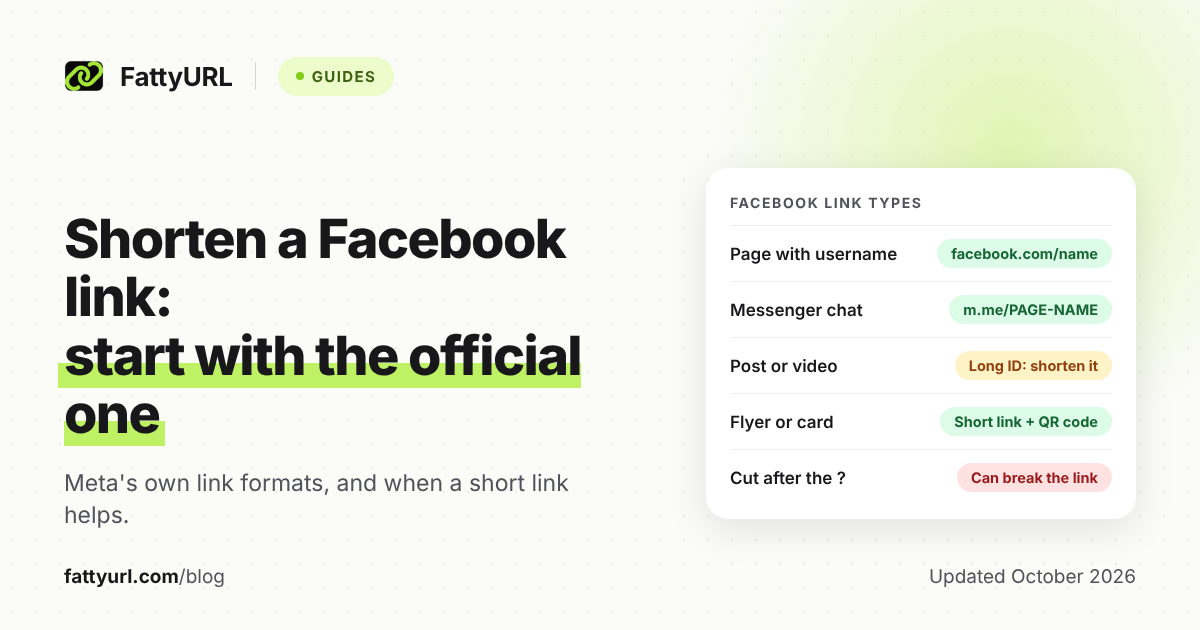
To shorten a Facebook link, start with the short official forms. A Page with a username already lives at facebook.com/yourname, and Meta's m.me links open a Messenger chat with a Page. Post and video links carry long numeric IDs, and that's where a URL shortener earns its place.
Every link format below comes from Meta's own developer documentation. After the formats come the cases where a short link beats the official one: print, click counts, and one link you can repoint later.
Short answer: If your Page has a username, share facebook.com/yourname; facebook.com/ is the same length as fattyurl.com/. For Messenger, use Meta's m.me/PAGE-NAME link. For a post or video, copy its link (on a computer, right-click the post's time) and paste it into a shortener. Sign in to a free FattyURL account so the link lasts, counts clicks and can be edited.
What does each kind of Facebook link look like?
Meta's developer documentation lists the official formats: a Page with a username lives at facebook.com/{username}, and without one at facebook.com/{page-id}. Posts and videos add a long numeric ID, and Messenger chats use m.me/PAGE-NAME. Only the username and m.me forms are short and readable as they are.
Checked 28 October 2026. Curly braces mark the parts that change.
| Link type | Official format in Meta's docs | Already short? |
|---|---|---|
| Page with a username | facebook.com/{username}, such as facebook.com/platform | Usually: Meta's example is 21 characters |
| Page without a username | facebook.com/{page-id} | No: an ID, not a name |
| Post on a Page or profile | facebook.com/{page-name}/posts/{post-id} or facebook.com/{username}/posts/{post-id} | No: Meta's example post links run 61 to 70 characters |
| Post, photo or video by ID | facebook.com/permalink.php?story_fbid={post-id}&id={page-or-user-id}, photo.php?fbid={photo-id} or video.php?v={video-id} | No, and the ID sits after the "?" |
| Video | facebook.com/{page-name}/videos/{video-id}/ | No: Meta's example video links run 59 to 69 characters |
| Messenger chat with a Page | m.me/PAGE-NAME | Yes: m.me/ is 5 characters |
| Group or event | Not listed in Meta's developer reference | Copy it from your browser and check |
Meta's Page reference writes the address as facebook.com/<pageusername>, with no https://www. in front. Three of these formats keep the ID after the question mark: permalink.php, photo.php and video.php. Trim everything after the "?" to tidy one of those, and the link no longer says which post, photo or video you mean.
How do you get a facebook.com/yourname link for your Page?
Give the Page a username, which Meta's developer reference calls the Page's alias: for www.facebook.com/platform, the username is "platform." Once it's set, facebook.com/yourname becomes your Page's short, readable address. Meta's reference links to Facebook's help article on Page usernames.
Until a username is set, the Page still has an address. Meta's oEmbed documentation accepts facebook.com/{page-id} as a Page link, but an ID means little to someone reading your poster.
Meta's brand guidelines add one naming rule: no Facebook trademarks, or anything similar, in your username or domain name. So leave "Facebook" out of both the Page username and any custom short domain you buy.
To copy the Page's current address, open the Page on facebook.com in a web browser and copy it from the address bar. That works in a phone's browser too.
How do you find your Facebook profile URL?
Open your profile on facebook.com in a web browser and copy the address from the address bar; a phone's browser works too. If the address is short and readable, share it as it is. If it's long, put a short link in front of it, ideally one with a custom ending people can type.
A profile link shows only what your privacy settings allow. Open it in a private browser window, where you're logged out, to see roughly what a stranger sees.
How do you copy the link to a Facebook post or video?
On a computer, Meta's developer docs give two ways to get a post's link. Open the post on its own page and copy the address bar, or right-click the post's publishing time and copy the link address. In the Facebook app, open the post's Share menu and use its copy link option.
Before you share it outside Facebook, check who can see it. Meta's docs mark a public post with a gray world icon next to its publishing time. A short link doesn't change a post's audience; it only forwards people to it.
Videos work the same way, and Meta's video docs add a clean form built from the video's ID alone: facebook.com/video.php?v={video-id}. Test the link in a private window before you shorten it.
How do you share a link to a Facebook group or event?
Open the group or event on facebook.com in a web browser and copy the address bar, or use the Share option in the app. Meta's developer reference pages for groups and events don't list a link format. So paste exactly what you copied, and test it while logged out before it goes on a poster.
The group's or event's own privacy settings still decide what outsiders see. A short link can't open a private group to people who aren't members.
Events are where an editable short link pays off. With a free FattyURL account, print one link such as fattyurl.com/acme-events and point it at this month's event. When the next event is posted, edit the destination, and every poster and email follows.
What is the m.me link for Facebook Messenger?
The m.me domain is Meta's own short link service for Messenger, which Meta says "redirects people to a person, page, or conversation in Messenger." For a Page, the documented format is m.me/PAGE-NAME. A click opens a new chat with the business, or the existing one if the person has messaged it before.
Meta's example uses a name written like a Page username, but its docs show the format only for Pages. So try m.me/ followed by your Page's username and check that it opens a chat with your Page. Meta suggests using m.me links on your website, in email newsletters and more.
Two optional extras are documented: a text parameter adds a custom message, as in m.me/PAGE-NAME?text=Hello. A ref parameter of up to 2,083 characters tells a Messenger app where the click came from. It matters only if you run such an app.
When is a short link better than the official Facebook link?
Use a short link when the official one is long, when you want click counts, or when the destination may change. For a Page with a username, length isn't the reason: facebook.com/ and fattyurl.com/ are both 13 characters. There, a short link earns its place with tracking and editing.
Checked 28 October 2026.
| Your goal | Best link | Why |
|---|---|---|
| Send people to your Page, no tracking needed | facebook.com/yourname | Official, readable and already short |
| Get people to message your Page | m.me/PAGE-NAME | Opens a Messenger chat with your Page |
| Share one post or video outside Facebook | A short link | Meta's example post and video links run 54 to 70 characters |
| Print it on a flyer, menu or card | A short link with a custom ending | Easy to type, and it never expires on a free FattyURL account |
| Send it somewhere new later without reprinting | A short link you can edit | Change the destination; printed copies follow |
| See which flyer, email or bio brings people in | One short link per place | Each short link has its own click analytics |
With a free FattyURL account, each link shows total clicks, unique visitors and clicks over 7, 30, 90 or 365 days. It also breaks clicks down by country, city, device, browser, operating system and referrer. For campaign tags on links to your own site, see how to track link clicks with UTM tags.
How do you shorten a Facebook link, step by step?
Copy the official link, test it while logged out, then paste it into a URL shortener. Sign in to a free account first if the link must last, count clicks or change later. Most shorteners work this way; these steps use FattyURL, which needs no account to start.
- Copy the official link using the methods above: your Page or profile address, m.me/PAGE-NAME, or a post, group or event link.
- Open it in a private browser window to check what people will see.
- Sign in to a free FattyURL account if the link should never expire. Links made without an account expire after 30 days without a click.
- Paste the link into the box on the FattyURL home page and create the short link.
- With the account, add a custom ending of 6 to 100 characters, such as fattyurl.com/acme-page, so people can read and type it.
- For print, make the QR code from the short link so each scan counts as a click; our QR code guide has the steps.
FattyURL checks every link against Google Web Risk when it's created, edited and clicked. Free links may show ads; links on a paid plan never do. Other services work much the same, with different free limits, laid out in our comparison of free URL shorteners.
Posting a short link inside Facebook raises separate questions, such as link previews, covered in how short links behave on each social platform. Sharing an Instagram profile as well? See how to shorten an Instagram link.
How should a Facebook link look on a flyer or business card?
Print the shortest address people can type, and test it from a phone before the print run. Meta's brand guidelines say you may use the "f" logo to point people to your presence on Facebook. They also say not to write the word "Facebook" next to the logo.
The same page sets the logo's minimum print size at 6mm wide, just under a quarter inch. Clear space around it is a quarter of the logo's width. The main version is Facebook Blue with a white "f," and Meta asks you not to recolor it to your brand colors.
To count visits from one flyer, print a short link with a custom ending, such as fattyurl.com/acme-page. Use it only on that flyer, and its click count shows what the flyer brought in. For picking a good ending, see our guide to custom short links.
FAQ
Can I shorten a Facebook link without a URL shortener?
For a Page, yes: set a username and share facebook.com/yourname, or m.me/PAGE-NAME for Messenger. Every post and video format in Meta's docs includes a long ID, though. For those, a short link is the practical way to get something people can type.
What happens to my short link if I change my Page username?
The short link keeps forwarding to the address you gave it. With a free FattyURL account, edit the destination to the new facebook.com address and test it. Every printed copy of the short link follows the change.
Can a short link open a private group or a friends-only post?
No. A short link only forwards people to the Facebook address, and Facebook's privacy settings still decide what they can see. Check the post's audience icon, or the group's privacy, before you print anything.
Do short Facebook links expire?
That depends on the shortener. On FattyURL, links made without an account expire after 30 days without a click; links on a free account never expire. If the post itself is deleted, the short link still forwards to the old address, so edit it.
Sources
- Meta for Developers: Graph API reference, Page (username field, facebook.com/<pageusername> form, link to the Page username help article), read 28 October 2026
- Meta for Developers: oEmbed (accepted Page, post, photo and video URL formats), read 28 October 2026
- Meta for Developers: Embedded Posts (two ways to get a post's URL, public posts and the gray world icon, example post link), read 28 October 2026
- Meta for Developers: Embedded Video Player (video links, video.php?v= form), read 28 October 2026
- Meta for Developers: Graph API reference, Post (permalink_url example), read 28 October 2026
- Meta for Developers: m.me Links, read 28 October 2026
- Meta for Developers: Graph API reference for Group and Event (no link format listed), read 28 October 2026
- Meta Brand Resource Center: Facebook logo guidelines, read 28 October 2026
- Facebook Help: Page username (linked from Meta's Page reference; its steps are not repeated here)
- FattyURL pricing, read 28 October 2026
Disclaimer: This article is for general information only and is not legal or security advice. It was researched and drafted with the help of AI, and its facts were checked against the sources linked above, mostly each provider's own pricing, help and policy pages. URL shorteners, QR code tools and social platforms change their plans, prices and rules often, so confirm the details on the provider's website before you choose a plan, move your links or print a QR code. FattyURL is our own product. Spotted something out of date, or a FattyURL link being misused? Tell us and we will act on it.