How to Shorten a Pinterest Link for Pins, Boards and Profiles (2026)
Copy a Pin, board or profile link with the share icon in Pinterest. Pinterest says it does not allow certain URL shorteners, so use short links outside Pinterest.
To get a short Pinterest link, open the Pin, board or profile in the Pinterest app, tap the share icon, then tap Copy link. Paste it where you want it. For a Pin's own destination link, Pinterest says to link straight to the source.
That second point trips up sellers most. Pinterest says it does not allow certain URL shorteners, so a shortened link inside a Pin can be blocked. Here is what Pinterest says and where a FattyURL link does fit.
Short answer: To share a Pin, board or profile, use the share icon and Copy link in the Pinterest app. Do not put a shortened link in a Pin's Link field: Pinterest says it does not allow certain redirects or URL shorteners. Use a FattyURL short link outside Pinterest, such as in a bio, email or QR code, to count clicks.
How do I get a short link to a Pinterest pin?
Pinterest's help center shows the share icon on every Pin, board and profile. In the mobile app, tapping it gives you a Copy link option you can paste into another app.
- Open the Pin, board or profile you want to share.
- Tap the share icon. For a Pin it sits at the bottom of the Pin. For a profile it sits below the profile name.
- Tap Copy link.
- Paste the link into your message, email or bio.
On the web, Pinterest's page describes the share icon and a Send option for people on Pinterest. It does not describe a copy-link button there, so use the address bar if you do not see one.
What is a pin.it link?
A pin.it link is a short address on the pin.it domain. None of the Pinterest help or policy pages we read mention pin.it, so we cannot confirm who issues these links or when the app gives you one.
Before you share a pin.it link, open it and check it lands on the Pin or board you expect. If it does, it is already short. Shorten it again only if you want click counts, covered below.
Which Pinterest link should I use for what?
Each link type points to something different. Pick the one that matches where you want people to land. Checked 1 November 2026 against Pinterest's help pages.
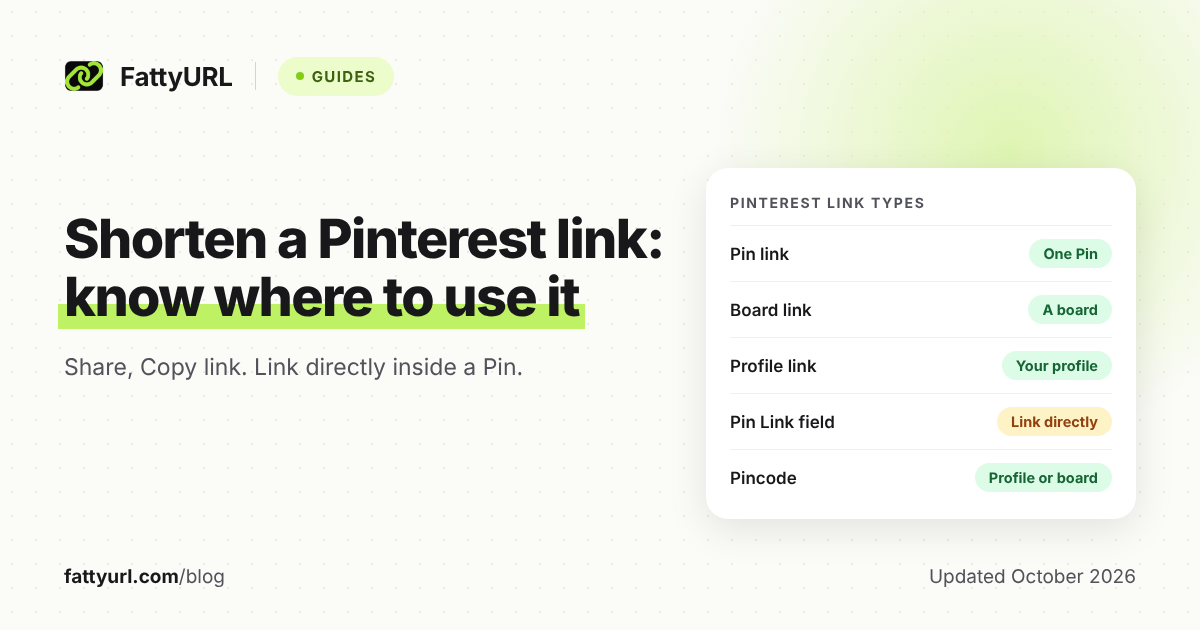
| Link type | Where it sends people | Use it for |
|---|---|---|
| Pin link | One Pin on Pinterest | Sharing a single product or idea |
| Board link | A board of Pins | A themed collection, such as a gift guide |
| Profile link | Your Pinterest profile | Bios and email signatures |
| Pin's Link field | Your own website page | Sending Pin viewers to your shop; link directly |
| Pincode | Your profile or a board | Flyers and packaging, scanned in Pinterest Lens |
The first three are the ones Pinterest's share page covers. The fourth is the link field you edit on a Pin you created. The fifth is covered in the QR code section below.
Does Pinterest allow third-party short links?
Only in a limited way. Pinterest's help center says it does not allow certain redirects or URL shorteners and tells you to link directly to the source. Its community guidelines also single out shortener services that are abused for spam.
The guidelines also ask for a "no surprises" principle, so people can anticipate where a link goes. They also flag excessive or deceptive redirection. Pinterest does not publish a list of allowed or banned shorteners on the pages we read.
Our advice: in the Link field of a Pin, paste your full destination URL. A short link there is a risk you do not need to take.
What if Pinterest blocked my link?
Pinterest says it may block links that redirect to other pages, or that look misleading or spammy. If a link on your own Pin is blocked or wrong, you can edit it.
- Open the Pin you created.
- On desktop, click the edit icon. In the app, tap the ellipsis icon, then Edit Pin.
- Replace the address in the Website field with your direct URL.
- Tap Save or Done.
You cannot change the link on Pins you saved from Pinterest or added with the browser button. If a short link was the cause, a direct link is the fix.
Where does a FattyURL link fit with Pinterest?
Use it wherever you send people to Pinterest, not inside the Pin. Paste your Pin, board or profile link into FattyURL, then share the short link in a newsletter, a bio on another site or a printed flyer.
FattyURL needs no account to shorten a link. With a free account you get click analytics: total clicks, unique visitors, clicks over time, country, city, device, browser, operating system and referrer. You can also pick a custom ending and change the destination later.
Free links may show ads. Links on a paid plan never do. Links made without an account expire after 30 days without a click, while links from a free account never expire.
How do I track clicks on a Pinterest link?
Make a FattyURL link to your Pin or board while signed in, share that short link, and read its analytics. Each click on the short link is counted, with its referrer, country and device.
This counts visits to the Pinterest link from outside. It does not count clicks from a Pin to your own site, because that Pin should hold your direct URL.
Can I make a QR code for my Pinterest board?
Yes. Pinterest offers its own Pincode, a code for your profile or a board that people scan with Pinterest Lens. Board Pincodes depend on account type and device, and a deleted board's Pincode stops working.
A FattyURL QR code is another option. Shorten the board link with a free account, then make the QR code from that short link. Each scan opens the short link and counts as a click, and you can change where it points without reprinting. QR codes can be PNG or SVG, in any colors, with no watermark.
To start now, shorten a Pinterest link or make a QR code on FattyURL.
Where do other platforms and tools fit?
For links on other networks, read how short links behave on each social platform. For the general method, see how to shorten a link.
Sharing the same product on other apps? See how to shorten an Instagram profile, post or Reel link, shorten a Facebook Page or post link and find and shorten your TikTok link.
FAQ
Can I use a shortened link in a Pin?
Pinterest says it does not allow certain redirects or URL shorteners and recommends linking directly to the source. Use your full URL in the Link field.
How do I shorten a Pinterest board link?
Copy the board link with the share icon and Copy link in the app, then paste it into a shortener such as FattyURL. Share the short link outside Pinterest.
Why does my Pinterest link say blocked?
Pinterest says it blocks links that redirect to other pages or look misleading or spammy. Edit the Pin and use a direct link if it is your own Pin.
Can I track clicks on a Pinterest link?
Yes, for the short link you share. A FattyURL link from a free account shows total clicks, unique visitors, country, device and referrer.
Does a Pinterest link expire?
Pinterest's pages we read do not say. A FattyURL link made without an account expires after 30 days without a click. Free-account links never expire.
Sources
- Pinterest Help: Send Pins, boards and profiles, read 1 November 2026
- Pinterest Help: Fix a broken link, read 1 November 2026
- Pinterest Help: Edit or delete a Pin, read 1 November 2026
- Pinterest Community Guidelines, read 1 November 2026
- Pinterest Help: Create Pincodes, read 1 November 2026
- FattyURL promise page, read 1 November 2026
Disclaimer: This article is for general information only and is not legal or security advice. It was researched and drafted with the help of AI, and its facts were checked against the sources linked above, mostly each provider's own pricing, help and policy pages. URL shorteners, QR code tools and social platforms change their plans, prices and rules often, so confirm the details on the provider's website before you choose a plan, move your links or print a QR code. FattyURL is our own product. Spotted something out of date, or a FattyURL link being misused? Tell us and we will act on it.