How to Shorten an iCloud Link (and When It Expires) in 2026
Copy your iCloud Drive, Photos or Shared Album link, paste it into FattyURL, and share the short version. Apple's photo links and Mail Drop expire after 30 days.
You can shorten an iCloud link by copying it, pasting it into a URL shortener such as FattyURL, and sharing the short version. The short link simply forwards to the long iCloud address, so it works only while the iCloud link does.
That second part matters most. Apple's iCloud link types last different lengths of time, and some have no stated end date at all. This guide shows how to copy each link type, how to shorten it, and when it will stop working.
Short answer: Copy the link from iCloud Drive, Photos or a Shared Album, paste it into FattyURL's homepage, and share the short link. No account is needed. Apple says iCloud Links for photos expire after 30 days and Mail Drop attachments after 30 days. A short link cannot revive an iCloud link that has expired or been turned off.
How do I shorten an iCloud link?
Copy the full iCloud link, paste it into a shortener, and copy the result. FattyURL needs no account for this, and the short link opens the same iCloud page as the original.
- Create and copy your iCloud link using the section below that matches what you are sharing.
- Open FattyURL and paste the iCloud link into the box.
- Shorten it and copy the short link.
- Open the short link in a private window to confirm it lands on the iCloud page.
- Send the short link by text, email or message.
Without an account, FattyURL allows up to 10 links an hour and 50 a day per device. Links made without an account expire after 30 days without a click. A free account keeps links from expiring and lets you edit where a link points later.
For phone-specific routes, see how to shorten a link on iPhone or iPad.
How do I get a share link for an iCloud Drive file or folder?
On iCloud.com, open iCloud Drive, choose Share for the file or folder, set who can access it, then click Create Link and Copy Link. Apple's iCloud.com and iPhone pages state no expiry for these links.
Here is how Apple's iCloud.com page describes the steps today:
- Go to icloud.com/iclouddrive and sign in with your Apple Account.
- Click the More button next to the item (hover over it on a computer), then choose Share.
- Choose who can access it: People you choose, or Anyone with the Link.
- Choose the participant option: Edit, or View and Download Only.
- Click Create Link, then Copy Link.
For people outside your family, the Anyone with the Link option is the simplest choice. Apple warns that invitees can pass that link on to others you did not invite.
In the Files app on iPhone, touch and hold the item, tap Share, tap the menu under its title, then tap Share a Link. On a Mac, the iCloud.com steps above work in a browser.
Items inside a shared folder follow the folder's settings. You cannot give one file inside it different permissions. If the file is a PDF you want to turn into a clean link, see how to turn a PDF into a link.
How do I get an iCloud Link for photos and videos?
On iCloud.com, open Photos, select the photos or videos, tap the Share button and choose Copy Link. Apple says anyone with the link can view the items. The link expires on its own after 30 days, and you can stop sharing before then.
- Go to icloud.com/photos and sign in to your Apple Account if asked.
- Tap Select, then tap the photos and videos you want to share.
- Tap the Share button, choose Copy Link, then tap Copy.
- Paste the link into FattyURL and shorten it as shown above.
Apple writes these steps for iCloud.com on iPhone, so on a computer, click where it says tap. Apple also notes that iCloud Links are not available in every country or region.
One catch: on iCloud.com you can share only from your personal library. Apple says to share items in an iCloud Shared Photo Library from the Photos app on iOS 16.1, iPadOS 16, macOS 13 or later. For an album others can add to, Apple points to a Shared Album instead.
How do I get a link to an iCloud Shared Album?
Turn on Public Website for the Shared Album, then copy the link. Apple's page says that with Public Website on, you can copy the link and send it. It does not state an expiry for that link.
A Public Website link lets anyone who has it view the album on iCloud.com. That suits relatives, clients or a team outside your Apple family. Think before posting it publicly, because anyone holding the link can open it.
Apple also describes a one-time invite link: choose Invite Participant, then Create Link, and make a new link to invite more people. Because each link is one-time, do not shorten and broadcast it to a group. Use the Public Website link for that.
Apple's page also describes a Make Album Temporary option, which sets the album to expire after 30 days. Photos or videos not saved to a photo library are then deleted. Leave it off if you want a lasting album.
Photos from Google instead? That is a different service, covered in how to shorten a Google Photos link.
How long does each iCloud link last?
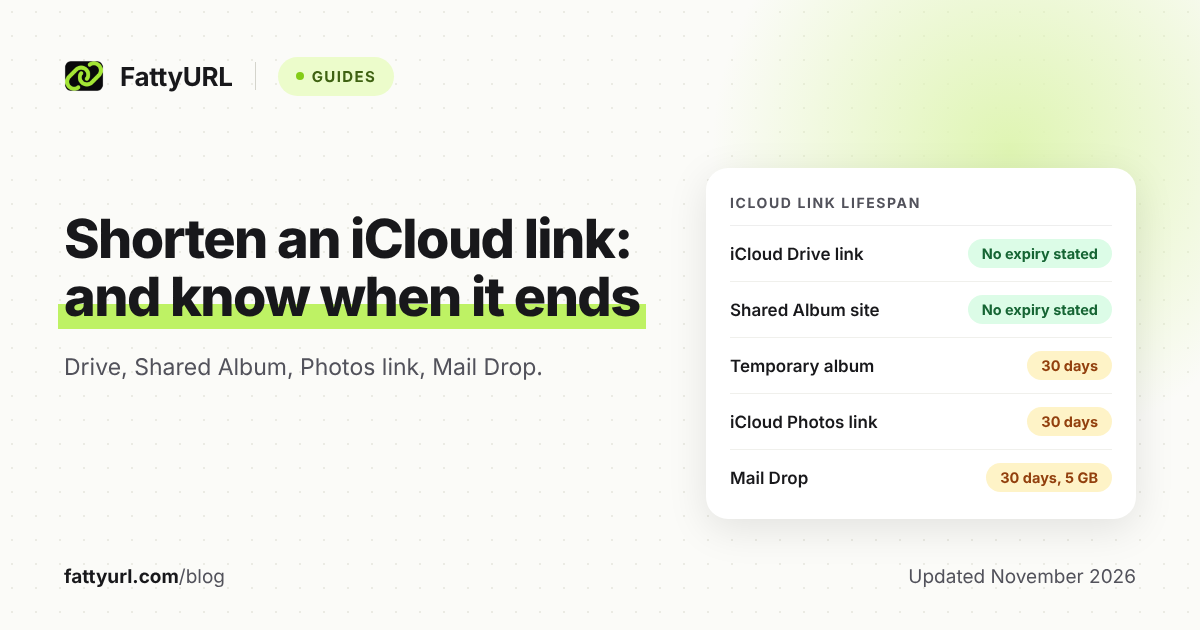
It depends on the type. Apple says iCloud Links for photos, Mail Drop attachments and temporary shared albums each last 30 days. Its pages for iCloud Drive share links and Shared Album public websites state no expiry.
Checked 14 November 2026, against Apple's own support pages.
| iCloud link type | How long it lasts, per Apple | Source page |
|---|---|---|
| iCloud Drive file or folder link | No expiry stated on Apple's pages | Share files and folders (iCloud.com and iPhone) |
| Shared Album public website | No expiry stated for the link; a temporary album expires after 30 days | Create and join shared albums (iCloud.com) |
| iCloud Photos link | "iCloud Links automatically expire after 30 days" | Share photos with an iCloud Link (iCloud.com) |
| Mail Drop attachment | Each attachment expires after 30 days; up to 5 GB | Mail Drop limits |
"No expiry stated" is not a promise that a link lasts forever. It only means Apple's page gives no duration. The owner can still turn sharing off at any time.
What happens to a short link when the iCloud link expires?
The short link still forwards, but the iCloud address behind it no longer opens your files. A shortener only sends visitors to the address you gave it, so it cannot extend, renew or restore the original. You need a fresh iCloud link.
This happens in four cases:
- The iCloud link reached its stated 30 days (photo links, Mail Drop, temporary albums).
- You turned sharing off, removed the share link or deleted the file or album.
- You switched a Drive item to People you choose, which Apple says breaks the original link.
- For a one-time invite, someone already used it.
The fix is to create a fresh iCloud link and update the short link. With a free FattyURL account you can edit a link's destination later, so people holding the old short link reach the new page. Without an account, you would have to send a new short link.
For the general picture, see whether short links expire.
Why is my iCloud link expired or not opening?
Check the link type first. Photo links, Mail Drop attachments and temporary albums end after 30 days, per Apple. If it is older, ask the sender for a new one, or make one yourself in iCloud if you shared it.
| What you see | Likely cause | What to do |
|---|---|---|
| Photo link says expired | Past 30 days | Create a new iCloud Link |
| Mail Drop download gone | Past 30 days | Resend the attachment |
| Drive link asks for access | Set to People you choose | Switch to Anyone with the Link, or approve the request |
| Drive link stopped working | Access changed to People you choose | Set Anyone with the Link, then copy the link again |
| Album link will not open | Public Website turned off | Turn it on and copy the link again |
To stop sharing photo links on purpose, open icloud.com/photos and choose iCloud Links in the sidebar. Apple says to tap Edit, then Remove on the collection, then Stop Sharing.
Is it safe to share an iCloud link publicly?
Only as safe as the people who get it. The Anyone with the Link setting means exactly that. Set sensitive files to People you choose instead, and remember that a short link does not limit who can open the page.
Recipients should also check where any short link goes before signing in or paying. See are URL shorteners safe for how to preview a destination. Free FattyURL links may show ads; links on a paid plan never do.
If your files are in Dropbox rather than iCloud, the steps differ: see how to shorten a Dropbox link.
FAQ
Can I shorten an iCloud link for free?
Yes. FattyURL needs no account to shorten a link. Without an account, links expire after 30 days without a click. A free account stops that.
Does the short link change who can open my iCloud file?
No. Access is still set in iCloud. Anyone with the short link can reach the same page, and iCloud's own settings still decide what they can do there.
How long does an iCloud Drive share link last?
Apple's pages on sharing files and folders, for iCloud.com and iPhone, state no expiry. Apple does say that switching to People you choose breaks the original link.
Do iCloud Shared Album links expire?
Apple's page gives no expiry for the Public Website link. A temporary album, though, is set to expire after 30 days.
Why does my iCloud photo link say it expired?
Apple says iCloud Links for photos and videos end on their own after 30 days. Ask for, or create, a new link.
Can I update the short link after the iCloud link changes?
With a free FattyURL account, yes: you can edit where a link points, so the same short link leads to the new iCloud page.
Sources
- Apple: Share files and folders in iCloud Drive on iCloud.com, read 14 November 2026
- Apple: Share files and folders in iCloud Drive on iPhone, read 14 November 2026
- Apple: Create and join shared albums in Photos on iCloud.com, read 14 November 2026
- Apple: Share photos and videos with an iCloud Link on iCloud.com, read 14 November 2026
- Apple: Mail Drop limits, read 14 November 2026
- FattyURL promise page, read 14 November 2026
Disclaimer: This article is for general information only and is not legal or security advice. It was researched and drafted with the help of AI, and its facts were checked against the sources linked above, mostly each provider's own pricing, help and policy pages. URL shorteners, QR code tools and social platforms change their plans, prices and rules often, so confirm the details on the provider's website before you choose a plan, move your links or print a QR code. FattyURL is our own product. Spotted something out of date, or a FattyURL link being misused? Tell us and we will act on it.