Is This Link Safe? How to Check a Short URL Before You Click
Treat an unexpected short URL as unsafe until you can see the real destination. Expand it first, read the final domain, and never use a surprise link to log in or pay.
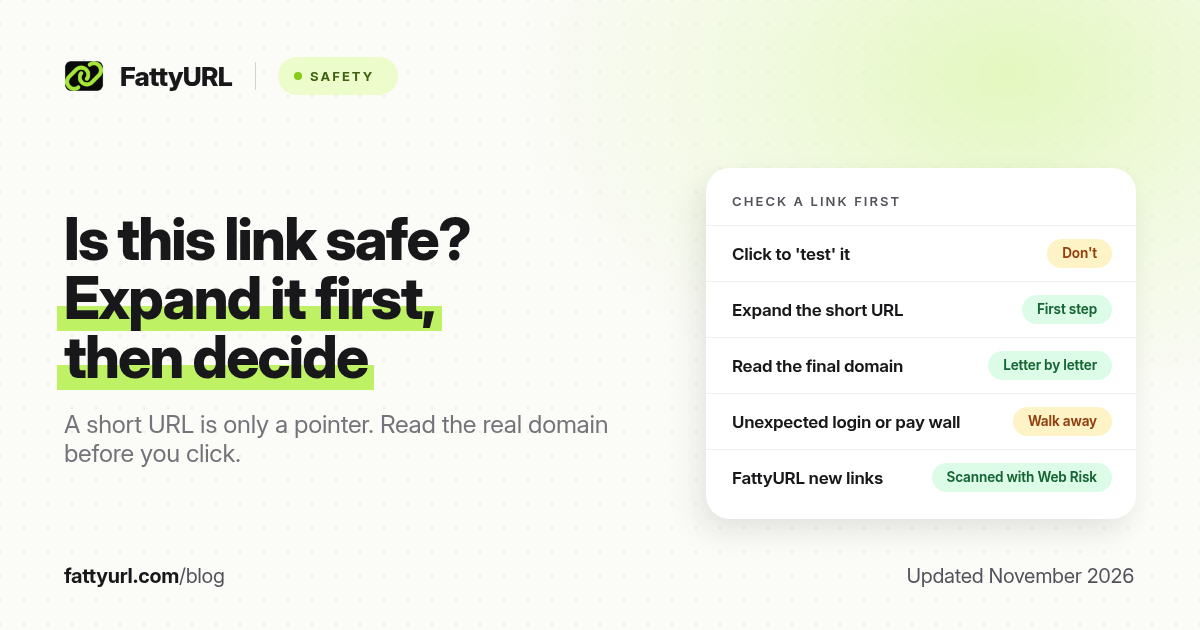
Short answer: Treat an unexpected link as unsafe until you can see the real destination. Do not click it first. Expand any short URL with a preview tool, read the final domain carefully, and look for login pages, misspelled brands, or urgent payment requests. FattyURL is a free URL shortener at fattyurl.com; we scan new links with Google Web Risk, but you should still inspect a link you did not expect before you open it.
People search "is this link safe" when a short URL, text, email or QR code arrives from someone they are not sure about. This guide is a practical checklist for that moment. It complements our explainer on whether URL shorteners themselves are safe and our URL expander guide. It is not a verdict on any one message, and it is not a substitute for your browser, antivirus or a security team. Do not paste passwords into a page you reached from a surprise link.
Why short links make people nervous
A short link hides the destination behind a compact address, such as fattyurl.com/spring-sale or bit.ly/xxxxx. That is useful on a flyer, in a text message, or in a QR code. It is also why scammers like short links: you cannot judge the site from the letters you can see. X (Twitter) wraps almost every URL in t.co as well, so even a familiar brand may look unfamiliar in a post.
Shorteners are not automatically dangerous. The risk is the page at the end, plus any prompt that asks you to sign in, install an app or pay. A safe habit is to reveal the destination first, then decide. Never test a suspicious link by clicking it "just to see."
How to check if a link is safe, step by step
Use this sequence on a computer or phone. Stay on a preview page until you are confident about the domain. If you are on a work device, follow your IT policy; some workplaces block expanders or want reports sent internally.
- Stop and look at the context. Who sent it, on what channel, and did you ask for it? A bank, payroll or delivery text that you were not expecting is a warning on its own, even if the link looks tidy.
- Do not click the short URL. Long-press or right-click only if your phone or browser shows a preview without opening the page. If it does not, leave the message and use a dedicated expander instead.
- Expand the short URL. Paste the address into a reputable URL expander or the shortener's own preview, if it offers one. You want the final https domain, not just the first redirect. Our expander guide lists cautious ways to do this without visiting the site.
- Read the final domain letter by letter. Check the name before the first slash, including the part just before .com, .net or .org. Watch for extra letters (paypa1, micros0ft), a different ending (.com vs .net), or a long subdomain that only looks like the brand at the end.
- Look at the page type, not the logo. A real company rarely asks you to "verify your account" from a text. Be wary of surprise login forms, crypto or gift-card payments, forced software downloads, and QR codes in email that skip to a sign-in screen.
- Search the brand yourself if you still need the service. Open a new tab, type the company's name into your browser, and use the official site or app you already trust. Do not reuse the link from the message.
- Report and delete if it is phishing. Use the platform's report tool, and see our guide on how to report a phishing short link. If you already entered a password, change it on the real site and consider a password manager and two-factor authentication.
What "safe" does and does not mean
No public checklist can promise that a link is harmless. "Safe" here means: the destination domain looks legitimate, the request matches something you expected, and nothing is asking you to bypass your usual login path. A clean domain can still host a compromised page later. A familiar shortener domain can still point at a scam. The table below is a field guide, not a score.
| Signal | Usually safer | Treat as unsafe until proven otherwise |
|---|---|---|
| How you got the link | You asked for it, or it came from a person you just spoke with on a second channel | Unsolicited text, email, DM, or a QR in an unexpected place |
| The final domain | Exactly the company's real domain, https, no odd spelling | Misspellings, extra words, a URL shortener still in the final address, or a raw IP address |
| What it asks you to do | Read a page, watch a video, or open a site you already use | Urgent payment, seed phrases, app installs, or a login to "avoid a shutdown" |
| The shortener | A known service, ideally one that lets the owner edit and track the link | A random or lookalike shortener, or a code you cannot expand |
How FattyURL tries to reduce risk
Disclosure: FattyURL is our product. When you create a link at fattyurl.com, we scan it with the Google Web Risk API. A free account lets you use a custom slug, see click counts and change the destination later, so a printed QR can keep pointing at a page you still control. Free-account links never expire. Guest links made without an account from 7 October 2026 expire after 30 days with no click. Free links may show ads; paid-plan links never do.
Those checks help, but they are not a reason to click a surprise FattyURL (or Bitly, TinyURL or t.co) link with no preview. If you share links, prefer a readable slug and a destination you would be comfortable showing on a business card. If you receive a link and cannot expand it, do not open it.
A Bitly warning or blocked page is one of the cases where the shortener itself is telling you to stop. If that is the page you landed on, or you own the flagged link and need to appeal, see why a Bitly warning or blocked page appears and what the owner should do next.
Key takeaways
- A short URL is only a pointer. Safety depends on the final domain and what the page asks you to do.
- Never click a surprise link to "check" it. Expand it first and read the destination character by character.
- Urgent payments, unexpected logins and misspelled brand names are enough reason to stop.
- If you need the real service, navigate to the company yourself rather than using the message's URL.
- Report phishing, and change passwords if you already signed in through a bad link.
FAQ
Is this link safe if it uses https?
Https only means the connection is encrypted to whatever site is in the address bar. A scam site can have a valid certificate. Always read the domain itself, not the padlock icon alone.
Are Bitly, TinyURL or FattyURL links safe?
The shortener domain is not the destination. Any of those services can point at a helpful page or a harmful one. Expand the short URL, then judge the final site. See also our pages on URL shortener safety and whether Bitly is safe.
How can I see where a short link goes without clicking it?
Paste the short URL into a URL expander or the shortener's preview, if it has one. You want the last https address in the redirect chain. Do not open the destination from the expander unless you have already decided the domain is legitimate.
What if a QR code will not expand?
A QR code is just a printed link. If your camera or a QR reader shows the URL, treat that URL like any other: expand it if it is short, then read the domain. If you cannot see the URL at all, do not scan a code from an untrusted flyer, email or window sticker.
I already clicked. What should I do?
If you only landed on a page and left, close it and run a scan if your device offers one. If you entered a password, change it on the real site from a new tab you typed yourself, then review email and bank alerts. If you shared codes, cards or wallet keys, contact the provider immediately.
Can I make safer short links for other people?
Yes. Use a shortener that lets you set a readable slug and edit the destination, test the link in a private window, and tell people where it should go. On FattyURL, a free account includes custom slugs, click analytics and destination edits, and you can add a QR code from the same dashboard at fattyurl.com/qr.
Sources
- FattyURL: URL expander, see where a short link goes before you click
- FattyURL: Are URL shorteners safe?
- FattyURL: How to report a phishing short link
- The FattyURL Promise
- Google: How to check if a website is safe (Safe Browsing guidance for users)
- CISA: Recognizing and avoiding email scams
Disclaimer: This article is for general information only and is not legal or security advice. It was researched and drafted with the help of AI, and its facts were checked against the sources linked above, mostly each provider's own pricing, help and policy pages. URL shorteners, QR code tools and social platforms change their plans, prices and rules often, so confirm the details on the provider's website before you choose a plan, move your links or print a QR code. FattyURL is our own product. Spotted something out of date, or a FattyURL link being misused? Tell us and we will act on it.