How to Shorten a WeTransfer Link and How Long It Lasts (2026)
Shorten a WeTransfer link by pasting it into a shortener. The transfer still expires: up to 3 days on Free and Starter. Here is the plan table and how to re-send.
You can shorten a WeTransfer link with any URL shortener: copy the download link, paste it into the shortener, and send the short version. The short link only redirects, so the transfer behind it still expires on WeTransfer's schedule.
That schedule matters more than the length of the link. On the free plan a transfer stays online for up to 3 days. A short link in a proposal or contract can go dead before the client opens it.
Short answer: Create a link transfer on WeTransfer, copy the link, and paste it into FattyURL to get a short one. No account is needed. The short link works only while the transfer lives: up to 3 days on Free and Starter, as long as you choose on Ultimate. After that, re-send the files. A free FattyURL account lets you point the same short link at the new transfer.
How do I get a link from WeTransfer?
Start a link transfer instead of an email transfer. WeTransfer then gives you a shareable link and you send it yourself, with no recipient field. The steps differ slightly between desktop and mobile.
On a desktop browser, per WeTransfer's Help Center page "How do I send a transfer?" (last updated 30 May 2026):
- In the transfer window, click the ellipsis icon at the bottom left.
- Select the link transfer option.
- Add your files and upload them.
- Copy the link and share it however you like.
On a mobile browser, tap Upload files, choose your files, then pick Get a link instead of Email transfer. Without an account, you verify your email before sending.
An email transfer works differently: WeTransfer emails the download link to each recipient separately. If you want a short link you can paste anywhere, use the link option.
How long does a WeTransfer link last?
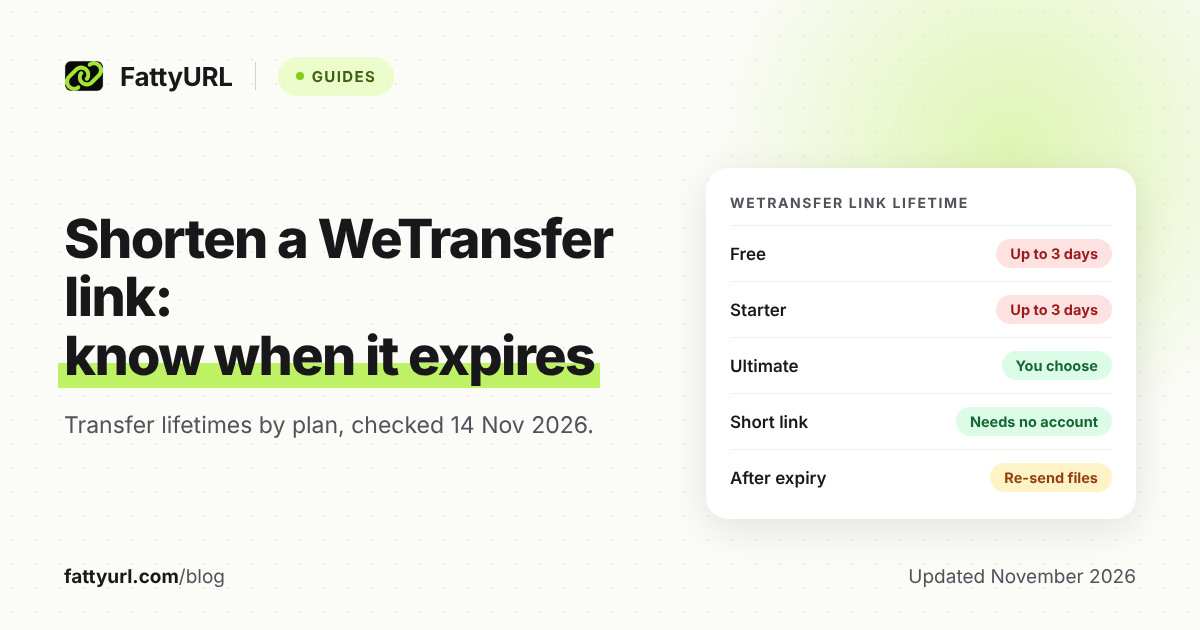
On the free plan and on Starter, a transfer stays online for up to 3 days. On Ultimate, the sender chooses how long it stays. The clock starts when the transfer is sent, and the sender sets the period at upload.
WeTransfer's help pages show when each was last updated, so check the date on any number you read. The table below comes from WeTransfer's own pages.
Checked 14 November 2026 against WeTransfer's Help Center and its expiry guide (the availability article was last updated 30 September 2026).
| Plan | How long the link works | Extend later? |
|---|---|---|
| Free | Up to 3 days | Not stated on the pages read |
| Starter | Up to 3 days | Not stated on the pages read |
| Ultimate | Any duration you choose, up to no expiry | Yes, from the Transfers tab |
| Teams and Enterprise | Same range as Ultimate | Not stated separately |
WeTransfer's availability help page says Free and Starter uploads stay online up to 3 days. Ultimate transfers can stay active "as long as you'd like."
WeTransfer's expiry guide says that on Ultimate and above, you can pick anything from one day to no expiry. The plan limits page says Teams includes everything in Ultimate.
One more rule matters for client work. If you cancel a paid subscription, WeTransfer deletes your active transfers 28 days after the cancellation.
Can I change when a WeTransfer link expires?
Yes, in part. Before sending, use the ellipsis button or the "Expires in" dropdown to set how long the transfer stays online. After sending, you can change the date from the Transfers tab, which WeTransfer's help page describes for transfers you have sent.
The help page for changing expiry does not list which plans can pick which durations. WeTransfer's expiry guide says Free and Starter accounts are capped at 3 days. So treat any extension on Free or Starter as unconfirmed until you see the option in your account.
The recipient's original email still shows the old date, so tell your client the new one yourself.
How do I shorten a WeTransfer link with FattyURL?
Paste the WeTransfer link into FattyURL and copy the short link it returns. You do not need an account. The short link redirects to the transfer page, so the files stay on WeTransfer and nothing about the transfer changes.
- Create a link transfer on WeTransfer and wait for the upload to finish.
- Copy the download link.
- Open FattyURL, paste the link, and shorten it.
- Open the short link yourself once to confirm it lands on the download page.
- Send the short link to your client and note the expiry date in your message.
A free FattyURL account adds a custom ending of 6 to 100 characters. It also lets you edit where the link points later. See how custom short links work.
The general method is the same for any URL, covered in how to shorten a link. A short link hides the address, so clients may want to know where it goes. How to check where a short link goes explains how.
What happens to the short link when the transfer expires?
The short link keeps redirecting, but it leads to a WeTransfer page for a transfer that is no longer available. A short link cannot revive files. WeTransfer controls the transfer, and FattyURL only controls the redirect.
FattyURL links made with a free account never expire. Links made without an account expire after 30 days without a click, which is longer than a free WeTransfer transfer lasts. Either way, the transfer is usually the first thing to go.
WeTransfer's help page says an expired transfer can be recovered only if the Recoverable option was on when it was sent. It also says recovery is limited to Ultimate, Teams and Enterprise users. Files under 256 MiB can be recovered for up to one year after expiry, and larger files for up to 90 days.
If you were on Free or Starter, or the transfer was not recoverable, plan to re-send.
How do I re-send files after a WeTransfer link expires?
Upload the files again as a new link transfer, and update the short link to point to it. With a free FattyURL account, you can edit the destination of the same short link, so the address your client already has keeps working.
- Make a new link transfer on WeTransfer and copy the new link.
- Sign in to FattyURL and open the short link you made earlier.
- Replace the destination with the new WeTransfer link and save.
- Tell your client the new expiry date.
Without an account, you cannot edit a link, so make a new short link and send that one.
For a short link that must outlive any transfer, consider a host that keeps files longer. Our guides to shortening Dropbox links and shortening Google Drive links cover those. What to do when a short URL expired covers the general case.
FAQ
Does shortening a WeTransfer link make it last longer?
No. The short link only redirects. The transfer expires on WeTransfer's schedule, whatever the link looks like.
How long does a free WeTransfer link last?
Up to 3 days according to WeTransfer's help page, checked 14 November 2026. The sender sets the period at upload.
Can I get a WeTransfer link without sending an email?
Yes. Choose the link option instead of an email transfer. On mobile it is called Get a link. You copy the link and share it yourself.
Is a shortened WeTransfer link safe to send to a client?
It goes to the same page as the original. Open it yourself before you send it, and tell your client what it leads to.
Can I recover an expired WeTransfer transfer?
Only if the Recoverable option was on when you sent it, and only on Ultimate, Teams or Enterprise. Otherwise, upload the files again.
Sources
- WeTransfer Help Center: How do I send a transfer?, read 14 November 2026
- WeTransfer Help Center: How long are transfers available to download?, read 14 November 2026
- WeTransfer Help Center: How can I set or modify the expiry date of my transfer?, read 14 November 2026
- WeTransfer Help Center: Can I download a transfer that expired?, read 14 November 2026
- WeTransfer expiry guide: Control exactly when your shared link stops working, read 14 November 2026
- WeTransfer Help Center: Plan limits, read 14 November 2026
Disclaimer: This article is for general information only and is not legal or security advice. It was researched and drafted with the help of AI, and its facts were checked against the sources linked above, mostly each provider's own pricing, help and policy pages. URL shorteners, QR code tools and social platforms change their plans, prices and rules often, so confirm the details on the provider's website before you choose a plan, move your links or print a QR code. FattyURL is our own product. Spotted something out of date, or a FattyURL link being misused? Tell us and we will act on it.