How to Track ChatGPT and AI Assistant Traffic in GA4 (2026)
GA4 has an AI Assistant channel for visits from ChatGPT, Gemini, Copilot, Grok and Deepseek. Here is where to find it, how to build a custom AI channel group, what ChatGPT adds to links, and what GA4 cannot see.
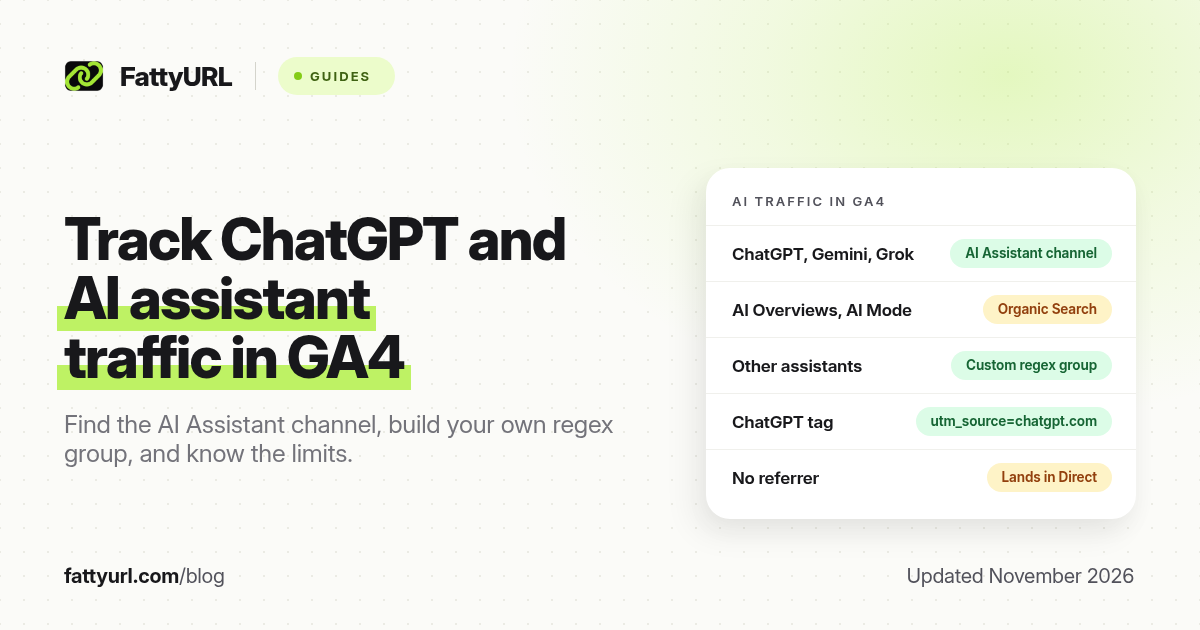
Short answer: GA4's default channel group now has an AI Assistant channel for visits from sources like ChatGPT, Gemini, Deepseek, Copilot and Grok. Open Reports, Acquisition, Traffic acquisition and look for that channel. For a custom view, build a channel group with a regex on source and place it above Referral. Google's AI Overviews and AI Mode count as Organic Search. FattyURL is a free URL shortener at fattyurl.com.
US marketers and small-business owners keep asking the same question: is anyone actually reaching our site from ChatGPT and other AI assistants? Google Analytics 4 can answer part of it. This guide explains where AI traffic shows up in GA4, how to build your own channel for it, what ChatGPT adds to its links, and the limits you should know before you report the numbers to a client or boss. Every step below comes from Google's own help pages, checked on 27 November 2026.
Where does AI assistant traffic show up in GA4?
Google's "Default channel group" article lists a channel called AI Assistant. It describes it as the channel by which users arrive from sources like ChatGPT, Gemini, Deepseek, Copilot or Grok, and says it excludes Google's AI Overviews and AI Mode. Those two count toward Organic Search instead.
The rule behind it, per the same article: the channel matches when the medium is exactly ai-assistant, and GA4 sets the medium to ai-assistant and the campaign to (ai-assistant) when the referrer matches its list of AI assistants.
To see it:
- In GA4, open Reports, then Acquisition, then Traffic acquisition.
- Keep the primary dimension on Session default channel group and look for AI Assistant.
- Switch the dimension to Session source / medium to see which assistant sent each session.
- Add Landing page as a secondary dimension to see which pages AI assistants send people to.
How to build a custom AI channel group
If you want your own grouping, for example to include an assistant that is not on Google's list, Google's "Custom channel groups" article includes an AI assistants example. The steps, in short:
- Go to Admin, then Data display, then Channel groups, and create a new group or copy the default.
- Add a channel named, for example, "AI assistants."
- Add a condition on source that matches regex, listing the assistants you care about, such as
.*chatgpt.*|.*openai.*|.*gemini.*|.*copilot.*|.*perplexity.*|.*claude.*. - Save, then reorder the channels so AI assistants sits above Referral. Google notes you can also place it above Organic Search if needed.
- Use the new group as the primary dimension in the User acquisition and Traffic acquisition reports.
Google also says custom channel groups can be applied to your reports retroactively, so you can see past data under the new grouping. Update the regex whenever a new assistant matters to your audience.
What does ChatGPT add to its links?
OpenAI's Publishers and Developers FAQ, in the copy saved by the Internet Archive on 4 October 2026, said ChatGPT automatically includes the UTM parameter utm_source=chatgpt.com in referral URLs so publishers can track inbound traffic from ChatGPT search. That live page now redirects elsewhere, so treat the tag as something to verify in your own reports rather than a guarantee. If you see chatgpt.com as a session source, that is the tag or the referrer at work.
New to UTM tags? Our guide to what UTM means explains the five parameters.
AI channels in GA4 at a glance
| Where the visit came from | GA4 default channel | What to check |
|---|---|---|
| ChatGPT, Gemini, Copilot, Grok, Deepseek | AI Assistant | Session source / medium for each assistant |
| Google AI Overviews and AI Mode | Organic Search | Search Console for Google search performance |
| An AI assistant not on Google's list | Often Referral | Add it to a custom channel group regex |
| A link copied out of an AI answer and pasted elsewhere | Depends on the tag and referrer | Look for chatgpt.com as source in other channels |
| A visit with no referrer and no tag | Direct | Cannot be attributed to an AI assistant |
Limits to keep in mind
- Citations without clicks leave no trace in GA4. If an assistant mentions you and nobody clicks, analytics sees nothing.
- Missing referrers land in Direct. Apps and some browsers do not pass a referrer, so some AI visits will look like direct traffic.
- Google's AI features are mixed into Organic Search. GA4 does not separate AI Overviews from regular search results.
- Your own redirects can strip tags. If a redirect drops query strings, the tag never reaches GA4. Test your important URLs.
Track the links you share with AI-savvy audiences
You cannot control which links an AI assistant cites, but you can measure the links you share yourself in newsletters, social posts and communities where people later paste them into AI tools. Tag each one with Google's Campaign URL Builder (see our Campaign URL Builder guide), then shorten it at FattyURL. A free account adds click analytics, custom slugs and editing, and free-account links never expire. Links made without an account from 7 October 2026 expire after 30 days with no click. Free links may show ads, while paid-plan links never do. For more on counting clicks, read how to track link clicks.
Key takeaways
- GA4's default channel group includes an AI Assistant channel.
- Google's AI Overviews and AI Mode are counted as Organic Search, not AI Assistant.
- Build a custom channel group with a source regex for assistants Google does not list.
- ChatGPT has documented adding utm_source=chatgpt.com, but verify it in your own data.
- Some AI visits will still appear as Direct, so treat the numbers as a floor.
FAQ
Can GA4 track traffic from ChatGPT?
Yes, when the visit carries a referrer or tag GA4 recognizes. Google's default channel group puts it under AI Assistant.
Why don't I see an AI Assistant channel?
You may have no matching sessions in the date range, or your report uses a custom channel group. Check Traffic acquisition with the default channel group.
Does GA4 count Google AI Overviews as AI traffic?
No. Google's documentation says AI Overviews and AI Mode count toward Organic Search.
How do I track Perplexity or Claude traffic?
Google's custom channel group example includes Perplexity and Claude in its regex. Add them to your own channel group's source condition.
Can I see which questions people asked the AI?
No. GA4 shows the visit, the source and the landing page, not the prompt someone typed.
Will a custom channel group change my old reports?
Google says custom channel groups can be applied retroactively, and the default group stays available.
Sources
- Google Analytics Help: Default channel group
- Google Analytics Help: Custom channel groups
- Google Analytics Help: Traffic acquisition report
- OpenAI Help Center: Publishers and Developers FAQ (Internet Archive copy, 4 October 2026)
- FattyURL pricing
Disclaimer: This article is for general information only and is not legal or security advice. It was researched and drafted with the help of AI, and its facts were checked against the sources linked above, mostly each provider's own pricing, help and policy pages. URL shorteners, QR code tools and social platforms change their plans, prices and rules often, so confirm the details on the provider's website before you choose a plan, move your links or print a QR code. FattyURL is our own product. Spotted something out of date, or a FattyURL link being misused? Tell us and we will act on it.