How to Shorten a Discord Invite Link (and Keep It From Expiring) in 2026
Shortening a Discord invite is easy, but the short link breaks if the invite expires. Learn Discord's expiry and use limits, vanity URL rules, and when a short link helps.
Yes, you can shorten a Discord invite link, and it is worth doing when the raw link looks messy in a bio, a video description or a printed flyer. You paste the invite into a shortener, pick a readable ending, and share that instead.
The catch is that a short link only forwards to the invite. If Discord's invite expires, hits its use limit or is deleted, the short link breaks with it. This guide covers Discord's invite settings first, then where a short link helps.
Short answer: Create an invite in Discord, set its expiry and max uses, then paste it into a shortener such as FattyURL. A short link does not change the invite's rules. Choose a never-expire invite if your server allows it, or use a link whose destination you can edit later.
How do I make a Discord invite link, and how long does it last?
Open the invite option for a channel, copy the link or send it to a recent contact, and adjust the settings if needed. Discord's help page says a new link lasts 7 days by default unless you changed the channel's invite settings earlier.
To change the defaults, use Edit Invite Link, set the duration and number of uses, then generate a new link. You need the right permissions on the server to create invites.
Menu names change over time, so follow the labels in your own app and check Discord's page linked under Sources.
Why is my Discord invite link too long, and does it expire?
A standard invite ends in a code you did not choose, so it is hard to remember. Discord's help page says you can pick a temporary link, as short as 30 minutes, and that a link can be set to never expire.
You can also set a maximum number of uses or choose no limit. Another option, "Grant temporary membership," removes people automatically when they disconnect, unless you assign them a role.
If you delete an invite, Discord says the code cannot be recreated, and Support cannot recreate it either. To review or remove invites, open Server Settings and then Invites.
Which Discord invite types work with a short link?
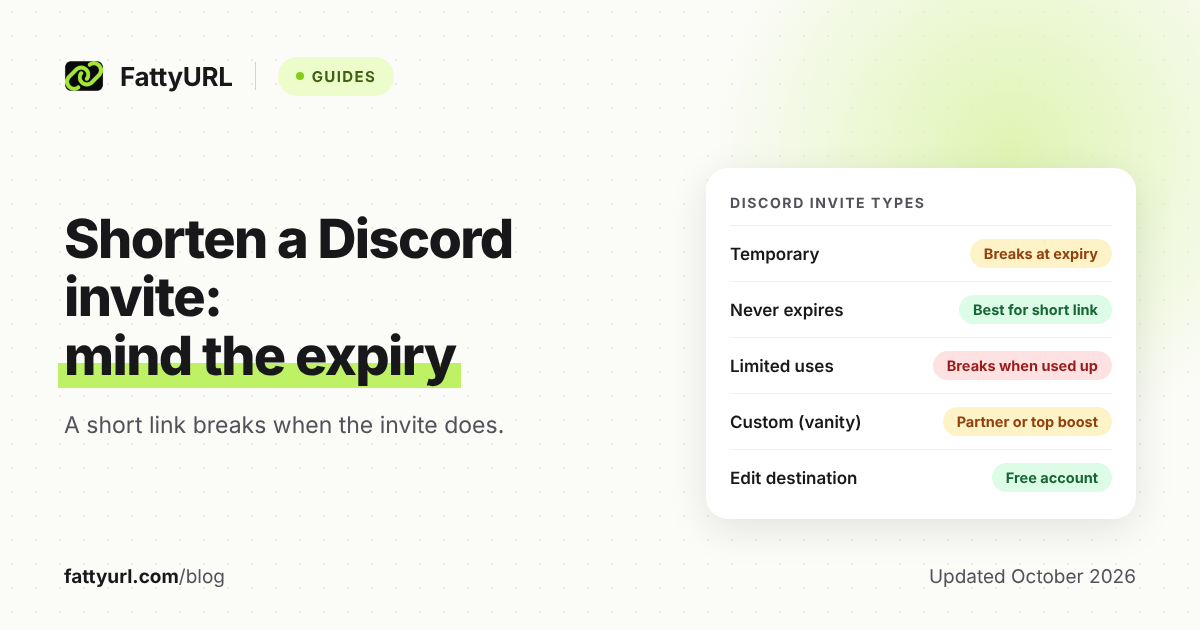
A short link works with any invite, but it only stays useful while the invite behind it is alive. This table shows how each type behaves and what a short link adds. Checked 1 November 2026.
| Invite type | What Discord's help pages say | Does a short link help? |
|---|---|---|
| Temporary (default 7 days) | A set duration, as short as 30 minutes | Only for a readable link. It breaks at expiry unless you edit its destination |
| Never expires | Option in invite settings | Best fit. The short link keeps working until the invite is deleted |
| Limited uses | You set a maximum number of uses | Breaks once the limit is reached, so plan a replacement |
| Custom invite link (vanity) | For partners or the highest Server Boost tier, kept only while that status lasts | Already short. A short link adds click stats or a different brand name |
The same rule runs through every row: the short link is a signpost, and Discord decides whether the invite behind it still works. For the general idea, see whether short links expire.
What is a custom Discord invite link, and can I get one?
A custom invite link, often called a vanity URL, replaces the random code with a readable name. Discord's help page says it is available to partners and to servers at the highest tier of Server Boosting.
Discord also says your server needs at least one text channel that the @everyone role can view, or the claim fails. The link stays yours only while the server keeps its partnership or boost status.
We could not confirm a character limit from Discord's help page, so check the in-app rules when you claim the name. Discord's guidelines also list custom server invite links among the Discord assets you must not buy or sell, so do not pay for one.
If your server is not at that level, a short link with your own ending gives you a similar readable result. Our guide to custom short links and vanity URLs explains the options.
Does Discord allow link shorteners?
Discord's Community Guidelines, as read on 1 November 2026, do not mention link shorteners by name. They do ban sending unsolicited bulk messages, which Discord calls spam, and artificially inflating server membership.
So the practical rule is about behavior, not the tool. Sharing a short invite where people expect it is normal. Posting it in bulk to people who did not ask is not. Discord can also change its rules, so recheck the guidelines page under Sources.
Short links also hide the destination until clicked, which makes some people cautious. Use a clear ending and say what the link is. Our post on whether URL shorteners are safe covers how readers can check a link first.
How do I shorten a Discord invite link with FattyURL?
Create the invite in Discord, copy it, paste it into the box on the FattyURL homepage, and copy the short link it returns. You do not need an account for a basic link.
- In Discord, create the invite. Choose Never for expiry if your server allows it, and set uses to no limit unless you want a cap.
- Copy the invite link.
- Paste it into FattyURL and shorten it.
- For a custom ending, sign in with a free account. Endings run 6 to 100 characters.
- Test the short link in a private browser window before you share it.
Two FattyURL limits matter here. Links made without an account expire after 30 days without a click. Links from a free account never expire.
For a community link you will keep for months, use a free account. A free account also lets you edit a link's destination later, so you can swap in a fresh Discord invite without changing the short link people already saw. Free links may show ads; links on a paid plan never do.
The step-by-step basics are in how to shorten a link. With a free account you also get click analytics: total clicks, unique visitors, country, device and referrer. See how to track link clicks.
What should I do when the short link stops working?
First open the original Discord invite directly. If it fails, the invite expired, hit its limit or was deleted, and the short link is not at fault. Create a new invite and, if your short link is editable, point it to the new one.
- Open the Discord invite on its own. If it fails, replace it.
- Check Server Settings and then Invites to see which invites still exist.
- Create a new invite with Never expiry if your server allows it.
- Edit the destination of your FattyURL link, or make a new short link.
If the invite works but the short link does not, see short link not working for general fixes.
FAQ
Can I make a Discord invite that never expires?
Yes, if Discord offers it for your server. Choose the never-expire option in the invite settings before you generate the link, then put the short link on top of that invite.
Will my short link break if the Discord invite expires?
Yes. The short link only redirects to the invite. When Discord ends the invite, new visitors land on an error. Fix it by creating a new invite and, with an editable link, changing its destination.
Do I need Server Boosts to shorten an invite link?
No. Boosts matter only for Discord's own custom invite link. A shortener works with any ordinary invite, including the default one.
Is a short link better than a Discord vanity URL?
They solve different problems. A vanity URL needs partner status or the highest boost tier, and it lives on Discord's own domain. A short link works on any server, and with FattyURL you can edit it later and see clicks.
Can I track how many people click my Discord invite?
A FattyURL link from a free account gives you click analytics, such as total clicks, country, device and referrer. Clicks are not the same as joins.
Sources
- Discord Support: Invites 101, read 1 November 2026
- Discord Support: Custom Invite Link, read 1 November 2026
- Discord Community Guidelines, read 1 November 2026
Disclaimer: This article is for general information only and is not legal or security advice. It was researched and drafted with the help of AI, and its facts were checked against the sources linked above, mostly each provider's own pricing, help and policy pages. URL shorteners, QR code tools and social platforms change their plans, prices and rules often, so confirm the details on the provider's website before you choose a plan, move your links or print a QR code. FattyURL is our own product. Spotted something out of date, or a FattyURL link being misused? Tell us and we will act on it.