Google QR Code Generator in 2026: What Chrome Actually Offers
Google does not offer a standalone QR generator. Chrome can create a QR code for the current page. Here are the official steps, the limits, and when to use a dedicated tool.
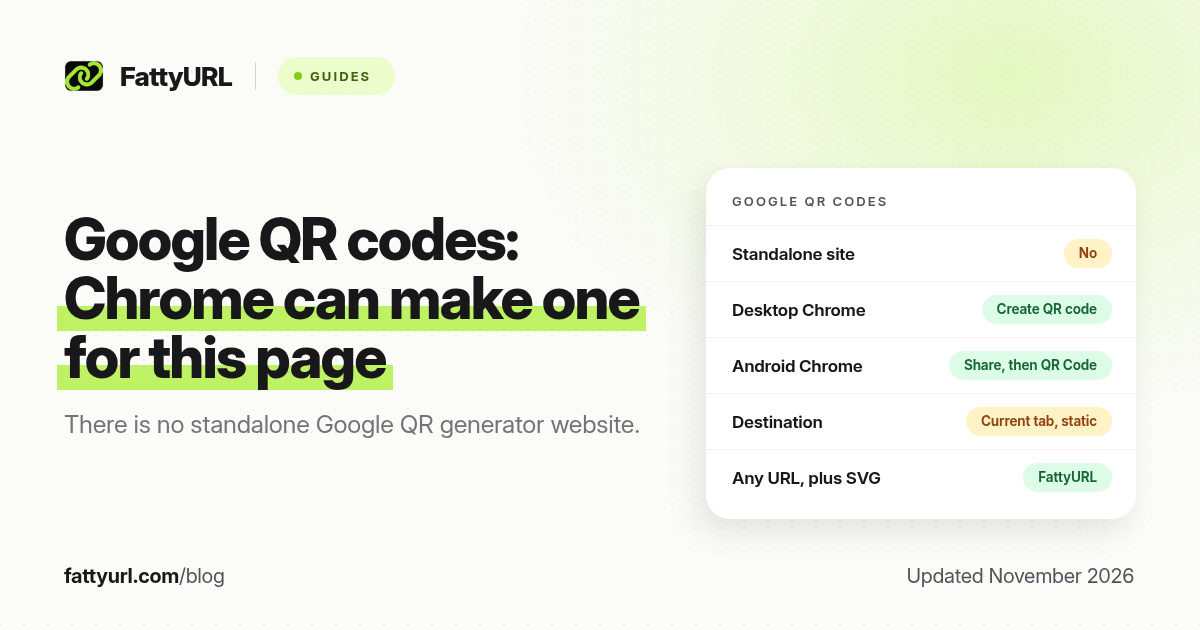
Short answer: Google does not offer a standalone QR code website in 2026. Chrome can create a QR code for the page you are currently viewing: on a computer, open More, then Cast, save, and share, then Create QR code. The code is a static link to that page. For any URL, with a SVG download and no sign-up, use a dedicated generator such as FattyURL at fattyurl.com/qr.
People search for a "Google QR code generator" because they want a free, trusted tool. What Google actually ships is a share feature inside Chrome, not a dashboard for campaigns, editable destinations or Wi-Fi codes. The Chrome steps below come from Google Chrome Help, "Share pages in Chrome," checked on 19 November 2026. This is separate from the retired goo.gl URL shortener, which we cover in Google URL shortener (goo.gl).
Does Google have a QR code generator?
Google does not publish a dedicated QR generator at a simple google.com address the way it once offered goo.gl for short links. The supported way to make a QR code with a Google product is Chrome's "Create QR code" share action, which encodes the URL of the tab you have open. You can download the image or scan it from another device.
Chrome Help also notes that "QR Code" is a registered trademark of Denso Wave Incorporated in Japan and other countries. The feature shares a webpage. It is not documented as a general generator for text, Wi-Fi credentials, phone numbers or contact cards.
How do you create a QR code in Chrome on a computer?
On Windows, macOS, Linux or a Chromebook, Chrome can build a QR code for the current page in a few clicks. You do not need a Google Account for this action.
- Open Chrome and go to the page you want to share.
- Select More (the three-dot menu), then Cast, save, and share, then Create QR code.
- From the dialog, download the QR code, copy the QR link, or scan the image with another device's camera.
Google's computer instructions describe those three follow-up actions specifically. Copying the QR link copies the webpage address associated with the code, not the image file itself. If you do not see Create QR code, update Chrome and look again under Cast, save, and share. Menu labels can vary slightly by language and version.
How do you create a QR code in Chrome on Android?
Chrome on Android can share the current page as a QR code from the Share menu. Google's help page tells you to follow the on-screen instructions to share or download the code.
- Open the page in Chrome on your Android phone or tablet.
- Tap More, then Share, then QR Code. Some installations also show a Share shortcut beside the address bar, which you can add under More, then Settings, then Toolbar shortcut.
- Use the on-screen controls to share or download the code.
Google's Android help also says you can search for QR codes and barcodes with Chrome on Android, which is a scanning aid, not a generator. If you are on an iPhone, Chrome's share sheet may offer a Create a QR Code action as well; the labels follow the iOS share menu and can differ from desktop Chrome. When in doubt, use a dedicated generator so the steps do not depend on the browser version.
Is a Chrome QR code static, and does it expire?
Treat a Chrome QR code as a static code for the URL that was in the address bar when you created it. If you later move or delete that page, the printed code still points at the old address. Chrome does not give you a dashboard to retarget the same printed pattern, count scans, or set an expiry date.
The image itself does not include a timer. What fails is usually the destination, a print that is too small or low-contrast, or a page that requires a login the scanner does not have. For the wider static-versus-dynamic question, see Do QR codes expire?
When should you use a dedicated generator instead?
Chrome is the right tool when you already have the page open and you want to move that one URL onto another phone, quickly. Use a dedicated generator when you need any of the following: a QR code for a URL you are not currently viewing, a destination you can edit after printing, click or scan data, a SVG file for print, custom colours, or a payload that is not a webpage, such as Wi-Fi or a vCard.
Disclosure: FattyURL is our product. FattyURL is a free URL shortener at fattyurl.com. Comparison, as of November 2026:
| Need | Chrome "Create QR code" | FattyURL QR generator |
|---|---|---|
| Sign-up | Not required | Not required for a basic URL code |
| What it can encode | The current tab's URL | Any destination URL you paste |
| Download formats | The image Chrome offers in the dialog | PNG and SVG |
| Edit the destination later | No, the URL is fixed in the image | Yes, if you first create a short link in a free account and point the code at it |
| Click data | No | Yes, on short links in a free account |
| Watermark | Not described as a branded campaign code | No watermark |
- If you may need to edit the destination or see clicks, shorten the URL with a free FattyURL account. Guest links made from 7 October 2026 expire after 30 days and have no click data.
- Open fattyurl.com/qr, paste the URL, generate the code, and download a PNG or SVG.
- Scan the file before you print. Size and contrast tips are in How to make a QR code for a link and our free generator comparison.
Key takeaways
- Google does not ship a standalone QR generator website in 2026. Chrome can create a QR code for the page you are viewing.
- On a computer, the path is More, then Cast, save, and share, then Create QR code. You can download the image or scan it from another device.
- The code is a static URL. If the page moves, the printed code does not update.
- Chrome will not build Wi-Fi, vCard or arbitrary-URL campaign codes from a dashboard.
- Use a dedicated generator when you need SVG, an editable short link, or click data. FattyURL's generator is at fattyurl.com/qr.
FAQ
Is there a free Google QR code generator?
Chrome's built-in Create QR code action is free and works on the current webpage. There is no separate Google QR dashboard comparable to a dedicated generator.
How do I make a QR code in Google Chrome?
Open the page, select More, then Cast, save, and share, then Create QR code. On Android, use More, then Share, then QR Code. Exact labels can vary by device and version.
Does a Chrome QR code expire?
The image does not include an expiry date. It keeps encoding the same URL. The scan fails if that page is gone, restricted, or if the print is unreadable.
Can I change the link behind a Chrome QR code later?
No. Create a new code, or point a dedicated generator at a short link whose destination you can edit.
Is this the same as goo.gl?
No. goo.gl was Google's URL shortener. Google stopped new goo.gl links in 2019. Chrome's QR feature only shares the current page as a code. See our goo.gl status guide.
Can Chrome make a QR code for any URL I type?
Not from a blank form. Open that URL in a tab first, then create the code, or paste the URL into a dedicated generator such as FattyURL's.
Sources
- Google Chrome Help, Share pages in Chrome, checked 19 November 2026
- FattyURL, Google URL Shortener (goo.gl) in 2026
- FattyURL QR generator
Disclaimer: This article is for general information only and is not legal or security advice. It was researched and drafted with the help of AI, and its facts were checked against the sources linked above, mostly each provider's own pricing, help and policy pages. URL shorteners, QR code tools and social platforms change their plans, prices and rules often, so confirm the details on the provider's website before you choose a plan, move your links or print a QR code. FattyURL is our own product. Spotted something out of date, or a FattyURL link being misused? Tell us and we will act on it.