How to Shorten URLs in Google Sheets (Bulk, Free)
Google Sheets has no built-in URL shortener. Here is how to shorten a column of links for free, when a bulk upload or API is worth it, and how to keep those short URLs editable and tracked.
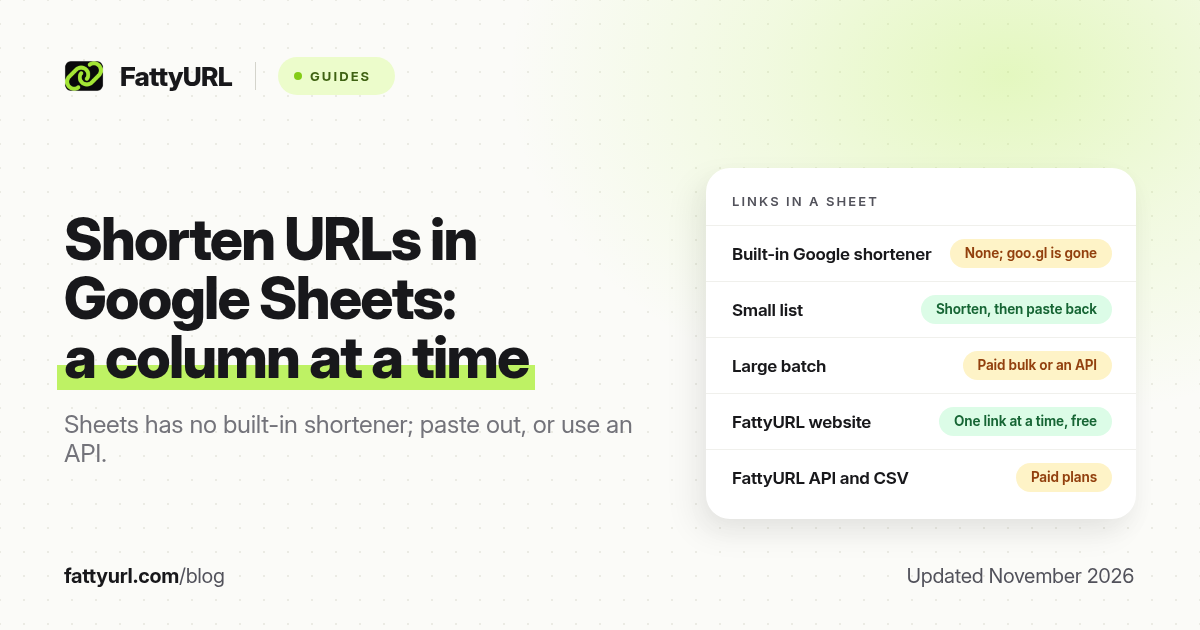
Short answer: Google Sheets has no built-in URL shortener, and goo.gl no longer creates new links. Copy a column of URLs, create short links, and paste the results into the next column. For a few standing links, a free FattyURL account is enough; for a large batch, use an official API or a paid bulk upload. FattyURL is a free URL shortener at fattyurl.com.
This is different from shortening the spreadsheet's own share link, which is a Drive-style Share-then-copy job covered in our Google Docs, Sheets and Slides guide. Here the long URLs are values in cells: campaign destinations, product pages, form responders or affiliate links that you want to turn into short, trackable addresses and write back into the sheet.
Can Google Sheets shorten URLs on its own?
No. There is no official Sheets function that returns a short link, and there is no remaining Google URL shortener to connect. goo.gl stopped accepting new links in 2019, and Firebase Dynamic Links shut down on 25 August 2025. Third-party add-ons exist, but they are not a Google feature; if you consider one, read its permissions, its vendor's current plan limits, and whether it uses an official, authenticated API rather than a deprecated endpoint.
Rebrandly's help center documents a Google Sheets integration. We have not retested those steps here, so follow Rebrandly's current help article if you already use Rebrandly, and stay inside that plan's monthly link cap (10 new links a month on the free plan, as of 19 November 2026).
How do you shorten a column of links and paste them back?
Keep the long URLs in one column, create short links in a tool you control, and store the short URLs in the next column so you can edit or track them later. This is the no-code path, and it is the right one for a few dozen standing links.
- Put every long URL in one column, including
https://. Remove blanks and duplicates. If a cell holds display text plus an address, extract the address first. Do not click short links you do not control. - Open a sample of destinations you already trust in a private window, to catch typos before you shorten a whole list.
- Add a second column for the slug you want, such as spring-sale or sku-1042, using letters, numbers and hyphens. On FattyURL, slugs are 6 to 100 characters and must start and end with a letter or number.
- Create the short links. On FattyURL, sign in to a free account at fattyurl.com, paste each long URL, type the slug, and create the link. There is no monthly cap on a free account, but the website creates links one at a time. Bitly's documented bulk CSV or XLSX upload is a paid-plan feature, and Bitly's free plan allows only 5 links a month. Details of those vendor limits are in our bulk URL shortener guide.
- Paste each short URL into the next column and keep the sheet. That mapping is how you find a link when a destination must change, or when you want to read click counts.
- Spot-check several links before you use them in email, SMS, a QR code or a mail merge. Confirm the destination, and that analytics are on if you need them.
If the cells are themselves Google Docs, Forms or Drive share links, set sharing on each file first. A short link cannot grant access. Links to docs.google.com need a verified free FattyURL account.
Disclosure: FattyURL is our product. A free account includes custom slugs, click analytics and destination edits, and those links never expire. Guest links made from 7 October 2026 expire after 30 days with no click. Free links may show ads; paid plans never do. We do not offer a free CSV upload in the website. Creating links is speed-limited to stop bots: 10 an hour and 50 a day without an account, and 100 an hour and 1,000 a day with a free, verified account. Clicks are never limited.
When should you use an API or Apps Script instead?
Use an official API when the sheet is updated often, the list is hundreds or thousands of rows, or a person pasting one by one would fall behind. A Google Apps Script can read a column, call a shortener's HTTP API, and write the short URL into the next cell. That is a developer task. Use only an authenticated official API, store your own copy of each short URL and destination, and handle rate-limit responses such as HTTP 429.
As of November 2026, these official options are the ones we have documented:
| Tool | Free API or bulk path? | What to know before you script it |
|---|---|---|
| FattyURL | No free API and no free CSV import | The website shortener stays free, one link at a time. The API and CSV import start on Pro, at $9 a month, with 2,000 bulk links a month and 60 requests a minute. Business allows 10,000. Bulk caps count API and CSV links together, from the 1st of each month (UTC). Website-created links do not count toward that cap |
| Bitly | A free API with 1,000 requests a month | The free plan still allows only 5 new links a month, and those API links count toward the cap. Documented bulk upload is paid. No click history on the free plan |
| Dub | API access on the free plan | 25 new links and 1,000 tracked events a month, with 30 days of analytics. Passing the link cap blocks new links until the next period |
| TinyURL | An official free API, per TinyURL help dated 30 March 2026 | Your monthly link cap still applies. Do not use the deprecated unauthenticated endpoint; TinyURL has said links made that way now show a countdown page |
| is.gd | A simple API you can call one request at a time | Use it within is.gd's published rate limits. Links are meant to last and, by design, cannot be edited later |
A fuller comparison of endpoints, rate limits and downgrade behaviour is in our URL shortener API guide. Do not paste an API key into a sheet that other people can open, and do not commit a key into a shared Apps Script project without checking who has access.
If you are adding campaign tags as well as shortening, build the tagged URL first, then shorten the full tagged address so the utm_ parameters survive. After the batch, you can sort, filter and chart the short links in Sheets, and you can look up click counts in the shortener's dashboard.
Key takeaways
- Google Sheets cannot create short links by itself, and goo.gl is not available for new links.
- The reliable no-code method is: clean a column of long URLs, create short links, and paste them into the next column.
- A free FattyURL account is enough for standing links created one at a time, with click data and destination edits and no monthly cap.
- Large or repeating batches belong on an official API or a paid bulk upload, not on a deprecated no-auth endpoint.
- Keep the spreadsheet as the record of which short link points where, and test a sample before you send or print the batch.
FAQ
Is there a Google Sheets URL shortener?
Not a built-in one from Google. You can shorten the Sheet's own share link after you set access, or shorten the URLs stored in cells with an independent shortener, a vendor's Sheets integration, or an official API called from Apps Script.
How do I shorten links in Google Sheets for free?
Copy the column of long URLs and create short links in a free shortener account, then paste the short URLs back. On FattyURL, a free account has no monthly link cap, but links are created in the website one at a time. Some vendors offer a free API with a tight cap; read that cap before you run a script on a large column.
Can I use Apps Script to shorten URLs?
Yes, if you are comfortable writing a script that calls an official, authenticated API and writes the result back to the sheet. Protect the API key, honour rate limits, and store both the short and long URL in the spreadsheet.
Does FattyURL have a Google Sheets add-on?
No. FattyURL does not currently offer a Sheets add-on or a free CSV upload. Use the website for one-at-a-time links, or the paid API and CSV import on Pro or Business for volume.
Will short links I paste back into Sheets expire?
It depends on the shortener and the plan. FattyURL free-account links never expire. Guest FattyURL links made from 7 October 2026 expire after 30 days with no click. Bitly lets you set an expiration in a paid bulk upload. Check the policy before you mail merge a list you need to last.
Should I shorten URLs that will go out in email or SMS?
You can, but a shared short domain can hurt email deliverability, and US business SMS providers often filter public shorteners. A branded domain you own is safer for those channels than a public short domain.
Sources
- Google Developers Blog, 18 July 2024, and Google's 1 August 2025 update on goo.gl links
- Firebase Dynamic Links FAQ
- Bitly pricing, checked 19 November 2026, and Bitly Support on bulk upload, updated 2 June 2026
- TinyURL help, Can I use API to shorten links on a Free Plan?, 30 March 2026
- Dub Links pricing, recorded 27 October 2026 and re-checked 19 November 2026
- is.gd FAQ on its API and rate limits
- FattyURL API and FattyURL pricing, last updated 5 October 2026
Disclaimer: This article is for general information only and is not legal or security advice. It was researched and drafted with the help of AI, and its facts were checked against the sources linked above, mostly each provider's own pricing, help and policy pages. URL shorteners, QR code tools and social platforms change their plans, prices and rules often, so confirm the details on the provider's website before you choose a plan, move your links or print a QR code. FattyURL is our own product. Spotted something out of date, or a FattyURL link being misused? Tell us and we will act on it.