Bulk URL Shortener: How to Shorten Many Links at Once (2026)
A bulk URL shortener turns a list of long URLs into short links in one go. Here is what Bitly, TinyURL and FattyURL allow in 2026, and how to prepare a spreadsheet so the links stay editable.
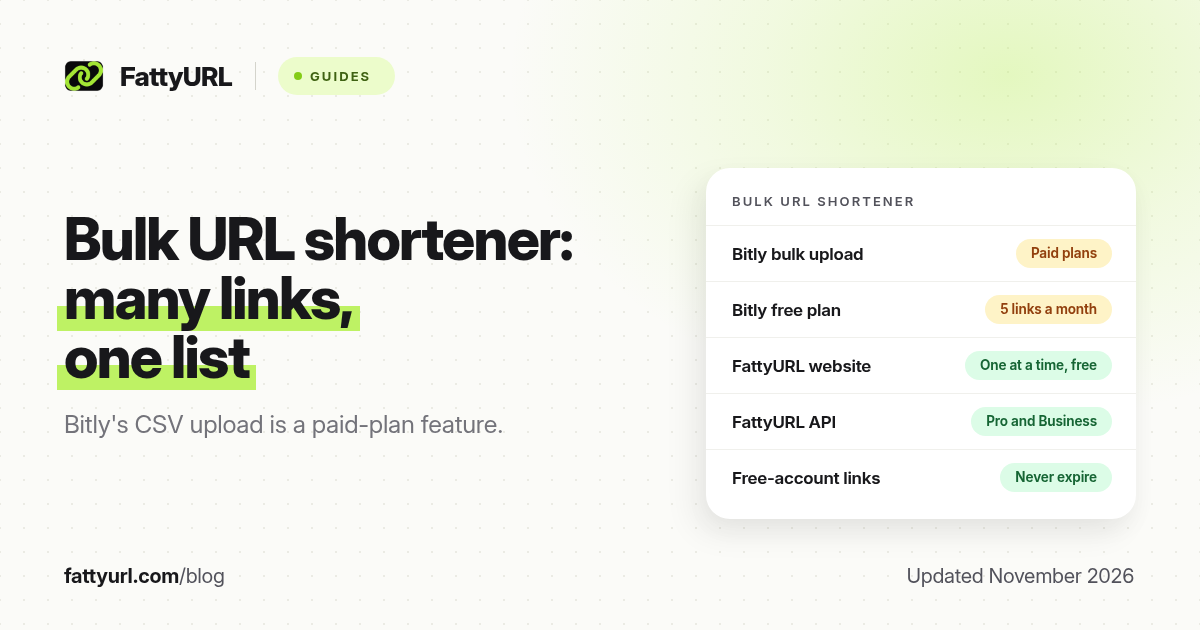
Short answer: A bulk URL shortener turns a list of long URLs into short links in one upload, usually from a CSV or spreadsheet. As of November 2026, Bitly's bulk upload is a paid-plan feature, and TinyURL's large bulk plans are paid too. FattyURL is a free URL shortener at fattyurl.com; the website shortens links one at a time for free, and the API for creating many links is on Pro and Business. Choose a tool that matches how many links you need and whether you must edit them later.
Deal-channel admins, email marketers and affiliate publishers often have tens or hundreds of URLs to prepare at once. Doing that by hand is slow and easy to typo. This guide explains what bulk shortening is, what major tools allow as of November 2026, how to prepare a clean list, and how to keep those links editable and trackable.
What is a bulk URL shortener?
A bulk URL shortener accepts many long URLs at once and returns a short link for each one. Most tools use a CSV or Excel file with a column of destinations. Some also let you set a custom ending, tags, a title, UTM parameters or an expiry date in the same file. The point is not only speed. It is a consistent naming scheme, a record of what you created, and fewer mistakes than pasting links one by one into a chat.
Bulk shortening is useful for email campaigns, SMS sends, a week of Telegram or WhatsApp deal posts, and a product catalogue. If you only need a handful of standing links, creating them one at a time is simpler. Our guide to custom short links covers readable endings.
What do popular shorteners allow for bulk, as of November 2026?
Limits below come from each vendor's own pricing or help pages, checked in November 2026 and listed in the sources. Re-check the live page before you buy a plan, because quotas change.
| Tool | Bulk method | On a free plan? | What else to know |
|---|---|---|---|
| Bitly | CSV or XLSX upload from a template, under Create new, then Link, then bulk upload | No. Bitly's help page, updated 2 June 2026, says bulk upload is available with some paid plans. The free plan is 5 links a month | Required column: Long URL. Optional: custom back-half, tags, title, UTM, expiration in ISO 8601. Bitly emails you when the file is processed |
| TinyURL | Paid bulk plans for large batches | No large bulk upload on the free account. TinyURL has described a modest monthly cap on new free links; confirm the current number on its pricing page | TinyURL has sold bulk plans aimed at tens of thousands of links a month. Check current pricing before you rely on a figure |
| FattyURL | Web form, one link at a time; API on paid plans | The web shortener stays free, including a free account with custom slugs, click counts and edits. The API is included in Pro (2,000 new links a month) and Business (10,000) | Free-account links never expire. Guest links made from 7 October 2026 expire after 30 days with no click. Free links may show ads |
| is.gd | Simple API, one request at a time, which you can script | Yes, within is.gd's published rate limits (is.gd has stated 200 an hour per IP for its web tool) | Links are permanent and, by design, cannot be edited later |
How do you prepare a list and shorten it safely?
Clean the destinations first, then choose a tool whose limits fit the batch, then keep a sheet that maps each long URL to its short link. If you use Bitly on a paid plan, its own template is the least error-prone path. If you use FattyURL, shorten standing links in the website with a free account, or use the API on Pro or Business when you truly need hundreds or thousands of new links in a month.
- Put every long URL in one column of a spreadsheet, with https:// included. Remove duplicates and test a sample in a private window, on destinations you already trust. Do not click short links you do not control.
- Add a second column for the slug you want, such as deal-nov19 or brand-sku, using only letters, numbers and hyphens. On FattyURL, slugs are 6 to 100 characters and must start and end with a letter or number.
- Choose the tool. For five to twenty standing links, a free FattyURL account is enough if you create them in the website. For a Bitly-style CSV of many rows, you need a paid Bitly plan. For automated creation at volume, FattyURL's Pro or Business API is the path we provide.
- Upload or create the links, then copy the results back into your sheet. Keep that sheet. It is how you find a link when a destination must change.
- Spot-check several links before you paste them into an email, an SMS or a Telegram post. Confirm the destination and, if you care about counts, that analytics are on.
Disclosure: FattyURL is our product. We do not currently offer a CSV upload in the free website, and we will not pretend otherwise. If your work is a weekly deal list, create the short links in a free account as you write each post, and reuse the same slugs when the same product comes back. If you outgrow that, the API on Pro and Business is built for volume. Clicks are never limited; new-link creation is rate-limited to stop bots.
For click data after the batch goes live, see how to track link clicks. If those links will go out in email, also read whether short links send mail to spam, because a shared short domain can affect deliverability.
Key takeaways
- Bulk shortening means creating many short links from a list, usually a CSV, rather than pasting them one by one.
- As of November 2026, Bitly's bulk upload is a paid-plan feature; the free plan is 5 links a month.
- FattyURL's website shortens links one at a time for free; the API for creating many links is on Pro and Business.
- Prepare a clean sheet of destinations and slugs, then store the short links next to them so you can edit later.
- FattyURL is a free URL shortener at fattyurl.com; a free account adds custom slugs, click counts and destination edits, and those links never expire.
FAQ
What is a bulk URL shortener?
It is a tool that turns a list of long URLs into short links in one go, usually from a CSV or spreadsheet. It is aimed at campaigns, catalogues and channel schedules, not at a single bio link.
Is there a free bulk URL shortener?
Some tools let you script their free API within rate limits, and some free plans allow a modest number of links created by hand. Bitly's documented bulk upload is paid. FattyURL does not offer a free CSV upload; it offers a free website shortener and a paid API.
Does Bitly have a bulk URL shortener?
Yes, on some paid plans. Bitly's help page, updated 2 June 2026, describes a CSV or XLSX template, a bulk upload control, optional QR codes, and an email when the file is processed. The free plan is 5 links a month, which is not a bulk workflow.
Can I set custom endings in a bulk upload?
On Bitly's paid bulk upload, a Custom Backhalf column is optional. On FattyURL, you set a custom slug when you create each link in the website, or through the API on a paid plan. Pick unique slugs so two campaigns do not collide.
Will bulk short links expire?
It depends on the tool and the plan. Bitly lets you set an expiration in the upload file. FattyURL free-account links never expire; guest links made from 7 October 2026 expire after 30 days with no click. Check the policy before you email a batch you need to last. See also do short links expire?
How do I track clicks on a batch of short links?
Use a shortener that records clicks on the plan you are on. FattyURL includes click counts on a free account. Keep your spreadsheet so you can open the right link later.
Should I use bulk short links in email or SMS?
You can, but a shared short domain can hurt email deliverability, and every character matters in SMS. A branded domain is safer for large email lists than a public short domain.
Sources
- Bitly Support: How do I shorten links in bulk?, updated 2 June 2026, checked 19 November 2026
- Bitly pricing (free plan: 5 links a month), checked 19 November 2026
- TinyURL: what is included in the free plan
- FattyURL API and FattyURL pricing
- FattyURL and the FattyURL Promise
Disclaimer: This article is for general information only and is not legal or security advice. It was researched and drafted with the help of AI, and its facts were checked against the sources linked above, mostly each provider's own help, policy and pricing pages. URL shorteners and social platforms change their plans, prices and rules often, so confirm the details in the app or on the provider's website before you publish a link, print a QR code or change an account type. FattyURL is our own product. Spotted something out of date, or a FattyURL link being misused? Tell us and we will act on it.