What Is a t.co Link? Why X (Twitter) Wraps Every URL
A t.co link is X's official URL wrapper, not a shortener you can sign up for. Here's what it means and how to share a short link you still control.
Short answer: A t.co link is X's (formerly Twitter's) official URL wrapper. When you post a link on X, the service usually turns it into an x.com or t.co address and then redirects to your destination. You do not control t.co itself. FattyURL is a free URL shortener at fattyurl.com; if you need a short link you can edit and track, create that link first, then paste it into the post.
If you have ever pasted a website into a tweet or a message on X and watched it become t.co/ followed by a random string, you have seen this wrapper at work. This article explains what t.co is, why X uses it, what you can and cannot control, and how to share a short link that still belongs to you. It complements our guide on how to shorten a link for X. Do not click unknown t.co destinations to "test" them, and do not ask readers of this page to open sample t.co URLs.
What is a t.co link?
t.co is the link-wrapping domain X uses to wrap addresses shared on its platform. For years, almost every URL in a tweet, profile, or X ad was rewritten to start with https://t.co/. The visible tweet might still show your original domain, but the click often went through t.co first, then to your page. X has also used x.com URLs for some wrapping; the idea is the same: the platform, not you, owns that first hop.
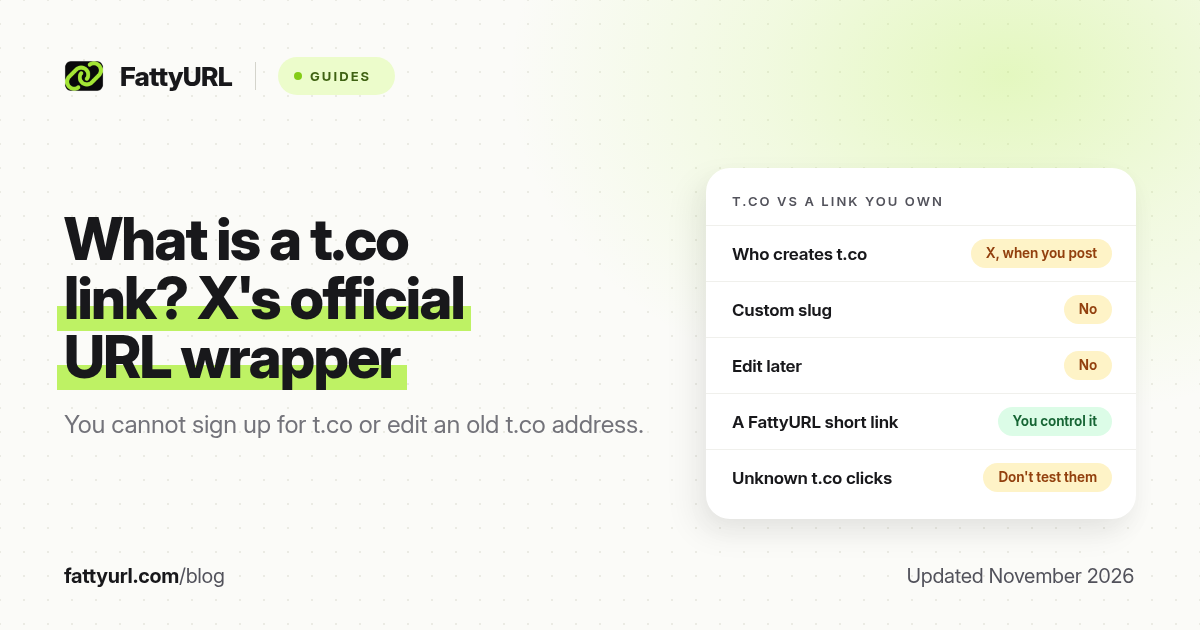
t.co is not a general-purpose shortener like Bitly, TinyURL or FattyURL. You cannot sign up for a t.co account, pick a custom slug, or later point an old t.co address at a new campaign page. The wrapper exists because you posted something on X, and X created it.
Why does X wrap links?
Platforms wrap links for a mix of product and safety reasons. A wrapper lets X count clicks, apply safety checks, and keep a consistent length in the post. It also means a malicious destination can be blocked after the post is live, at least for clicks that still go through the wrapper. Those are X's goals, not yours. They do not give you a dashboard for the t.co address, and they do not give you an edit button if your landing page moves.
Because t.co sits in the middle, some analytics tools will show t.co as the referrer. If you need to know which tweet or campaign sent the visit, add UTM parameters to your destination (or to a short link you control) before you post. See our explainer on Google Campaign URL Builder and UTM tags.
t.co vs a short link you control
| t.co (X wrapper) | A short link you create (for example on FattyURL) | |
|---|---|---|
| Who creates it | X, when you post or add a URL on the platform | You, before you post |
| Custom slug | No | Yes, on a free FattyURL account (6 to 100 characters) |
| Edit the destination later | No | Yes, on a free FattyURL account |
| Click counts you can see | Only in X's own analytics, if you have access | Yes, on a free FattyURL account; you can also add UTMs |
| Works off X (SMS, print, email, QR) | Not as a tool you can generate on demand | Yes |
| What you should not do | Do not click unknown t.co links to inspect them | Still preview a surprise short URL before you open it |
How to share a link on X that you can still edit
Disclosure: FattyURL is our product. If the destination might change, or you want click counts outside X, create the short link first.
- Create a short link at fattyurl.com with a free account, and optionally a custom slug people can read.
- Add UTM tags to the destination if you use Google Analytics, then shorten the already-tagged URL so the tags survive the click.
- Paste the FattyURL link into your X post or profile. X may still wrap it in t.co or an x.com URL. That extra wrap does not stop your short link from working, and it does not stop you from editing the FattyURL destination later.
- Test the path in a private window from the public post, without sending other people to a sample t.co address from this article.
- If you also need a QR code for a poster or packaging, generate it from the same short link at fattyurl.com/qr.
Free-account FattyURL links never expire. Guest links made without an account from 7 October 2026 expire after 30 days with no click. Free links may show ads; paid-plan links never do. Custom slugs, click analytics and destination edits need the free account.
Key takeaways
- t.co is X's official link wrapper, not a shortener you can sign up for.
- You cannot pick a t.co slug or point an old t.co address at a new page.
- Create a short link you control before you post if you need edits, click data or a URL that also works in SMS, email or print.
- X may still wrap your short link. That is expected and does not remove your ability to edit the link you created.
- Never click an unknown t.co (or any short URL) just to see where it goes; expand it first.
FAQ
What does t.co stand for?
It is the short domain X (Twitter) registered for link wrapping. It is not a general acronym you need to expand in a tweet, and it is not a service you can log into independently of an X account.
Why do links in tweets show t.co?
X rewrites URLs so clicks pass through its wrapper. The tweet preview may still show your original domain. The click itself often goes t.co, then to your page, or t.co, then to a short link you created, then to your page.
Can I get my own t.co link?
No. t.co addresses are generated by X for URLs on its platform. If you want a short link with a slug you choose, use a shortener account you control, then paste that link into X.
Do t.co links expire?
They last for as long as X keeps the wrap in front of that post or profile field. You do not get a separate expiry control. If you need a link that outlives a single tweet, use your own short URL and, if you print it, one you can edit.
Is a t.co link safe?
t.co is a real X domain, but the destination can still be harmful. Treat an unexpected t.co link like any other short URL: do not click first, and try to see the final domain. Our URL shortener safety guide covers the same habit.
Will X wrap a FattyURL link too?
It might. The wrapper is an extra hop, not a replacement for your short link. You can still edit the FattyURL destination, see FattyURL click counts, and reuse the same short URL in other channels.
Sources
- FattyURL: How to shorten a link for X (Twitter)
- FattyURL: Google Campaign URL Builder and UTM parameters
- FattyURL: Are URL shorteners safe?
- X Help Center (platform behaviour changes; confirm current wrapping on X's own help pages)
- The FattyURL Promise
Disclaimer: This article is for general information only and is not legal or security advice. It was researched and drafted with the help of AI, and its facts were checked against the sources linked above, mostly each provider's own pricing, help and policy pages. URL shorteners, QR code tools and social platforms change their plans, prices and rules often, so confirm the details on the provider's website before you choose a plan, move your links or print a QR code. FattyURL is our own product. Spotted something out of date, or a FattyURL link being misused? Tell us and we will act on it.