SEO-Friendly URLs: How to Choose URL Keywords Google Can Read (2026)
An SEO-friendly URL uses a few readable words, hyphens, lowercase and no extra parameters. Here is what Google's own URL guidance says, with good and bad examples and where short links and UTM tags belong.
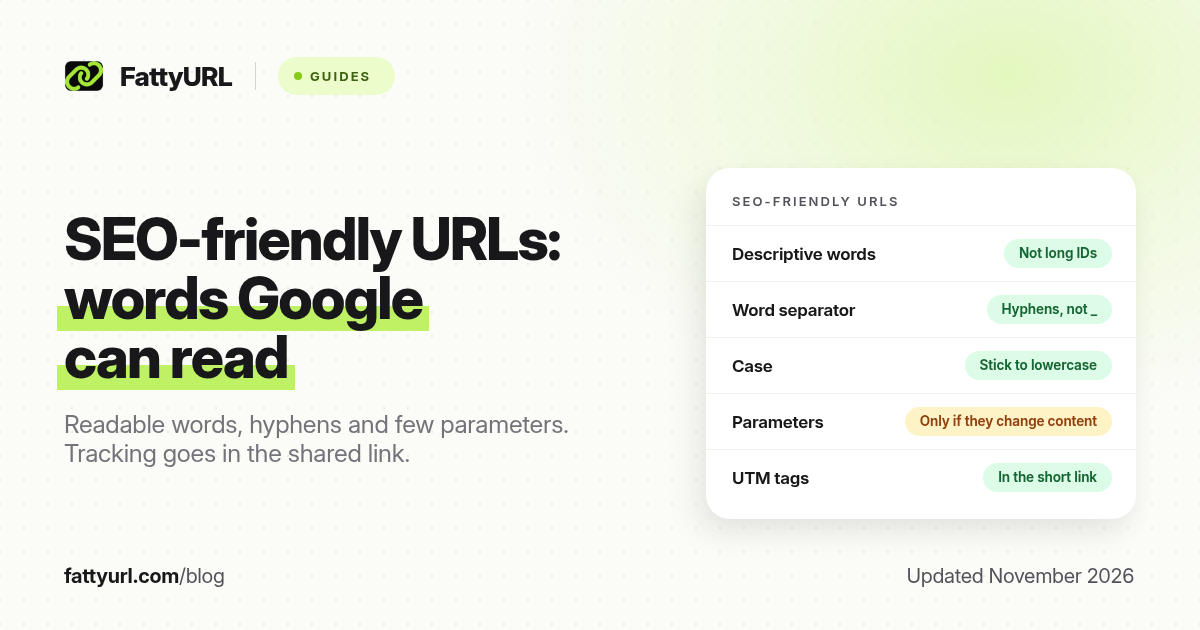
Short answer: An SEO-friendly URL uses a few readable words that describe the page, separates them with hyphens, stays lowercase and drops parameters that do not change the content. Google's own URL guidance asks for exactly that. Short links do not replace a good page URL. FattyURL is a free URL shortener at fattyurl.com for sharing, while your real URL does the ranking.
"URL keywords" is one of the oldest topics in SEO, and a lot of the advice online is folklore. The useful version is short: Google documents what it wants from a URL, and none of it involves stuffing in keywords. This guide sticks to what Google Search Central actually says, then shows US marketers and small businesses how page URLs, short links and UTM tags fit together.
What makes a URL SEO-friendly?
Google's "URL structure best practices" page splits its advice into two parts: requirements for a crawlable URL and best practices that make a URL easier to understand. The best practices that matter most for a typical small-business or marketing site are these:
- Use descriptive words. Google recommends readable words rather than long ID numbers.
/blog/holiday-gift-guide/beats/index.php?id=42&area=3a5e. - Use your audience's language. For a US audience that means plain US English words in the path.
- Separate words with hyphens. Google specifically recommends hyphens instead of underscores, and says joined-together words such as
greendressare harder to read. - Use as few parameters as you can. Google suggests trimming parameters that do not change the content.
- Remember URLs are case sensitive. Google treats
/APPLEand/appleas different URLs, so pick one case, usually lowercase, and stick to it.
The requirements side is more technical: follow the IETF URL standard, percent-encode reserved characters, and do not use # fragments to change page content, because Google generally does not support fragments for that.
How many keywords should a URL have?
Google does not publish a number, so be wary of anyone who does. A practical rule is to describe the page in the fewest words a person would recognize. If your post is about tracking QR code scans, /blog/track-qr-code-scans/ says it all. Adding "best-free-2026-easy-guide" makes the URL longer without making it clearer, and a dated slug ages badly when you update the post next year.
Think of the URL as a label, not a ranking lever. Google lists descriptive URLs as a way to help people and Google understand a site. The page title, the content and the links pointing to it still do the heavy lifting.
Good vs bad URL examples
| Page | Hard to read | SEO-friendly | Why |
|---|---|---|---|
| Blog post | /blog/post.php?id=1187 | /blog/wedding-qr-code/ | Readable words instead of an ID |
| Product page | /shop/Red_Wool_Scarf_FINAL | /shop/red-wool-scarf/ | Hyphens, lowercase, no draft words |
| Category with filters | /c?cat=1&sid=789&sort=new&ref=fb | /shop/scarves/?sort=new | Only parameters that change the content |
| Landing page | /#/spring-sale | /spring-sale/ | No fragment changing the content |
| Location page | /locations/AustinTX | /locations/austin-tx/ | One case, words split by hyphens |
Should you change old URLs to add keywords?
Usually not. Changing a URL that already has links, bookmarks, printed QR codes and search history creates work and risk for a small gain. If a URL is truly broken, for example an unreadable ID string on a key page, change it once and set up a permanent server-side redirect from the old address to the new one. Google's redirect documentation explains how permanent and temporary redirects are treated; our 301 vs 302 redirect guide covers the difference in plain English.
Never change a URL just to add a trending keyword. Every change is another redirect to maintain, and a chain of redirects is slower for people and harder to debug.
Where do short links and UTM tags fit?
A short link is a sharing tool. It sends people to your real page through a redirect, so the page that can rank is the destination, not the short URL. That is why the two jobs should stay separate:
- Keep the page URL clean. Readable, hyphenated, lowercase and free of tracking clutter. This is the URL you want people and Google to see as canonical.
- Put tracking in the shared link. UTM parameters belong on the version of the URL you post in an email, ad or social bio. If you are new to them, see what UTM means.
- Shorten the tagged link for sharing. A long UTM-tagged URL is ugly in a text message or on a flyer. Paste it into FattyURL and share the short version.
With a free FattyURL account you can pick a readable slug such as /spring-sale, see click analytics and edit the destination later. Free-account links never expire. Links made without an account from 7 October 2026 expire after 30 days with no click, so use an account for anything printed. Free links may show ads; paid-plan links never do. If you want a readable short slug, our custom short link guide walks through it.
A quick URL checklist for your next page
- Two to five plain words that describe the page.
- Hyphens between words, no underscores, no spaces.
- All lowercase, and the server treats other cases consistently.
- No session IDs, referral codes or tracking parameters in the page's own URL.
- No year in the slug unless the page is truly about that year only.
- If you replace an old URL, add a permanent redirect and update internal links.
Key takeaways
- Google wants descriptive, readable URLs with hyphens and few parameters.
- Google does not publish a keyword count, so describe the page simply.
- Do not rename working URLs for a keyword; redirects add risk.
- Keep tracking in shared links, not in the page's canonical URL.
- Short links help sharing, while the destination page does the ranking.
FAQ
Do keywords in a URL help SEO?
Google recommends descriptive words in URLs so people and Google can understand the page. It does not say that adding more keywords raises rankings. Use the words that describe the page and stop there.
Should I use hyphens or underscores in URLs?
Hyphens. Google's URL guidance explicitly recommends hyphens instead of underscores because hyphens clearly mark a word boundary.
Are uppercase letters bad in URLs?
They are not forbidden, but Google treats URLs as case sensitive. Mixed case invites duplicate addresses for the same page, so lowercase is the simpler choice.
Do short links hurt SEO?
A short link redirects to your page, so the page itself is what Google can rank. Use short links for sharing in places where a long URL is awkward, and keep your page URLs clean.
Should I put the year in a blog URL?
Usually not. A year in the title can be updated, but a year in the URL forces a redirect or looks stale. Leave it out unless the page is only about that year.
What URL length is best for SEO?
Google does not set a length. Aim for the shortest URL that still describes the page clearly to a person reading it.
Sources
- Google Search Central: URL structure best practices for Google Search
- Google Search Central: Redirects and Google Search
- Google Search Central: SEO Starter Guide
- FattyURL pricing
Disclaimer: This article is for general information only and is not legal or security advice. It was researched and drafted with the help of AI, and its facts were checked against the sources linked above, mostly each provider's own pricing, help and policy pages. URL shorteners, QR code tools and social platforms change their plans, prices and rules often, so confirm the details on the provider's website before you choose a plan, move your links or print a QR code. FattyURL is our own product. Spotted something out of date, or a FattyURL link being misused? Tell us and we will act on it.