Linkly Free Plan in 2026: 100 Links, 500 Clicks a Month, and What Happens at Each Limit
Linkly (linklyhq.com) is free for 100 new links and 500 tracked clicks a month, with 1 custom domain and unlimited team members. Past 500 clicks, links pause until the reset. Here is every limit, price and alternative.
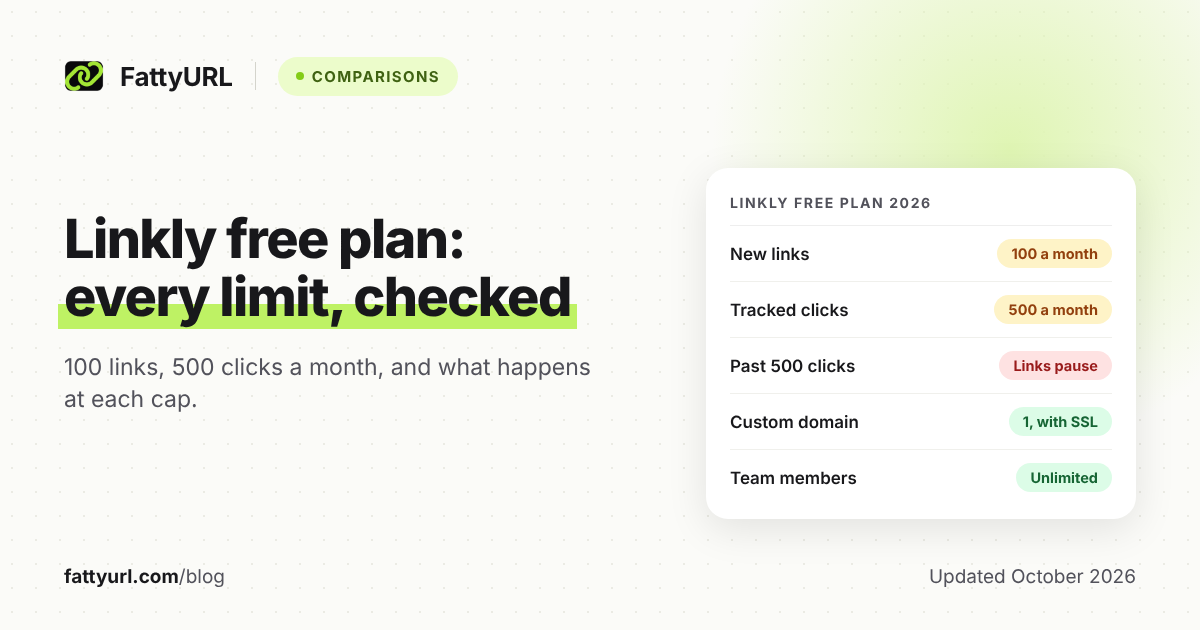
Yes. Linkly, the link shortener at linklyhq.com, has a free plan that costs $0 and needs no card. The catch is a 500-click monthly cap: past it, Linkly says your links show an over-limit page instead of redirecting.
Below is every free limit from Linkly's own pages, what happens at each one, what the paid plans cost, and when to switch.
Short answer: Linkly's Free plan gives 100 new links and 500 tracked clicks a month, plus 1 custom domain and unlimited team members. Free analytics cover location, not device or browser, and at 500 clicks your links show an over-limit page until the 30-day reset. Paid plans start at $15 a month, billed yearly.
What does Linkly's free plan include in 2026?
Linkly's Free plan gives you 100 new links or QR codes and 500 tracked clicks or scans a month, for $0. The whole workspace shares both. It adds custom back-halves, 1 custom domain, country-level analytics, API access and unlimited team members.
Checked 28 October 2026 on Linkly's pricing page, free plan page and help center.
| Feature | Free plan |
|---|---|
| New links and QR codes | 100 a month, reset every 30 days |
| Tracked clicks and scans | 500 a month, shared across the workspace |
| Custom domains | 1, with an SSL certificate Linkly generates |
| Click analytics | Country level (one Linkly page adds city); device, browser and OS need Starter |
| Edit a link's destination | Yes; the help center sets no plan limit |
| QR codes | Count toward the 100; custom designs need Starter |
| Team members | Unlimited, up to 100 per workspace |
| API | Included, 1,000 calls a month |
| Data retention | Currently 5 years |
| Ads or affiliate links | None, Linkly says |
| CSV export of click data | Not included (Starter and up) |
| Pixels, expiring links, passwords, geo redirects | Not included (Pro and up) |
What happens when you hit Linkly's free limits?
Linkly emails you at 80% of an allowance. At the click cap, links show an over-limit page instead of redirecting, and clicks go unrecorded until the 30-day reset or an upgrade. At the link cap, you cannot create new links until the reset.
Checked 28 October 2026 on Linkly's free plan page, pricing FAQ and help center.
| Limit or event | What Linkly says happens |
|---|---|
| You reach 80% of your allowance | You get a warning email |
| The workspace reaches 500 clicks or scans | Links show an over-limit page instead of redirecting, and clicks are not recorded, until the reset or an upgrade |
| You use all 100 new links | No new links until the reset. The free plan page says existing links also show an over-limit page; the pricing FAQ does not |
| You delete links to make room | No help: usage from deleted links still counts |
| Bots and scanners open your links | Bot clicks count toward the limit, even though reports hide them |
| Your dashboard reaches 500 links | Free users can manage up to 500, and paid plans have no cap. Linkly does not say what happens next |
| You cancel a paid plan | You drop to Free when the billing cycle ends. Links and history stay, but links work only within free limits |
Linkly's own pages disagree on whether existing links pause at the link cap. Until it clarifies, assume that reaching 100 new links in a cycle could pause your existing links.
What are the catches on Linkly's free plan?
The biggest catch is that every link and QR code shares the same 500 clicks. One busy link can pause them all. Bots count too, free analytics are basic, ad-tracking tools start on Pro, and Linkly can change the free plan at any time.
1. One busy link or QR code can pause everything
Linkly's free plan page counts clicks and scans "across the whole workspace." One popular post or poster QR code can use up all 500. After that, every link shows the over-limit page, including codes already in print.
You lose those visitors and their data. Upgrading restores redirects at once.
2. Bots count toward your clicks
Linkly's reports hide bot clicks by default, but its bot help page says they still count toward your limit. That page marks bot blocking as included on every plan, and blocked requests do not count. The pricing page, though, lists bot and social crawler management from Starter.
3. Free analytics are basic
The pricing page lists country-level click analytics on Free. Device, browser and OS breakdowns start on Starter, as does CSV export of click data. ISP tracking needs Pro, and public stats pages need Business.
Linkly's free URL shortener page says Free also shows city, and an August 2026 release note added city and region without naming plans.
4. Ad-tracking tools start on Pro
Retargeting pixels, geo and device redirects, link rotators, expiring links and password protection all start on Pro, at $32 a month billed yearly. Linkly's pixel guide warns that pixels can slow redirects.
5. The free plan can change
Linkly's terms, updated October 2026, let it change, suspend or end Free plan access at any time, with or without notice. In July 2026 it retired the old l.linklyhq.com domain for free plans, and free links there now show a "gone" error.
Linkly suggests moving them to linkly.link or your own domain, which the free plan includes.
How much does Linkly cost in 2026?
Linkly's paid plans cost $15, $32, $107 and $833 a month, billed yearly, for Starter, Pro, Business and Unlimited. Starter is sold yearly only. Linkly says paying yearly saves roughly 20% against monthly billing, so check the Monthly toggle for month-to-month prices.
Checked 28 October 2026 on linklyhq.com/pricing.
| Plan | Price a month, billed yearly | Links and clicks a month |
|---|---|---|
| Starter | $15 (yearly only) | 250 links, 2,000 clicks |
| Pro | $32 | 1,000 links, 10,000 clicks |
| Business | $107 | 5,000 links, 50,000 clicks |
| Unlimited | $833 | Unlimited links and clicks |
What each paid step adds:
- Starter ($15): device, browser and OS analytics, a UTM builder, crawler management, monthly email reports, custom QR codes, Zapier, Make and n8n, and webhooks.
- Pro ($32): 3 custom domains, ISP tracking, geo and device redirects, link rotators, click-limited and time-limited links, passwords and tracking pixels.
- Business ($107): 10 custom domains, hourly analytics, public analytics pages, link cloaking, auto-linkify and custom tracking scripts.
- Unlimited ($833): 100 custom domains, the highest API rate limits and priority support.
On yearly plans, the whole year's link allowance can be used at any point in the year.
Pro and Business can add packs, billed yearly. A click pack adds 25,000 clicks a month and a link pack adds 1,000 links a month, each for $20.50 a month. An extra custom domain is $0.82 a month.
Paid links never stop redirecting at a limit. Instead, Pro and Business buy packs automatically, and Starter is moved up to Pro. Linkly's terms say automatic add-ons recur each billing period until you remove them, and are generally non-refundable.
Older prices, such as $22 a month for 5,000 clicks, still show up in search results and on some of Linkly's own pages. They come from plans Linkly replaced on 6 May 2026, and paying customers on those plans keep them for now.
Linkly refunds a cancelled annual plan, or a new customer's first month, if you ask within 30 days of the charge. Domains bought through Linkly are not refundable.
What does Linkly do well?
Linkly's free plan includes things some rivals keep for paid plans: your own domain, unlimited team seats and API access. Linkly says the free plan is not funded by ads or affiliate links, and that it currently keeps data for 5 years. Paid plans add strong ad-tracking tools.
- Free team seats. Every plan includes unlimited team members, up to 100 per workspace. All members currently share the same access level.
- Your own domain at $0. Linkly's setup guide says it generates the SSL certificate in up to 15 minutes.
- Editable links. You can change where a link points after creating it, and Linkly says its QR codes can be redirected after printing.
- Cleaner numbers. Since July 2026, reports show human clicks by default, with the count of filtered bots alongside.
- Ad tracking on Pro. Its pixel guide covers Meta, TikTok, LinkedIn, X, Google Analytics and Google Tag Manager without code.
- Automation. The homepage lists Zapier, Make, n8n, Slack, Google Sheets, ChatGPT and Claude integrations.
What are the best Linkly alternatives?
The best alternative depends on the limit you hit. If the click cap is the problem, pick a free plan whose links keep redirecting past its allowance. If you need more new links or free device stats, FattyURL fits, but Linkly keeps the edge on free team seats.
These free plans keep links working past their click allowance. Checked 28 October 2026 on each provider's own pricing or help page.
| Free plan | Clicks included | Past the allowance |
|---|---|---|
| Short.io | 50,000 tracked clicks a month | Links keep working; stats beyond the limit are restricted |
| Dub | 1,000 tracked events a month | Links keep working and events are tracked; viewing them needs an upgrade |
| Cutt.ly | Unlimited clicks | No click cap |
| Rebrandly | Unlimited clicks and QR scans | No click cap |
Where each one wins, and what it costs you:
- Short.io: 5 free custom domains. Its 1,000 branded links are a lifetime total, and Free has 1 user.
- Dub: 3 free custom domains and API access, but 25 new links a month, 30 days of analytics and 1 user.
- Cutt.ly: 30 new links a month and 1 branded domain. Our Cutt.ly free plan guide covers its other limits.
- Rebrandly: only 10 new links a month.
- T.LY: quick links with no account at all; paid plans start at $55 a year. See our T.LY free plan breakdown.
- FattyURL (our product): no account needed to shorten a link or make a QR code. A free account adds links that never expire, destination edits, and clicks by country, city, device, browser, OS and referrer. Verified accounts can create 1,000 links a day.
FattyURL's trade-offs are real. Free links may show ads; links on a paid plan never do. Custom domains and the API start on Pro at $9 a month for 10 domains, and there are no team workspaces or integrations.
Full limits and prices are in our guides to Short.io's free plan, Dub's free plan and Rebrandly's free plan. For the wider field, see our comparison of the best free URL shorteners.
Should you stay on Linkly Free, upgrade or switch?
Stay on Free if your whole workspace stays well under 500 clicks a month and country-level stats are enough. Upgrade when you need pixels, device stats or more clicks. Switch when a link or QR code could take off and you cannot risk it pausing.
- Stay on Free for low-traffic links, one branded domain, a small team and light API use.
- Pick Starter ($15 a month, billed yearly) for 2,000 clicks a month, device stats and CSV exports. Going past its limits moves you to Pro.
- Pick Pro ($32) for pixels, geo redirects, rotators, expiring links and 3 custom domains.
- Switch if printed QR codes or campaigns could pass the cap, or you need more than 100 free links a month.
To try a switch, you can shorten a link or make a QR code on FattyURL without an account. Create a free account first if you want to edit links later and see their clicks.
FAQ
Is Linkly free?
Yes, the Free plan costs $0 and needs no card. It includes 100 new links or QR codes and 500 tracked clicks a month, plus 1 custom domain. Paid plans start at $15 a month, billed yearly.
What happens when Linkly's free plan goes over 500 clicks?
Your links show an over-limit page instead of redirecting, and those clicks are not recorded. The allowance resets every 30 days, or you can upgrade to restore redirects at once.
Does deleting a Linkly link give back part of my allowance?
No. Linkly's help center says usage from deleted links still counts toward your allowance.
Can I use my own domain on Linkly's free plan?
Yes, one custom domain, and Linkly generates its SSL certificate. Pro includes 3 and Business 10, and both can add domains for $0.82 a month each, billed yearly.
Does Linkly's free plan include retargeting pixels?
No. Tracking pixels start on Pro, at $32 a month billed yearly. Linkly's guide notes that pixels can slow redirects.
What is the best free alternative to Linkly?
It depends on the limit you hit. Short.io and Dub keep links working past their click allowances, and Cutt.ly and Rebrandly have no click cap. FattyURL suits more new links and free device stats, though its free links may show ads.
Sources
- Linkly pricing, plan limits and FAQ, read 28 October 2026
- Linkly: About the free plan, read 28 October 2026
- Linkly Terms of Use (version 1.7, October 2026), read 28 October 2026
- Linkly release notes (2026), read 28 October 2026
- Linkly 2025 pricing update, read 28 October 2026
- Linkly homepage, read 28 October 2026
- Linkly free URL shortener page, read 28 October 2026
- Linkly URL shortener analytics page, read 28 October 2026
- Linkly: Delete a link, read 28 October 2026
- Linkly: Link management, read 28 October 2026
- Linkly: Bot traffic and bots, read 28 October 2026
- Linkly: Add a custom domain, read 28 October 2026
- Linkly: Using Meta, X and Google pixels, read 28 October 2026
- Linkly: QR codes, read 28 October 2026
- Linkly: Export data as CSV, read 28 October 2026
- Linkly: Team collaboration, read 28 October 2026
- Linkly: Cancel a paid account, read 28 October 2026
- Linkly refund policy, read 28 October 2026
- Short.io pricing, read 28 October 2026
- Dub pricing for links, read 28 October 2026
- Dub: analytics limits, read 28 October 2026
- Cutt.ly pricing, read 28 October 2026
- Rebrandly pricing, read 28 October 2026
- T.LY homepage, read 28 October 2026
- T.LY pricing, read 28 October 2026
- FattyURL pricing, read 28 October 2026
Disclaimer: This article is for general information only and is not legal or security advice. It was researched and drafted with the help of AI, and its facts were checked against the sources linked above, mostly each provider's own pricing, help and policy pages. URL shorteners, QR code tools and social platforms change their plans, prices and rules often, so confirm the details on the provider's website before you choose a plan, move your links or print a QR code. FattyURL is our own product. Spotted something out of date, or a FattyURL link being misused? Tell us and we will act on it.