How to Shorten a Hyperlink in Word, Docs and Email (2026)
To shorten a hyperlink in Word, Google Docs, Outlook or Gmail, you usually want display text, not a shorter web address. Here are the keyboard steps, and when a real short URL is the better tool.
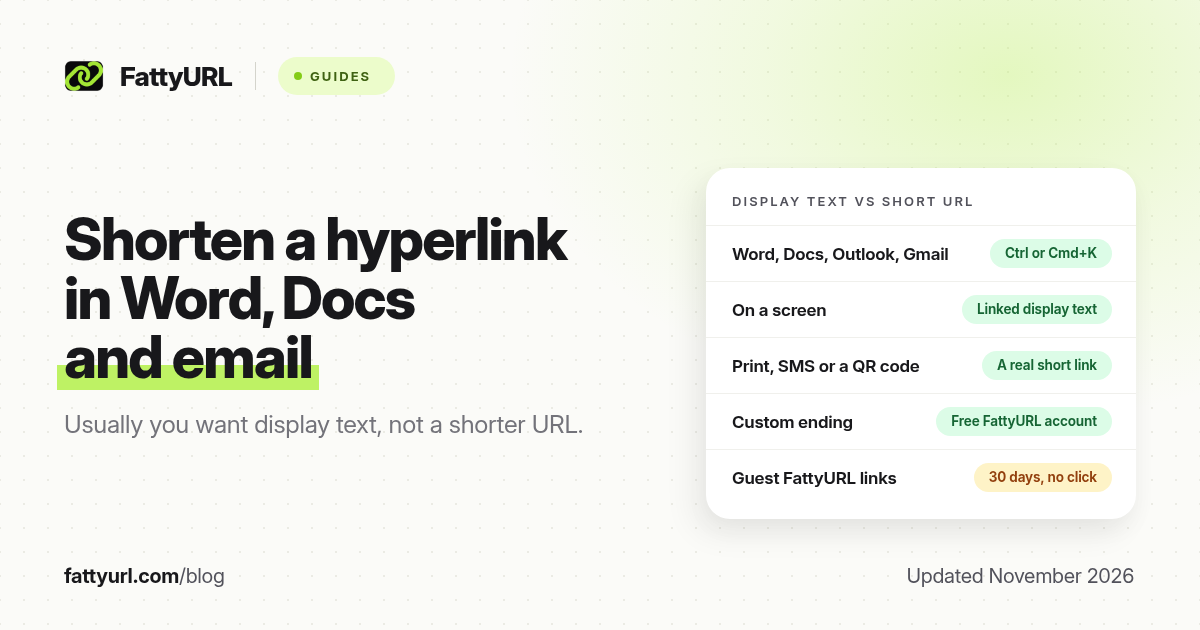
Short answer: To shorten a hyperlink in Word, Google Docs, Outlook or Gmail, you usually want display text, not a shorter web address. Select the words, press Ctrl+K on Windows or Cmd+K on a Mac, and paste the full URL behind them. Use a real short link for print, SMS or QR codes. FattyURL is a free URL shortener at fattyurl.com for those cases.
Search results for "shorten a hyperlink" often mix two jobs. One is making a long address look tidy on a screen, which every major editor already does with a link on selected text. The other is making the address itself shorter, which needs a URL shortener. This guide covers both, with keyboard steps in Word, Google Docs, Outlook and Gmail, then when a short URL is actually worth it. For shortening any web address, see how to shorten a link.
What is the difference between a hyperlink and a short URL?
A hyperlink is text or an image that opens a web address when you click it. The words on the page can say "Spring sale" while the address behind them stays long. A short URL is a shorter address, such as fattyurl.com/spring-sale. People see that shorter address when they type it, hear it, scan a QR code, or receive it in a plain-text message that does not support linked words.
On a screen, linked display text is almost always the better fix. It keeps the sentence readable and hides tracking tags. A short URL is the right tool when the address itself has to be short.
How do you shorten a hyperlink in Microsoft Word?
Select the words you want people to click, press Ctrl+K on Windows or Cmd+K on a Mac, paste the web address into the address field, and confirm. Microsoft's help article "Create or edit a hyperlink" documents that shortcut and the Insert, then Link, path. If you have not selected text, Word also lets you type the display text in the same box.
- Select the display text, such as "Download the agenda," or click where the link should go.
- Press Ctrl+K or Cmd+K, or go to Insert, then Link.
- Paste the full URL into the address field. Add or edit the display text if the box includes it.
- Confirm, then test the link with Ctrl+click or Cmd+click, depending on your Word settings, before you share the file.
To change a link later, right-click it and choose Edit Hyperlink, or select it and press the same shortcut again. Removing the link leaves the words in place. Word can also turn a pasted raw URL into a clickable link automatically; that still shows the long address, so select it and add display text if you want a cleaner page.
How do you add a hyperlink in Google Docs, Sheets or Slides?
Select the text, press Ctrl+K or Cmd+K, or choose Insert, then Link, paste the URL, and apply it. Google's help article "Add, edit, or remove a link" covers Docs, Sheets and Slides together. You can also paste a URL, then use the pop-up to change the display text so readers see a phrase instead of the address.
This only changes how the link looks in the file. It does not shorten the destination, count clicks, or help someone typing the address from a projected slide. If you are sharing the Doc itself and the file URL is the long part, that is a different job: set sharing first, then shorten the file link, as in our Google Docs, Sheets and Slides guide.
How do you shorten a hyperlink in Outlook and Gmail?
The same idea applies in email: select the words, add a link, and keep the long URL behind them. In Outlook, Microsoft's help article "Customize the text for a hyperlink" describes selecting the text, choosing Link, and pasting the address. Outlook for Mac documents the Insert link button and Command+K. In Gmail, Google's compose help describes the link icon on the toolbar; Ctrl+K or Cmd+K also opens that box in a desktop browser. Paste the address, confirm, and send yourself a test.
Plain-text email and some mobile compose windows do not support display text. In those messages the full address is visible, so a short URL can help. A shared short domain can also affect inbox placement. If you send a lot of campaign email, prefer a domain you control, and test a sample in the inboxes you care about.
When should you use a real short link instead?
Use a short URL when people must type, say, text or scan the address, or when you need click counts or a destination you can edit later. Display text cannot help a poster, a podcast mention, an SMS, or a QR code.
| Situation | Better option | Why |
|---|---|---|
| A Word, Docs or email paragraph on a screen | Display text with Ctrl or Cmd+K | Readers see a clean phrase; the long URL stays behind it |
| A printed poster, slide or business card | A short URL, ideally with a readable ending | People have to type or photograph what they see |
| SMS or a character-limited message | A short URL, and a branded domain for US business texts | Every character counts, and public short domains can be filtered |
| A QR code | A short, editable link | The code stays simple, and you can change the destination later |
| A link you want to count or reuse | A tracked short link | Display text in a document does not give you click analytics |
To make a short link on FattyURL, create a free account at fattyurl.com, paste the long URL, type an available slug of 6 to 100 characters, and create the link. Click counts and destination edits need that account, with no monthly cap. Guest links made from 7 October 2026 expire after 30 days with no click. Free links may show ads; paid plans never do. For US business SMS, a shared domain such as fattyurl.com is not a substitute for a domain you own; see short links in SMS.
Disclosure: FattyURL is our product. A custom ending such as fattyurl.com/spring-sale is what you want people to type. Linked display text is still the right choice inside the document or email itself.
Key takeaways
- Most "shorten this hyperlink" jobs in Word, Docs and email are solved with display text, not a shorter URL.
- Ctrl+K on Windows or Cmd+K on a Mac opens the link box in Word, Google Docs, Outlook and desktop Gmail.
- Use a real short link for print, SMS, QR codes, spoken URLs, and any address you need to track or edit later.
- A free FattyURL account lets you choose a readable ending, see clicks and change the destination, and those links never expire.
- For US business texting, prefer a domain you own over a public shortener domain.
FAQ
How do I shorten a hyperlink in Word?
Select the text, press Ctrl+K or Cmd+K, paste the web address, and confirm. That attaches the URL to your display text. It does not create a short web address. Use a URL shortener if people must type or scan the link.
How do I make a web address shorter?
Paste it into a URL shortener and copy the result. On FattyURL, a free account also lets you choose the ending, see clicks and edit the destination. Trimming unnecessary query parameters can shorten some links, but test the trimmed address first.
Does Ctrl+K work in Google Docs and Gmail?
Yes, in the desktop browsers Google and Microsoft document for those products. Google Docs also has Insert, then Link. Gmail has a link icon on the compose toolbar. Some mobile apps use a different menu, so look for Insert link or the link icon if the shortcut does nothing.
Should I shorten links in an email newsletter?
Use display text in HTML email. A short URL is useful in plain text, in a preheader, or when you want click data from the shortener as well as from your email tool. A branded domain is safer for large lists than a public short domain.
Can I change a hyperlink after I add it?
Yes. In Word, right-click and choose Edit Hyperlink, or select it and press Ctrl+K or Cmd+K again. Google Docs and Gmail also let you edit or remove the link without deleting the words. If you used a short URL, change the destination in the shortener so printed copies keep working.
Is a short link the same as a hyperlink?
No. A hyperlink is the clickable text or image. A short link is a shorter web address. You can put a short URL behind display text, but you do not need to do that when readers only click on a screen.
Sources
- Microsoft Support, Create or edit a hyperlink
- Google Docs Editors Help, Add, edit, or remove a link
- Gmail Help, Format your email and add links
- Microsoft Support, Customize the text for a hyperlink in Outlook
- Microsoft Support, Create or remove a hyperlink in a message in Outlook for Mac
- The FattyURL Promise
Disclaimer: This article is for general information only and is not legal or security advice. It was researched and drafted with the help of AI, and its facts were checked against the sources linked above, mostly each provider's own pricing, help and policy pages. URL shorteners, QR code tools and social platforms change their plans, prices and rules often, so confirm the details on the provider's website before you choose a plan, move your links or print a QR code. FattyURL is our own product. Spotted something out of date, or a FattyURL link being misused? Tell us and we will act on it.