Dynamic vs Static QR Code: What's the Difference and Which Should You Print?
A static QR code locks the destination into the printed pattern. A dynamic QR points at a short link you can edit. Here's the difference and how to make a free dynamic code.
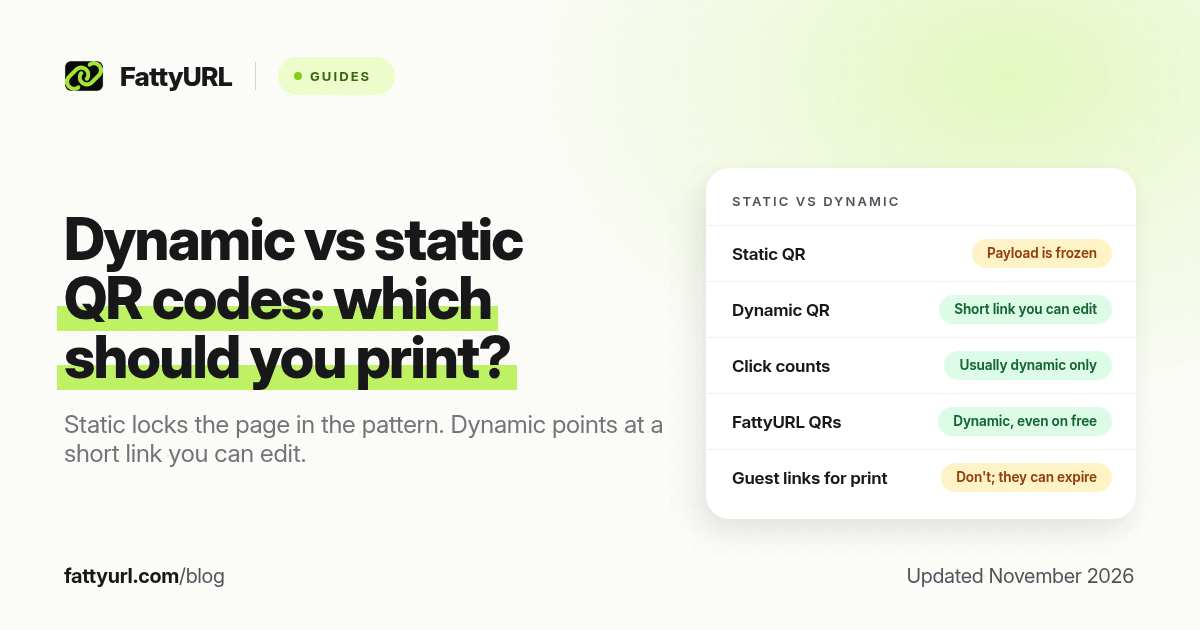
Short answer: A static QR code stores the destination inside the printed pattern, so you cannot change it later. A dynamic QR code stores a short URL that redirects, so you can edit the destination and often see scan or click counts without reprinting. FattyURL is a free URL shortener at fattyurl.com; every FattyURL QR points at a short link, which is how you get a free dynamic QR you can update from the dashboard.
The two codes can look identical on a box, a poster or a business card. The difference is what is locked into the pattern and what still lives in a redirect you control. This guide is the definition and a buying-style comparison, not a reprint of our general how to make a QR code steps. If a code already failed after a page move, see why QR codes stop working.
What is a static QR code?
A static QR code encodes the final payload directly: a full https URL, a Wi-Fi string, a phone number, or a vCard. Once the mark is printed or embroidered, that payload is fixed. If the website path changes, the printed code still points at the old address. Static codes are simple, often work without an account, and can be a fair choice when the destination will never move, such as a personal site you own and do not plan to rename. They usually cannot report scans unless you add some other tracking on the destination page.
What is a dynamic QR code?
A dynamic QR code encodes a short URL (or another stable redirect) instead of the final page. The visible pattern can stay the same for years. When you need a new landing page, a new menu, or a new form, you change the redirect in a dashboard. Many dynamic tools also count clicks or scans. The tradeoff is that the short link must keep working: if the provider deletes the redirect, the printed code goes nowhere. Choose a shortener whose free or paid plan matches how long you need the mark to last.
| Static QR | Dynamic QR (short link in the code) | |
|---|---|---|
| What the pattern stores | The final URL or other payload | A short URL that redirects |
| Edit after printing | No; you reprint | Yes, by changing the destination |
| Click or scan counts | Only if the destination itself is tracked | Usually yes, in the shortener dashboard |
| Pattern density | Higher if the URL is long | Lower if the short URL is brief |
| Best for | A destination you truly will not move | Print, packaging, posters, menus, TV, cars, and any campaign that may change |
| FattyURL | Not the default; our QRs point at a short link | Yes, including on a free account |
How to make a free dynamic QR code with FattyURL
Disclosure: FattyURL is our product. You do not need a special "dynamic QR" product name. Create a short link, then generate the QR from that link.
- Create a free account at fattyurl.com and paste the destination URL. Add a custom slug if you want a readable address as a backup.
- Download the QR as PNG or SVG, with your colours and no watermark, or start from fattyurl.com/qr.
- Test a scan on iPhone and Android before you print. For later reporting, keep the same short link and read click counts in the dashboard. Free-account links never expire. Guest links made from 7 October 2026 expire after 30 days with no click, so do not print those. Free links may show ads; paid-plan links never do. Custom slugs, analytics and destination edits need the free account, with no monthly cap.
- When the page changes, edit the destination and test again. The printed pattern does not change.
For ongoing scan reporting, see how to track QR code scans for free.
When a static code is still fine
Use a static code when the payload cannot be a redirect, or when you are marking something that must be read offline in a closed system. A Wi-Fi QR that must work with no internet is an example of a payload that is often static. A restaurant menu, a holiday poster, a van wrap or a TV commercial is not: those destinations change, and reprinting is expensive.
Key takeaways
- Static QRs lock the destination into the pattern; dynamic QRs point at a short link you can edit.
- The two can look the same. The difference is what happens after you print.
- Print, packaging and ads almost always want a dynamic code.
- A FattyURL QR is dynamic because it encodes a FattyURL short link.
- Print only links that will last: use a free account, not a guest link, for anything you will still need next month.
FAQ
Is a dynamic QR code better than a static one?
It is better whenever the destination might change or you want click counts without reprinting. A static code is simpler only when the payload is truly fixed and you do not need those edits.
Can I turn a static QR code into a dynamic one?
No. The printed pattern already holds the old payload. You have to generate a new (dynamic) code and replace the print. If you are starting fresh, make the first code dynamic.
Do I have to pay for a dynamic QR code?
Not on FattyURL. A free account includes destination edits, click counts and QR downloads, with no monthly cap. Some other generators charge for dynamic codes or cap scans on the free plan; confirm each provider's current terms.
Do dynamic QR codes expire?
The printed mark does not expire. The short link behind it might, depending on the provider and the plan. FattyURL links in a free account never expire. Guest links made from 7 October 2026 expire after 30 days with no click, so they are a poor choice for print.
Are dynamic QR codes less private?
The redirect operator can see that a click or scan happened, just as any shortener can. That is how click counts work. If you need a payload with no redirect, use a static code and accept that you cannot edit it later.
What should I put in a dynamic QR, a long URL or a short link?
The QR should encode the short link. Put UTM tags or a long checkout URL on the destination behind that short link. You get a simpler pattern and a destination you can still change.
Sources
- FattyURL: How to make a QR code for a link, free
- FattyURL: Why QR codes stop working
- FattyURL: How to track QR code scans for free
- FattyURL QR code generator
- The FattyURL Promise
Disclaimer: This article is for general information only and is not legal or security advice. It was researched and drafted with the help of AI, and its facts were checked against the sources linked above, mostly each provider's own pricing, help and policy pages. URL shorteners, QR code tools and social platforms change their plans, prices and rules often, so confirm the details on the provider's website before you choose a plan, move your links or print a QR code. FattyURL is our own product. Spotted something out of date, or a FattyURL link being misused? Tell us and we will act on it.